Composio
Bundles 包含支援與 AgentBuilder 特定第三方整合的自訂Components。
此頁面描述 Composio bundle 中可用的Components。
如需特定 Composio 功能的資訊,請參閱 Composio 文件。
在 Flow中使用 Composio Components
Composio Components主要用作agent 工具。
Composio bundle 包含一個聚合的 Composio Tools Components以及以下單一服務Components:
- Dropbox
- GitHub
- Gmail
- Google Calendar
- Google Meet
- Google Tasks
- Linear
- Outlook
- Slack (您的 Slack 帳戶)
- Slackbot (機器人整合)
- Supabase
- Todoist
- Youtube
Composio Tools Components是多個 Composio 服務(工具)的存取點。 然而,大多數這些服務也作為單一服務Components提供,建議使用這些Components而非 Composio Tools Components。
雖然您可以在 Flow中使用單一服務Components進行非 agent 動作,但它們主要在 Tool Mode 中與 Agent Components一起使用。 相反地,Composio Tools Components_只能_作為 agent 的工具;它不支援非 agent 使用。
以下範例示範如何將 Composio Gmail Components用作 Agent Components的工具。 這允許 agent 在必要時使用 Composio Gmail 功能來產生回應。 您可以以相同方式連接其他 Composio Components。
-
基於 Simple Agent 範本建立 Flow。
-
在 Bundles 中,找到 Composio bundle,然後將 Gmail Components新增到 Flow中。
-
在 Composio API Key 欄位中,輸入您的 Composio API 金鑰或使用
COMPOSIO_API_KEY全域變數。 如需詳細資訊,請參閱 Composio 驗證。如果金鑰有效, Alert 會被 Success 指標取代,並且 Actions 清單會填入您的 API 金鑰可用的動作。
-
在Components標頭選單中啟用 Tool Mode。
如果您使用的是 Composio Tools Components,請跳過此步驟,因為Components已經配置為工具。
-
在 Actions 清單中,配置您想要提供給 agent 的 Gmail 動作。 您可以選擇要允許的動作,並且可以編輯每個動作的 slug(agent 標籤)和描述,這有助於 agent 決定使用哪些工具。
-
將 Gmail Components的 Toolset 輸出連接到 Agent Components的 Tools 輸入。
-
在 Agent Components中,輸入您的 OpenAI API 金鑰或配置 Agent Components使用不同的 LLM。 如需詳細資訊,請參閱語言模型Components。
此時,您的 Flow有四個連接的Components:
- Chat Input Components連接到 Agent Components的 Input 連接埠。 這允許 Flow由來自使用者或應用程式的傳入提示觸發。
- Gmail Components作為工具連接到 Agent Components。 agent 可能不會為每個請求使用此工具;agent 只有在決定 Gmail 工具可以幫助回應提示時才使用此連接。
- Agent Components的 Output 連接埠連接到 Chat Output Components,將最終回應返回給使用者或應用程式。
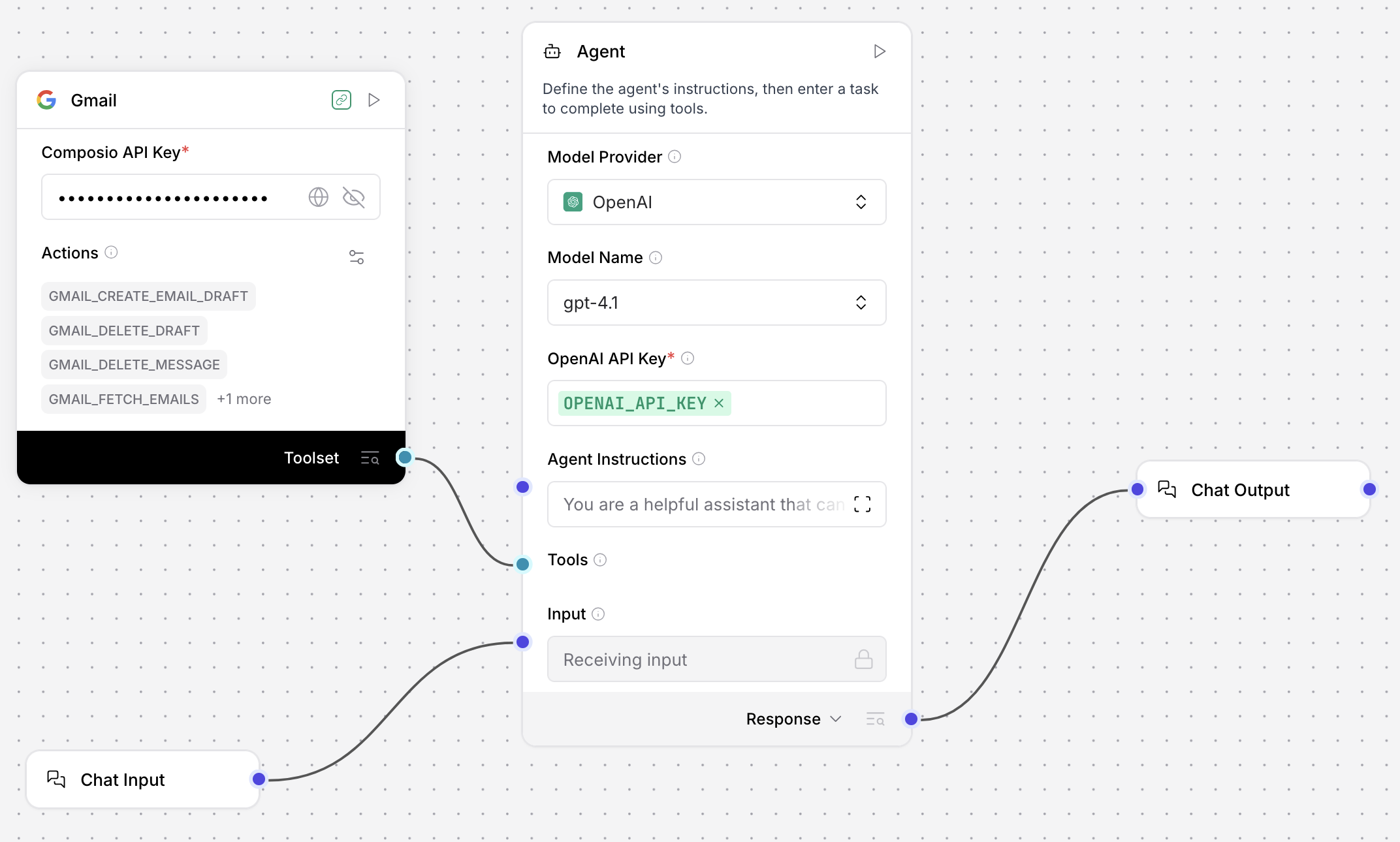
-
要測試 Flow,請點擊 Playground,然後詢問 LLM 可用工具。 agent 應該提供連接工具的清單,包括 Gmail 工具和 Agent Components中的內建工具。 例如:
_18User:_18What tools are available to you?_18_18I have access to a variety of tools that allow me to help you with different tasks. Here are the main categories of tools available to me:_18_181. Gmail Tools:_18- Fetch emails, search, and filter messages._18- Fetch specific email details by message ID._18- Create email drafts (with attachments, HTML, CC/BCC, etc.)._18- Delete email drafts or specific messages._18_182. Date & Time Tools:_18- Get the current date and time in any timezone._18_183. Multi-Tool Use:_18- Run multiple tools in parallel for efficiency._18_18If you have a specific task in mind, let me know and I can tell you which tool I would use or demonstrate how I can help! -
要測試特定工具或功能,請告訴 agent 執行使用該工具的動作。 例如,要求 agent 撰寫草稿電子郵件:
_10Create a draft email with the subject line "Greetings from Composio"_10recipient: "your.email@address.com"_10Body content: "Hello from composio!"Playground 會列印邏輯,因為 agent 選擇
GMAIL_CREATE_EMAIL_DRAFT工具來建立電子郵件草稿。 以下範例回應為縮寫:_10The draft email with the subject "Greetings from Composio" and body "Hello from composio!" has been successfully created._24{_24"recipient_email": "your.email@address.com",_24"subject": "Greetings from Composio",_24"body": "Hello from composio!",_24"is_html": false_24}_24_24{_24"data": {_24"response_data": {_24"id": "r-237981011463568567",_24"message": {_24"id": "195dd80528171132",_24"threadId": "195dd80528171132",_24"labelIds": [_24"DRAFT"_24]_24}_24}_24},_24"error": null,_24"successfull": true,_24"successful": true_24}為了進一步確認,您可以前往您的 Gmail 帳戶並在草稿資料夾中找到訊息。
-
選用:要新增更多 Composio 服務,請重複這些步驟將更多 Composio Components新增到您的 Flow。 對於每個Components,提供必要的憑證,啟用 Tool Mode,配置動作,然後將其連接到 Agent Components的 Tools 連接埠。
Composio 參數
所有單一服務 Composio Components具有相同的參數,而 Composio Tools Components有一個額外參數:
| Name | Type | Description |
|---|---|---|
| entity_id | String | 輸入參數。Composio 帳戶的實體 ID。預設值:default。此參數在視覺編輯器中預設為隱藏。如果您需要設定此參數,可以透過Components標頭選單中的 Controls 存取它。 |
| api_key | SecretString | 輸入參數。Composio API 金鑰,用於與 Composio 平台驗證。確保金鑰授權您想要使用的特定服務。如需詳細資訊,請參閱 Composio 驗證。 |
| tool_name | Connection | 僅限 Composio Tools Components的輸入參數。選擇要連接的 Composio 服務(工具)。 |
| action | List | 輸入參數。選擇要使用的動作。可用動作因服務而異。有些動作可能需要特定服務的高級存取權。 |
Composio 驗證
Composio Components需要使用 Composio API 金鑰驗證 Composio 平台。
您可以直接在Components中提供此金鑰,或使用 COMPOSIO_API_KEY 全域變數,AgentBuilder 可以自動從您的 .env 檔案載入它。
Composio API 金鑰_僅_處理與 Composio 的連接。 服務提供者驗證是透過 Composio 平台為您想要使用的每個服務管理的。
確保您的 Composio API 金鑰提供對 Flow中Components所需服務的存取權。 例如,如果您使用 Composio Gmail Components,您的 Composio API 金鑰必須有 Gmail 服務的存取權。
Composio 輸出
當用作 agent 工具時,Composio Components輸出 Tools,這是 agent 使用的工具清單。
當 agent 呼叫時,Composio 服務的回應會被 agent 擷取,而不是直接作為輸出傳遞給使用者或應用程式。
在非 agent 使用案例中,輸出是包含來自指定 Composio 服務回應的 DataFrame,取決於 Flow中使用的Components和動作。
因為 Composio Tools Components_僅_支援 agent 使用,它無法輸出 DataFrame。
所有單一服務 Composio Components都可以輸出 DataFrame 或 Tools。
