Language Model
AgentBuilder 中的語言模型組件使用指定的巨型語言模型 (LLM) 生成文本。 這些組件接受聊天消息、文件和指令等輸入來生成文本響應。
AgentBuilder 包含一個 Language Model 核心組件,具有對許多 LLM 的內建支持。 或者,您可以使用任何附加語言模型來替換 Language Model 核心組件。
在 Flow中使用語言模型組件
在 Flow中任何需要使用 LLM 的地方使用語言模型組件。
- Chat
- Drivers
- Agents
語言模型組件最常見的用例之一是在 Flow中與 LLM 聊天。
以下示例在類似於 Basic Prompting 模板的聊天機器人 Flow中使用語言模型組件。
-
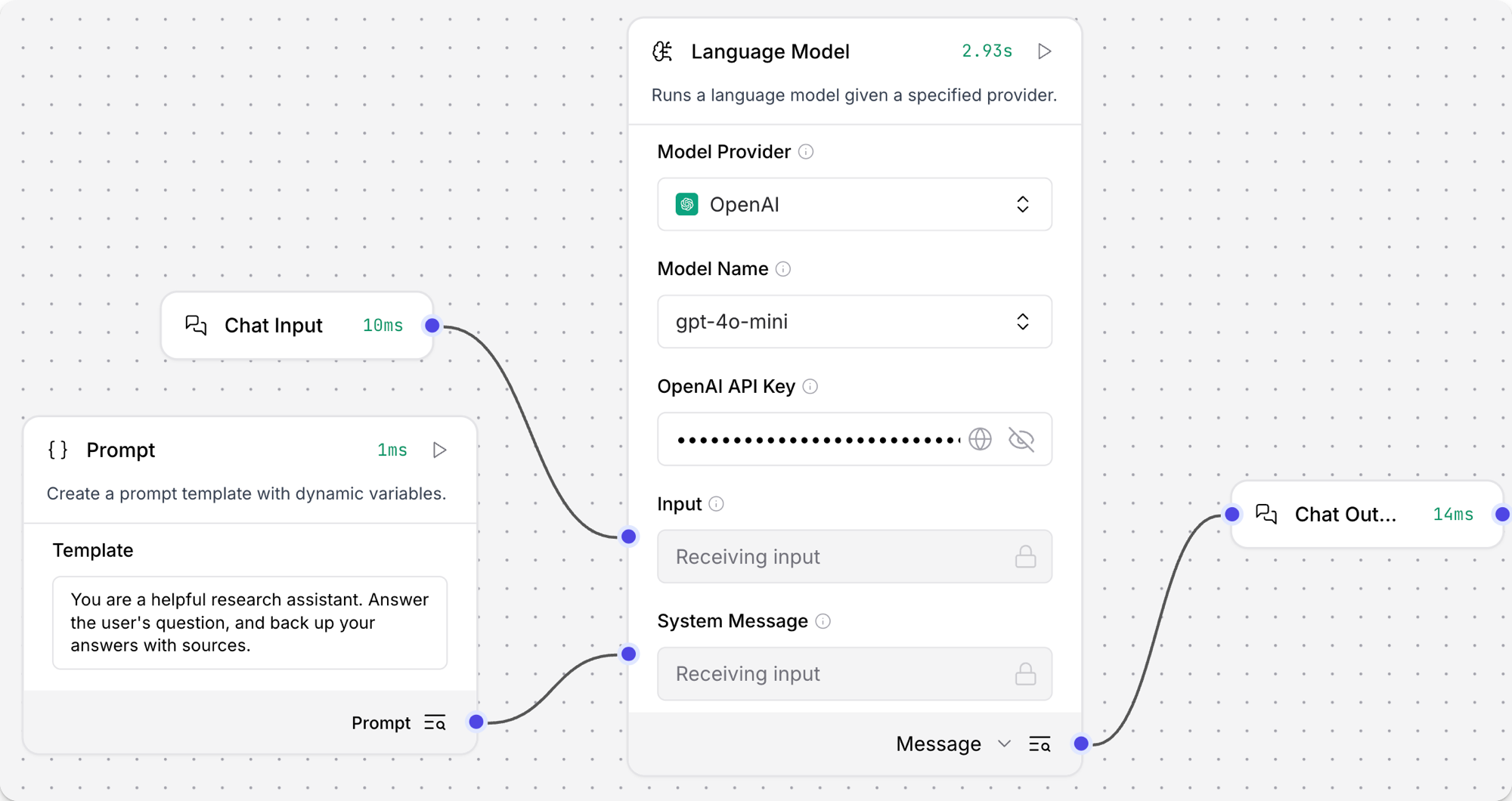
將 Language Model 核心組件添加到您的 Flow中,然後輸入您的 OpenAI API 密鑰。
此示例使用 Language Model 核心組件的默認 OpenAI 模型。 如果您想使用不同的提供商或模型,請相應地編輯 Model Provider、Model Name 和 API Key 字段。
-
在組件的標題菜單中,點擊 Controls,啟用 System Message 參數,然後點擊 Close。
-
將 Prompt Template 組件添加到您的 Flow中。
-
在 Template 字段中,輸入一些 LLM 的指令,例如
You are an expert in geography who is tutoring high school students。 -
將 Prompt Template 組件的輸出連接到 Language Model 組件的 System Message 輸入。
-
將 Chat Input 和 Chat Output 組件添加到您的 Flow中。 這些組件對於與 LLM 的直接聊天交互是必需的。
-
將 Chat Input 組件連接到 Language Model 組件的 Input,然後將 Language Model 組件的 Message 輸出連接到 Chat Output 組件。
-
打開 Playground,並提出問題來與 LLM 聊天並測試 Flow,例如
What is the capital of Utah?。Result
以下響應是 OpenAI 模型響應的示例。 您的實際響應可能會根據請求時的模型版本、您的模板和輸入而有所不同。
_10The capital of Utah is Salt Lake City. It is not only the largest city in the state but also serves as the cultural and economic center of Utah. Salt Lake City was founded in 1847 by Mormon pioneers and is known for its proximity to the Great Salt Lake and its role in the history of the Church of Jesus Christ of Latter-day Saints. For more information, you can refer to sources such as the U.S. Geological Survey or the official state website of Utah. -
可選:嘗試不同的模型或提供商來查看響應如何變化。 例如,如果您使用的是 Language Model 核心組件,您可以嘗試 Anthropic 模型。
然後,打開 Playground,提出與之前相同的問題,然後比較響應的內容和格式。
這有助於您了解不同模型如何處理相同請求,以便為您的用例選擇最佳模型。 您還可以在每個模型提供商的文檔中了解更多關於不同模型的信息。
Result
以下響應是 Anthropic 模型響應的示例。 您的實際響應可能會根據請求時的模型版本、您的模板和輸入而有所不同。
請注意,此響應較短並包含來源,而之前的 OpenAI 響應更像百科全書且未引用來源。
_10The capital of Utah is Salt Lake City. It is also the most populous city in the state. Salt Lake City has been the capital of Utah since 1896, when Utah became a state._10Sources:_10Utah State Government Official Website (utah.gov)_10U.S. Census Bureau_10Encyclopedia Britannica
某些組件使用語言模型組件來執行 LLM 驅動的操作。 通常,這些組件為下游組件準備數據以進行進一步處理,而不是發出直接聊天輸出。 例如,請參閱 Smart Function 組件。
組件必須接受 LanguageModel 輸入才能將語言模型組件用作驅動程序,並且您必須將語言模型組件的輸出類型設置為 LanguageModel。
有關更多信息,請參閱語言模型輸出類型。
如果您不想使用 Agent 組件的內建 LLM,您可以使用語言模型組件連接您偏好的模型:
-
將語言模型組件添加到您的 Flow中。
您可以使用 Language Model 核心組件或瀏覽 Bundles 以查找附加語言模型。 Bundles 中的組件可能沒有
language model在名稱中。 例如,Azure OpenAI LLM 是通過 Azure OpenAI 組件提供的。 -
根據需要配置語言模型組件以連接到您偏好的模型。
-
將語言模型組件的輸出類型從 Model Response 更改為 Language Model。 輸出端口更改為
LanguageModel端口。 這是將語言模型組件連接到 Agent 組件所必需的。 有關更多信息,請參閱語言模型輸出類型。 -
將 Agent 組件添加到 Flow中,然後將 Model Provider 設置為 Connect other models。
Model Provider 字段更改為 Language Model (
LanguageModel) 輸入。 -
將語言模型組件的輸出連接到 Agent 組件的 Language Model 輸入。 Agent 組件現在從連接的語言模型組件繼承語言模型設置,而不是使用任何內建模型。
語言模型參數
以下參數適用於 Language Model 核心組件。 其他語言模型組件可能有附加或不同的參數。
某些參數在視覺編輯器中預設為隱藏。 您可以透過 Components的標頭選單 中的 Controls 修改所有參數。
| 名稱 | 類型 | 描述 |
|---|---|---|
| provider | String | 輸入參數。要使用的模型提供商。 |
| model_name | String | 輸入參數。要使用的模型名稱。選項取決於選定的提供商。 |
| api_key | SecretString | 輸入參數。與選定提供商進行身份驗證的 API 密鑰。 |
| input_value | String | 輸入參數。要發送到模型的輸入文本。 |
| system_message | String | 輸入參數。有助於設置助手行為的系統消息。 |
| stream | Boolean | 輸入參數。是否流式傳輸響應。默認值:false。 |
| temperature | Float | 輸入參數。控制響應中的隨機性。範圍:[0.0, 1.0]。默認值:0.1。 |
| model | LanguageModel | 輸出參數。默認 Message 輸出的替代輸出類型。生成使用指定參數配置的 Chat 實例。請參閱語言模型輸出類型。 |
語言模型輸出類型
語言模型組件,包括核心組件和捆綁組件,可以產生兩種類型的輸出:
-
Model Response:默認輸出類型將模型生成的響應作為
Message數據發出。 當您希望典型的 LLM 交互時使用此輸出類型,其中 LLM 基於給定輸入生成文本響應。 -
Language Model:當您需要在 Flow中將 LLM 附加到另一個組件時,將語言模型組件的輸出類型更改為
LanguageModel,例如 Agent 或 Smart Function 組件。使用此配置,語言模型組件支持由另一個組件完成的動作,而不是直接聊天交互。 例如,Smart Function 組件使用 LLM 從自然語言輸入創建函數。
附加語言模型
如果您的提供商或模型不受 Language Model 核心組件支持,附加語言模型組件可在 Bundles 中獲得。
您可以按照在 Flow中使用語言模型組件中解釋的方式使用這些組件,就像使用核心 Language Model 組件一樣。
將模型與向量存儲配對
根據設計,向量資料對於 LLM 應用程式(如聊天機器人和 agents)至關重要。
雖然您可以單獨使用 LLM 進行通用聊天互動和常見任務,但您可以透過上下文敏感性(如 RAG)和自訂資料集(如內部業務資料)將您的應用程式提升到下一個層級。 這通常需要整合向量資料庫和向量搜尋,以提供額外上下文並定義有意義的查詢。
AgentBuilder 包含可以讀取和寫入向量資料的向量儲存Components,包括嵌入儲存、相似性搜尋、圖形 RAG 遍歷和專用搜尋實例,如 OpenSearch。 由於它們的相互依賴功能,通常在同一 Flow或一系列依賴 Flow中使用向量儲存、語言模型和嵌入模型Components。
要尋找可用的向量儲存Components,請瀏覽 Bundles 或 Search 您的偏好向量資料庫提供者。
示例:向量搜索 Flow
For a tutorial that uses vector data in a flow, see Create a vector RAG chatbot.
The following example demonstrates how to use vector store components in flows alongside related components like embedding model and language model components. These steps walk through important configuration details, functionality, and best practices for using these components effectively. This is only one example; it isn't a prescriptive guide to all possible use cases or configurations.
-
Create a flow with the Vector Store RAG template.
This template has two subflows. The Load Data subflow loads embeddings and content into a vector database, and the Retriever subflow runs a vector search to retrieve relevant context based on a user's query.
-
Configure the database connection for both Astra DB components, or replace them with another pair of vector store components of your choice. Make sure the components connect to the same vector store, and that the component in the Retriever subflow is able to run a similarity search.
The parameters you set in each vector store component depend on the component's role in your flow. In this example, the Load Data subflow writes to the vector store, whereas the Retriever subflow reads from the vector store. Therefore, search-related parameters are only relevant to the Vector Search component in the Retriever subflow.
For information about specific parameters, see the documentation for your chosen vector store component.
-
To configure the embedding model, do one of the following:
-
Use an OpenAI model: In both OpenAI Embeddings components, enter your OpenAI API key. You can use the default model or select a different OpenAI embedding model.
-
Use another provider: Replace the OpenAI Embeddings components with another pair of embedding model components of your choice, and then configure the parameters and credentials accordingly.
-
Use Astra DB vectorize: If you are using an Astra DB vector store that has a vectorize integration, you can remove both OpenAI Embeddings components. If you do this, the vectorize integration automatically generates embeddings from the Ingest Data (in the Load Data subflow) and Search Query (in the Retriever subflow).
tipIf your vector store already contains embeddings, make sure your embedding model components use the same model as your previous embeddings. Mixing embedding models in the same vector store can produce inaccurate search results.
-
-
Recommended: In the Split Text component, optimize the chunking settings for your embedding model. For example, if your embedding model has a token limit of 512, then the Chunk Size parameter must not exceed that limit.
Additionally, because the Retriever subflow passes the chat input directly to the vector store component for vector search, make sure that your chat input string doesn't exceed your embedding model's limits. For this example, you can enter a query that is within the limits; however, in a production environment, you might need to implement additional checks or preprocessing steps to ensure compliance. For example, use additional components to prepare the chat input before running the vector search, or enforce chat input limits in your application code.
-
In the Language Model component, enter your OpenAI API key, or select a different provider and model to use for the chat portion of the flow.
-
Run the Load Data subflow to populate your vector store. In the File component, select one or more files, and then click Run component on the vector store component in the Load Data subflow.
The Load Data subflow loads files from your local machine, chunks them, generates embeddings for the chunks, and then stores the chunks and their embeddings in the vector database.
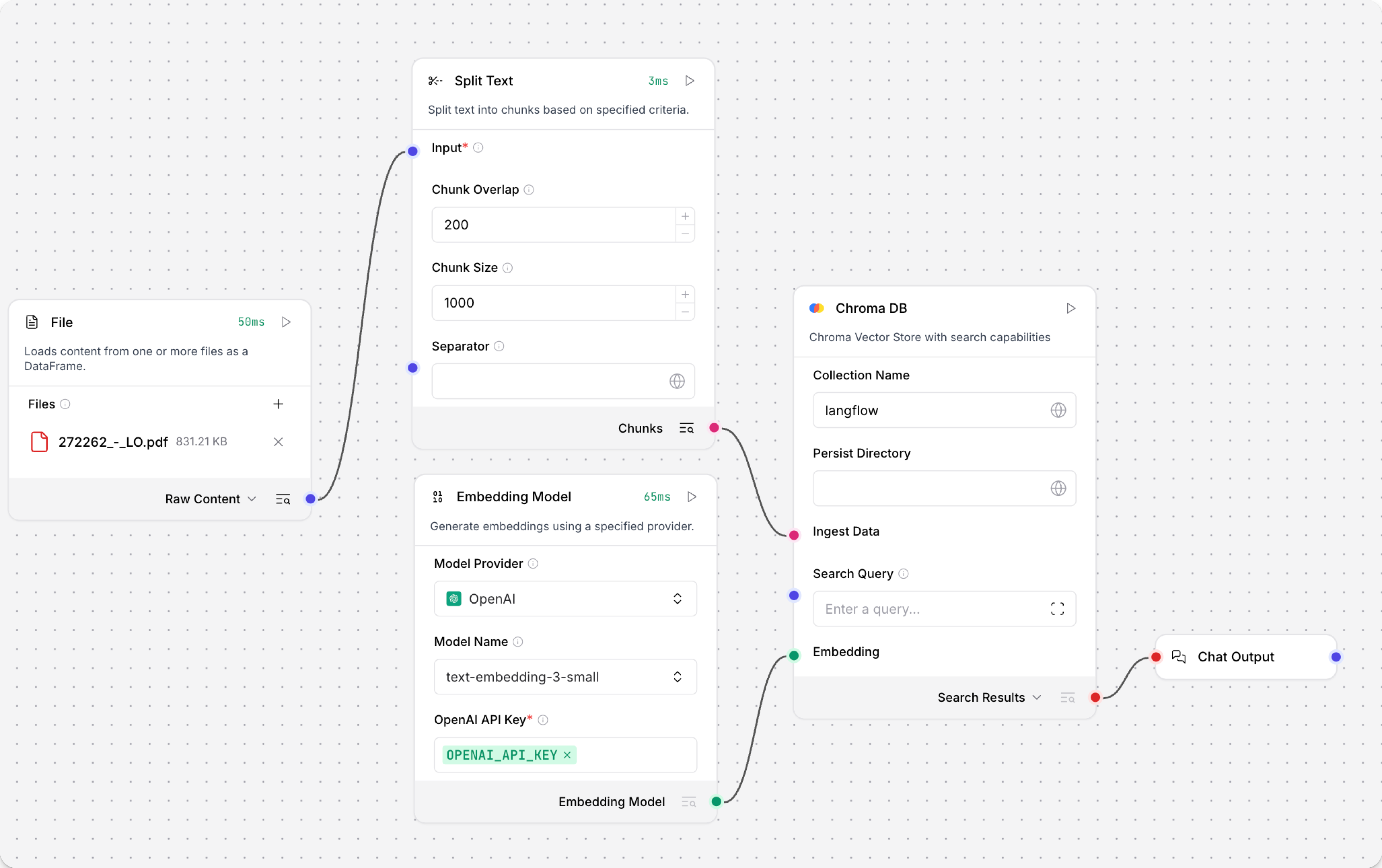
The Load Data subflow is separate from the Retriever subflow because you probably won't run it every time you use the chat. You can run the Load Data subflow as needed to preload or update the data in your vector store. Then, your chat interactions only use the components that are necessary for chat.
If your vector store already contains data that you want to use for vector search, then you don't need to run the Load Data subflow.
-
Open the Playground and start chatting to run the Retriever subflow.
The Retriever subflow generates an embedding from chat input, runs a vector search to retrieve similar content from your vector store, parses the search results into supplemental context for the LLM, and then uses the LLM to generate a natural language response to your query. The LLM uses the vector search results along with its internal training data and tools, such as basic web search and datetime information, to produce the response.
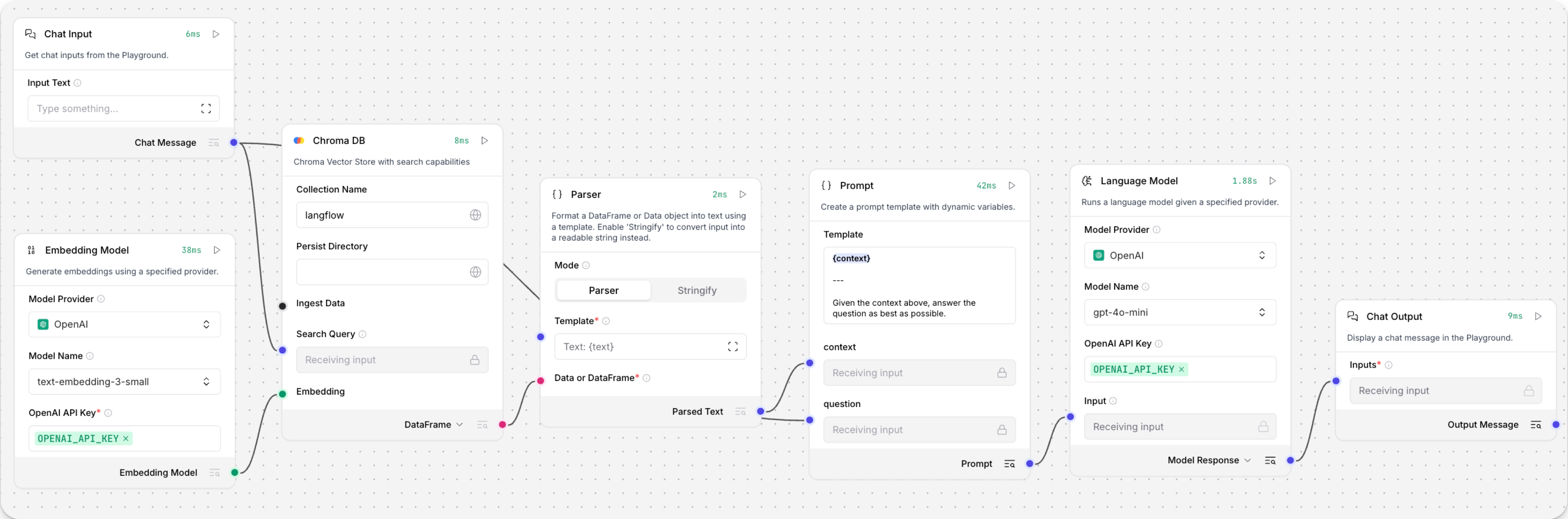
To avoid passing the entire block of raw search results to the LLM, the Parser component extracts
textstrings from the search resultsDataobject, and then passes them to the Prompt Template component inMessageformat. From there, the strings and other template content are compiled into natural language instructions for the LLM.You can use other components for this transformation, such as the Data Operations component, depending on how you want to use the search results.
To view the raw search results, click Inspect output on the vector store component after running the Retriever subflow.
