AgentBuilder Agent
AgentBuilder 的 Agent Components 對於建置 Agent Flow 至關重要。 此Components提供您建立 Agent 所需的一切,包括多個大型語言模型 (LLM) 提供者、工具調用和自訂指示。 它簡化了 Agent 配置,讓您可以專注於應用程式開發。
agent 如何運作?
agent 透過整合 工具 來擴展大型語言模型 (LLM),這些工具是提供額外上下文並實現自主任務執行的函數。 這些整合使 agent 比獨立的 LLM 更專業和強大。
雖然 LLM 可能對一般查詢和任務產生可接受的、惰性的回應,但 agent 可以利用整合的上下文和工具來提供更相關的回應,甚至採取行動。 例如,您可能建立一個 agent,可以存取您公司的文件、儲存庫和其他資源,以幫助您的團隊處理需要了解您特定產品、客戶和程式碼的任務。
agent 使用 LLM 作為推理引擎來處理輸入、決定為了解決查詢而採取哪些行動,然後產生回應。 回應可能是典型的基於文字的 LLM 回應,或者可能涉及行動,如編輯檔案、運行腳本或呼叫外部 API。
在 agent 上下文中,工具是 agent 可以運行來執行任務或存取外部資源的函數。
函數被包裝為具有 agent 理解的通用介面的 Tool 物件。
agent 透過工具註冊了解工具,這通常在 agent 初始化時提供可用工具的清單。
Tool 物件的描述告訴 agent 工具可以做什麼,以便它可以決定工具是否適合給定的請求。
在FLOW中使用 Agent Components
以下步驟說明如何從空白FLOW在 AgentBuilder 中建立 Agent Flow。 對於預建示例,請使用 Simple Agent 模板或 AgentBuilder 快速入門。
-
點擊 New Flow,然後點擊 Blank Flow。
-
將 Agent Components新增到您的FLOW。
-
選取您要使用的提供者和模型。 Agent Components的預設模型是 OpenAI 模型。 如果您想使用不同的提供者,請相應地編輯 Model Provider 和 Model Name 欄位。 如果您的首選模型未列出,請在 Model Name 欄位中輸入完整模型名稱,然後從 Model Name 選單中選取它。 確保模型在您的模型提供者帳戶中已啟用/驗證。 有關更多資訊,請參閱 Agent Components參數。
-
為您選取的模型提供者輸入有效的憑證。 確保憑證有權限調用選取的模型。
-
將 Chat Input 和 Chat Output Components 新增到您的FLOW,然後將它們連接到 Agent Components。
此時,您已經建立了一個基本的基於 LLM 的聊天FLOW,您可以在 Playground 中測試它。 但是,此FLOW僅與 LLM 聊天。 要增強此FLOW並使其真正具有 Agent 性,請新增一些工具,如後續步驟中所述。
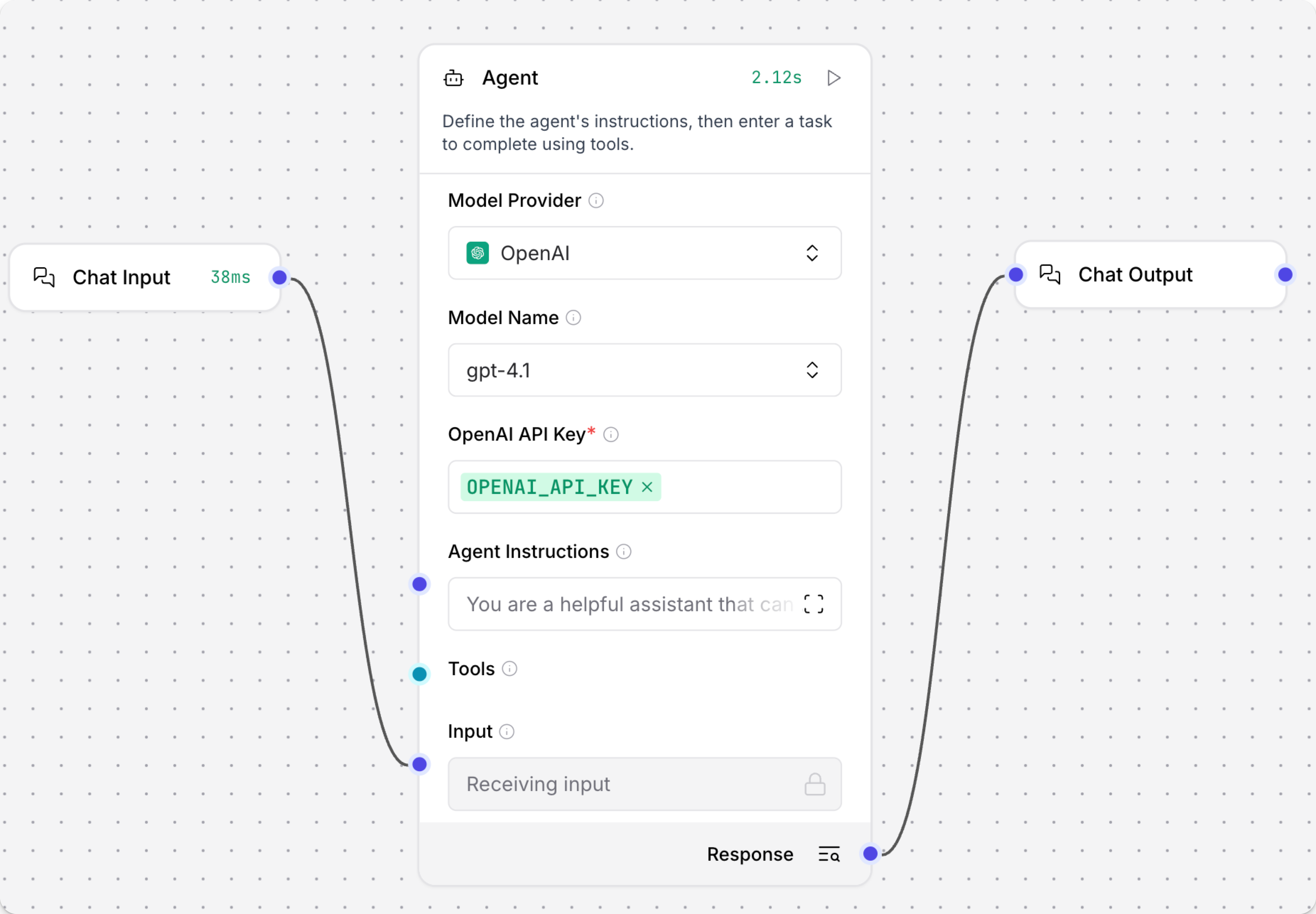
-
將 News Search、URL 和 Calculator Components新增到您的FLOW。
-
在 News Search、URL 和 Calculator Components中啟用 Tool Mode:
- 點擊 News Search Components以公開 Components的標頭選單,然後啟用 Tool Mode。
- 對 URL 和 Calculator Components重複此操作。
- 將每個工具Components的 Toolset 連接埠連接到 Agent Components上的 Tools 連接埠。
Tool Mode 通過修改Components的輸入使Components成為工具。 啟用 Tool Mode 後,Components可以接受來自 Agent Components的請求,使用Components的可用動作作為工具。
在 Tool Mode 中,Components有一個 Toolset 連接埠,如果您想允許 Agent 使用該Components的動作作為工具,則必須將其連接到 Agent Components的 Tools 連接埠。
有關更多資訊,請參閱 為 Agent 配置工具。
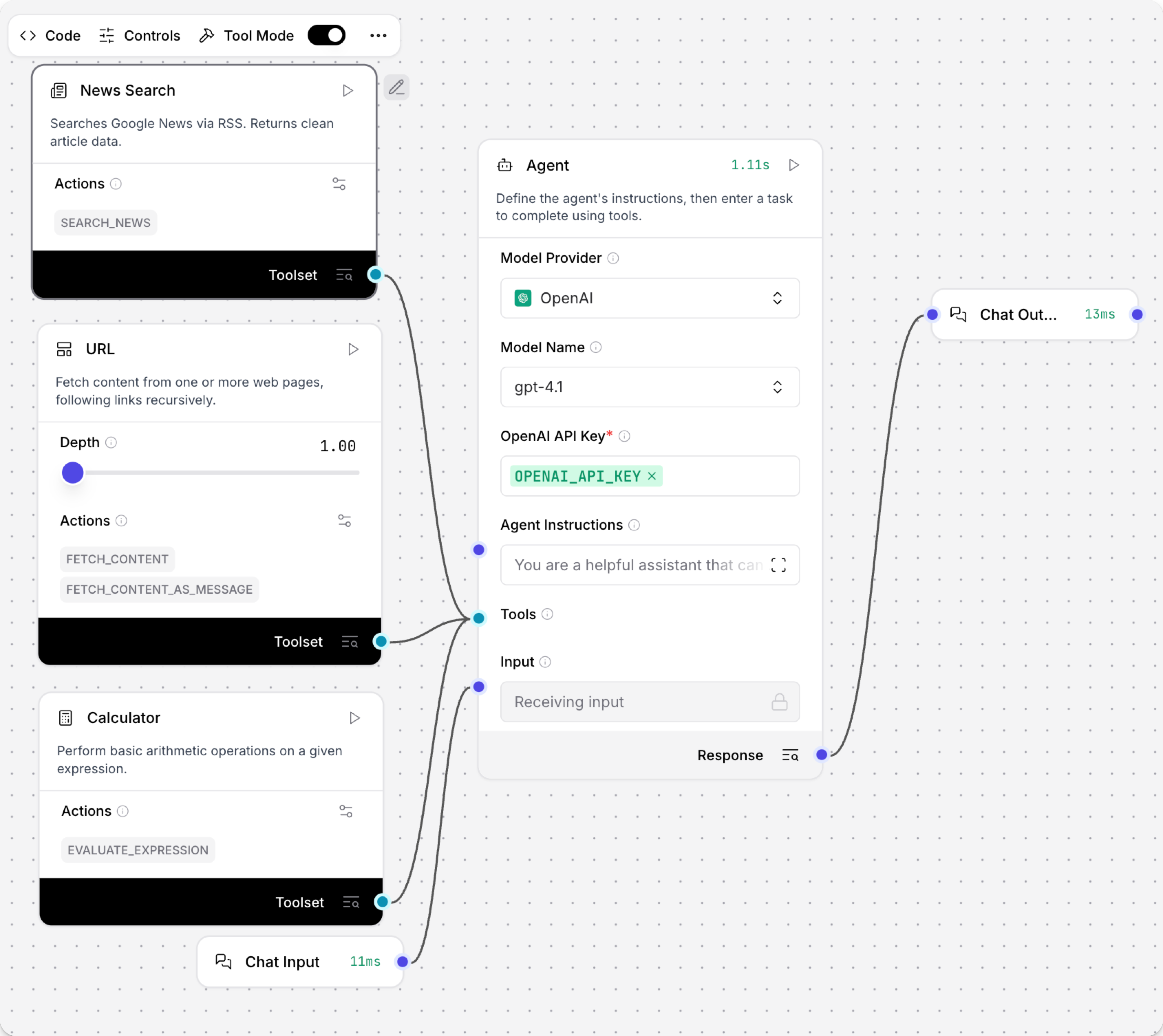
-
開啟 Playground,然後詢問 Agent,
What tools are you using to answer my questions?Agent 應該以連接工具的列表回應。 它也可能包括內建工具。
_10I use a combination of my built-in knowledge (up to June 2024) and a set of external tools to answer your questions. Here are the main types of tools I can use:_10Web Search & Content Fetching: I can fetch and summarize content from web pages, including crawling links recursively._10News Search: I can search for recent news articles using Google News via RSS feeds._10Calculator: I can perform arithmetic calculations and evaluate mathematical expressions._10Date & Time: I can provide the current date and time in various time zones._10These tools help me provide up-to-date information, perform calculations, and retrieve specific data from the internet when needed. If you have a specific question, let me know, and I'll use the most appropriate tool(s) to help! -
要測試特定工具,請詢問 Agent 一個使用其中一個工具的問題,例如
Summarize today's tech news。為了幫助您調試和測試FLOW,Playground 顯示 Agent 的工具調用、提供的輸入以及 Agent 在產生摘要之前收到的原始輸出。 使用給定的示例,Agent 應該調用 News Search Components的
search_news動作。
您已經成功建立了一個使用一些通用工具的基本 Agent Flow。
要繼續基於此教程進行建置,請嘗試連接其他工具Components或 使用 AgentBuilder 作為 MCP 客戶端 以支援更複雜和專門的任務。
有關多 Agent 示例,請參閱 使用 Agent 作為工具。
Agent Components參數
您可以配置 Agent Components以使用您首選的提供者和模型、自訂指示和工具。
某些參數在視覺編輯器中預設為隱藏。 您可以透過 Components的標頭選單 中的 Controls 修改所有參數。
提供者和模型
使用 Model Provider (agent_llm) 和 Model Name (llm_model) 設定來選取您希望 agent 使用的模型提供者和 LLM。
Agent Components包含來自幾個流行模型提供者的許多模型。 要存取其他提供者或模型,您可以執行以下任一操作:
- 將 Model Provider 設定為 Connect other models,然後連接任何 語言模型Components。
- 選取您的首選提供者,在 Model Name 欄位中輸入完整模型名稱,然後從 Model Name 選單中選取您的自訂選項。 確保模型在您的模型提供者帳戶中已啟用/驗證。
如果您需要在FLOW中產生嵌入,請使用 嵌入模型Components。
模型提供者 API 金鑰
在 API Key 欄位中,如果您使用內建提供者,請輸入您選取的模型提供者的有效認證金鑰。 例如,要使用預設 OpenAI 模型,您必須提供有效的 OpenAI API 金鑰,該金鑰對有權限調用 OpenAI LLM 的 OpenAI 帳戶有效。
您可以直接輸入金鑰,但建議您遵循儲存和引用 API 金鑰的行業最佳實務。 例如,您可以使用 全域變數 或 環境變數。 有關更多資訊,請參閱 將Components API 金鑰新增到 AgentBuilder。
如果您選取 Connect other models 作為模型提供者,認證在傳入的語言模型Components中處理。
Agent Instructions and Input
在 Agent Instructions (system_prompt) 欄位中,您可以提供您希望 Agent Components在每次對話中使用的自訂指示。
這些指示除了 Input (input_value) 之外還會應用,Input 可以直接輸入或通過另一個Components提供,例如 Chat Input Components。
工具
Agents 在有適當工具可用來完成請求時最有用。
Agent Components可以使用任何 AgentBuilder Components作為工具,包括 other agents 和 MCP 伺服器。
要將Components作為工具附加,您必須在要附加的Components上啟用 Tool Mode,然後將其附加到 Agent Components的 Tools 連接埠。 有關更多資訊,請參閱 為 agents 配置工具。
要允許 agents 使用來自 MCP 伺服器的工具,請使用 MCP Tools Components。
Agent Memory
AgentBuilder agents 預設啟用了內建聊天記憶。 此記憶允許它們擷取和引用來自先前對話的訊息,為每個聊天會話 ID 維持滾動上下文視窗。
聊天記憶按 session ID (session_id) 分組。
如果您需要為運行相同FLOW的不同使用者或應用程式分離聊天記憶,建議使用自訂 session ID。
預設情況下,Agent Components使用您的 AgentBuilder 安裝的儲存,並擷取有限數量的聊天訊息,您可以使用 Number of Chat History Messages 參數進行配置。
Message History Components對於預設聊天記憶不是必需的,但如果您想使用外部聊天記憶如 Mem0,則是必需的。 此外,Message History Components為排序、篩選和限制記憶提供了更多選項。儘管如此,這些選項中的大多數都內建於 Agent Components中,並有預設值。
有關更多資訊,請參閱 儲存聊天記憶 和 Message History Components。
其他參數
使用 Agent Components,可用參數可以根據選取的提供者和模型而改變,包括對其他模式、參數或功能(如聊天記憶和溫度)的支援。 例如:
- Current Date (
add_current_date_tool):啟用 (true) 時,此設定會為 agent 新增一個可以擷取當前日期的工具。 - Handle Parse Errors (
handle_parsing_errors):啟用 (true) 時,此設定允許 agent 修復錯誤,如分析使用者輸入時的拼寫錯誤。 - Verbose (
verbose):啟用 (true) 時,此設定記錄詳細的日誌輸出以進行調試和分析。
某些參數在視覺編輯器中預設為隱藏。 您可以透過 Components的標頭選單 中的 Controls 修改所有參數。
Agent Components輸出
Agent Components輸出一個 Response (response),這是包含 agent 對查詢的原始回應的 Message 資料。
通常,這會傳遞給 Chat Output Components,以人類可讀格式返回回應。 如果您需要在返回給使用者之前或除了返回給使用者之外進一步處理回應,也可以將其傳遞給其他Components。
