輸入 / 輸出
輸入和輸出組件定義資料進入和離開您 Flow的位置,但它們的功能並不完全相同。
具體來說,Chat Input and Output 組件設計用於促進對話式互動,其中訊息在累積對話中交換。 這些組件處理的資料包括訊息文字加上額外的中繼資料,如傳送者、工作階段 ID 和時間戳。
相比之下,Text Input and Output 組件設計用於簡單的字串輸入和輸出,不需要與聊天訊息相關聯的額外上下文和中繼資料。 這些組件處理的資料簡化為基本的文字字串。
Chat Input and Output
Chat Input and Output 組件是與 Playground 中的 Flow聊天所必需的。 如需詳細資訊,請參閱在 Playground 中測試 Flow。
Chat Input and Output 組件設計用於處理 AgentBuilder 中的對話式互動。
Chat Input
Chat Input 組件接受文字和檔案輸入,例如聊天訊息或檔案。
此資料作為 Message 資料傳遞給其他組件,包含提供的輸入以及相關的聊天中繼資料,如傳送者、工作階段 ID、時間戳和檔案附件。
初始輸入 不應該 作為完整的 Message 物件提供,因為 Chat Input 組件會建構 Message 物件,然後將其傳遞給 Flow中的其他組件。
Chat Input parameters
某些參數在視覺編輯器中預設為隱藏。 您可以透過 Components的標頭選單 中的 Controls 修改所有參數。
| Name | Display Name | Info |
|---|---|---|
| input_value | Input Text | 輸入參數。要作為輸入傳遞的訊息文字字串。 |
| sender | Sender Type | 輸入參數。將傳送者識別為 User 或 Language Model。 |
| sender_name | Sender Name | 輸入參數。傳送者的名稱。若未指定,預設為 User 或 Language Model。 |
| session_id | Session ID | 輸入參數。聊天工作階段的唯一識別碼。若為空值,則使用目前的工作階段 ID 參數。 |
| files | Files | 輸入參數。要與訊息一起傳送的檔案。 |
| background_color | Background Color | 輸入參數。圖示的背景顏色。 |
| chat_icon | Icon | 輸入參數。訊息的圖示。 |
| should_store_message | Store Messages | 輸入參數。是否將訊息儲存在聊天歷史記錄中。 |
| text_color | Text Color | 輸入參數。名稱的文字顏色。 |
有關產生的 Message 物件的資訊,包括直接映射到 Message 屬性的輸入參數,請參閱 Message 資料。
Chat Input 的 Message 方法
ChatInput 類別提供了一個非同步方法來基於輸入參數建立和儲存 Message 物件。
Message 物件是在 ChatInput 類別的 message_response 方法中使用的 Message.create() 工廠方法建立的。
_12message = await Message.create(_12 text=self.input_value,_12 sender=self.sender,_12 sender_name=self.sender_name,_12 session_id=self.session_id,_12 files=self.files,_12 properties={_12 "background_color": background_color,_12 "text_color": text_color,_12 "icon": icon,_12 },_12)
Chat Output
Chat Output Components從其他Components擷取 Message、Data 或 DataFrame 資料,在需要時將其轉換為 Message 資料,然後將最終輸出作為聊天訊息發出。
有關這些資料類型的資訊,請參閱使用 AgentBuilder 資料類型。
在 Playground 中,聊天輸出僅限於 Message 物件中與聊天介面相關的部分,例如文字回應、傳送者名稱和檔案附件。
要查看與聊天訊息相關的中繼資料,請檢查 Playground 中的訊息日誌。
使用 AgentBuilder API 時,API 回應包括 Chat Output Message 物件以及 Flow運行的其他回應資料。
AgentBuilder API 回應可能非常詳細,因此您的應用程式必須包含從回應中提取相關資料的程式碼,以返回給使用者。
如需範例,請參閱 AgentBuilder 快速入門。
Chat Output parameters
某些參數在視覺編輯器中預設為隱藏。 您可以透過 Components的標頭選單 中的 Controls 修改所有參數。
| Name | Display Name | Info |
|---|---|---|
| input_value | Inputs | 輸入參數。要作為輸出傳遞的訊息文字字串。 |
| should_store_message | Store Messages | 輸入參數。是否將訊息儲存在聊天歷史記錄中。 |
| sender | Sender Type | 輸入參數。將傳送者識別為 User 或 Language Model。 |
| sender_name | Sender Name | 輸入參數。傳送者的名稱。若未指定,預設為 User 或 Language Model。 |
| session_id | Session ID | 輸入參數。聊天工作階段的唯一識別碼。若為空值,則使用目前的工作階段 ID 參數。 |
| data_template | Data Template | 輸入參數。將 Data 輸入 轉換為 text 的模板。若為空值,則動態設定為 Data 物件的 text 鍵。 |
| background_color | Background Color | 輸入參數。圖示的背景顏色。 |
| chat_icon | Icon | 輸入參數。訊息的圖示。 |
| text_color | Text Color | 輸入參數。名稱的文字顏色。 |
| clean_data | Basic Clean Data | 輸入參數。啟用時,DataFrame 輸入 在轉換為文字時會被清理。清理會移除空行、儲存格中的空行以及多個換行符。 |
有關產生的 Message 物件的資訊,包括直接映射到 Message 屬性的輸入參數,請參閱 Message 資料。
在 Flow中使用 Chat Input 和 Output Components
要在 Flow中使用 Chat Input 和 Chat Output Components,請將它們連接到接受或發出 Message 資料 的Components。
例如,以下 Flow將 Chat Input 和 Chat Output 連接到 Language Model Components,建立一個簡單的基於 LLM 的聊天 Flow。
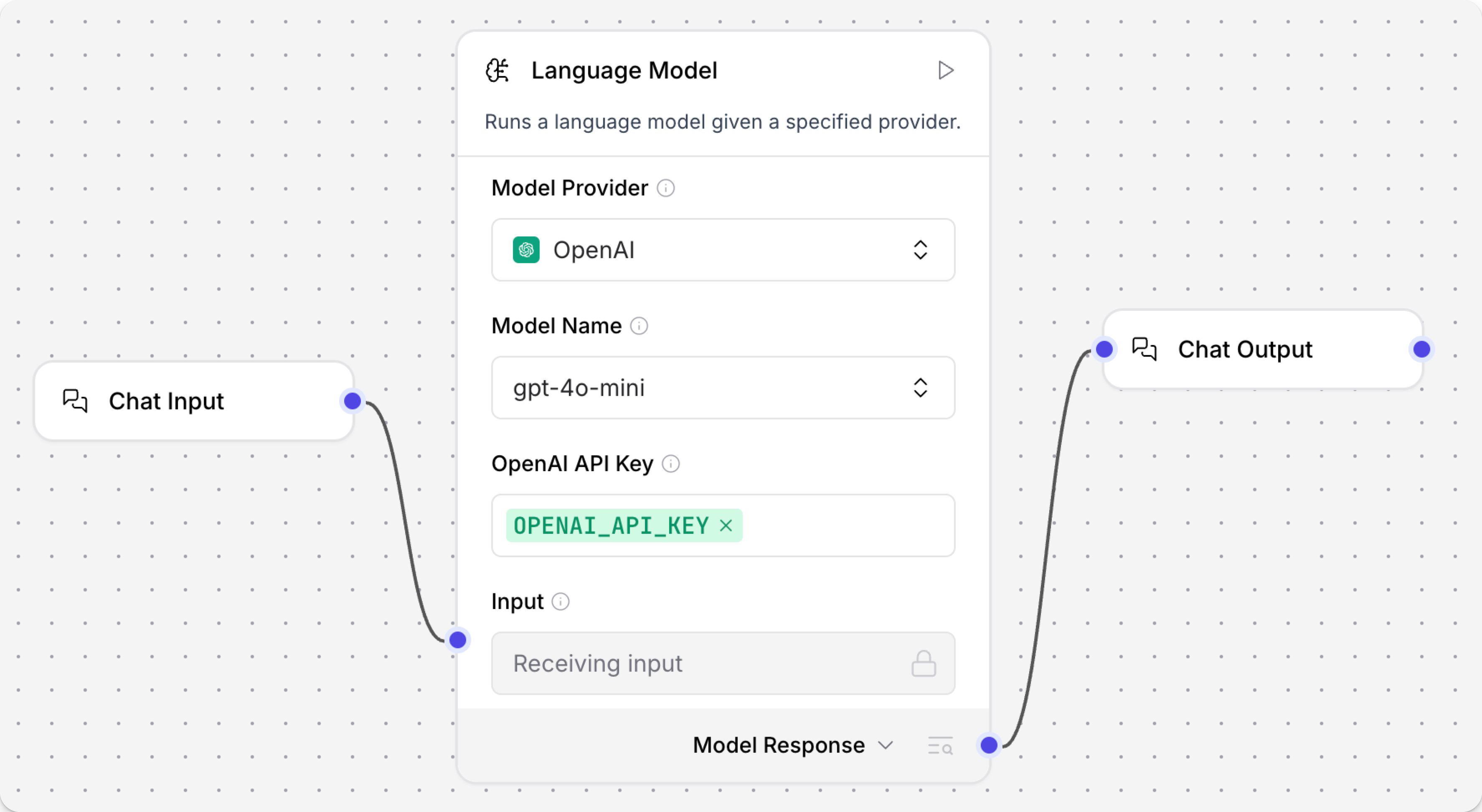
有關 Flow中 Chat Input and Output Components的詳細範例,請參閱以下內容:
- AgentBuilder 快速入門:建立並運行基本 agent flow。
- Basic Prompting 模板:建立一個基於 LLM 的聊天 Flow,接受聊天輸入以及包含 LLM 額外指示的提示。許多其他 AgentBuilder 模板也使用 Chat Input and Output Components。
- 將應用程式連接到 agent:探索圍繞 agent flow 和提示的更進階概念,包括從外部應用程式觸發 agent flow。
使用 AgentBuilder API 發送聊天輸入
您可以使用 AgentBuilder API 通過向 Chat Input Components發送輸入來運行 Flow:
_10curl --request POST \_10 --url "http://$LANGFLOW_SERVER_ADDRESS/api/v1/run/$FLOW_ID" \_10 --header "Content-Type: application/json" \_10 --header "x-api-key: $LANGFLOW_API_KEY" \_10 --data '{_10 "input_value": "What's the recommended way to install Docker on Mac M1?",_10 "output_type": "chat",_10 "input_type": "chat"_10}'
使用 AgentBuilder API 觸發 Flow時,載荷必須包含 Chat Input Components輸入參數的值,例如 input_value。
並非所有參數都需要在請求中指定。
例如,如果省略 session_id,則使用 Flow的預設工作階段 ID。
如果您想使用自訂工作階段 ID,請在請求中包含 session_id:
_10curl --request POST \_10 --url "http://$LANGFLOW_SERVER_ADDRESS/api/v1/run/$FLOW_ID" \_10 --header "Content-Type: application/json" \_10 --header "x-api-key: $LANGFLOW_API_KEY" \_10 --data '{_10 "input_value": "Whats the recommended way to install Docker on Mac M1",_10 "session_id": "$USER_ID",_10 "output_type": "chat",_10 "input_type": "chat"_10}'
有關更多資訊,請參閱使用 AgentBuilder API 觸發 Flow。
Text Input and Output
Text Input and Output Components在 Playground 中不受支援。 因為資料未格式化為聊天訊息,資料不會出現在 Playground 中,您無法在 Playground 中與您的 Flow聊天。
如果您想在 Playground 中與 Flow聊天,您必須使用 Chat Input and Output Components。
Text Input and Output Components設計用於擷取或發出簡單文字字串的 Flow。 這些Components不支援完整的對話式互動。
將類似聊天的中繼資料傳遞給 Text Input and Output Components不會改變Components的行為;結果仍然是一個簡單的文字字串。
Text Input
Text Input Components接受作為 Message 資料 傳遞給其他Components的文字字串輸入,其中僅在 text 屬性中包含提供的輸入文字字串。
它僅接受 Text (input_value),這是作為Components輸入提供的文字。
這可以直接輸入到Components中,或作為 Message 資料從其他Components傳遞。
初始輸入 不應該 作為完整的 Message 物件提供,因為 Text Input Components會建構然後傳遞給FLOW中其他Components的 Message 物件。
Text Output
Text Output Components從其他Components擷取 Message 資料,僅在簡化的 Message 物件中發出 text 屬性。
它僅接受 Text (input_value),這是要擷取並作為字串輸出的文字。
這可以直接輸入到Components中,或作為 Message 資料從其他Components傳遞。
