嵌入模型
AgentBuilder 中的嵌入模型Components使用指定的語言模型 (LLM) 生成文字嵌入。
AgentBuilder 包含一個 Embedding Model 核心Components,具有對某些 LLM 的內建支援。 或者,您可以使用任何其他嵌入模型來替代 Embedding Model 核心Components。
在 Flow中使用嵌入模型Components
在需要生成嵌入的任何地方使用嵌入模型Components。
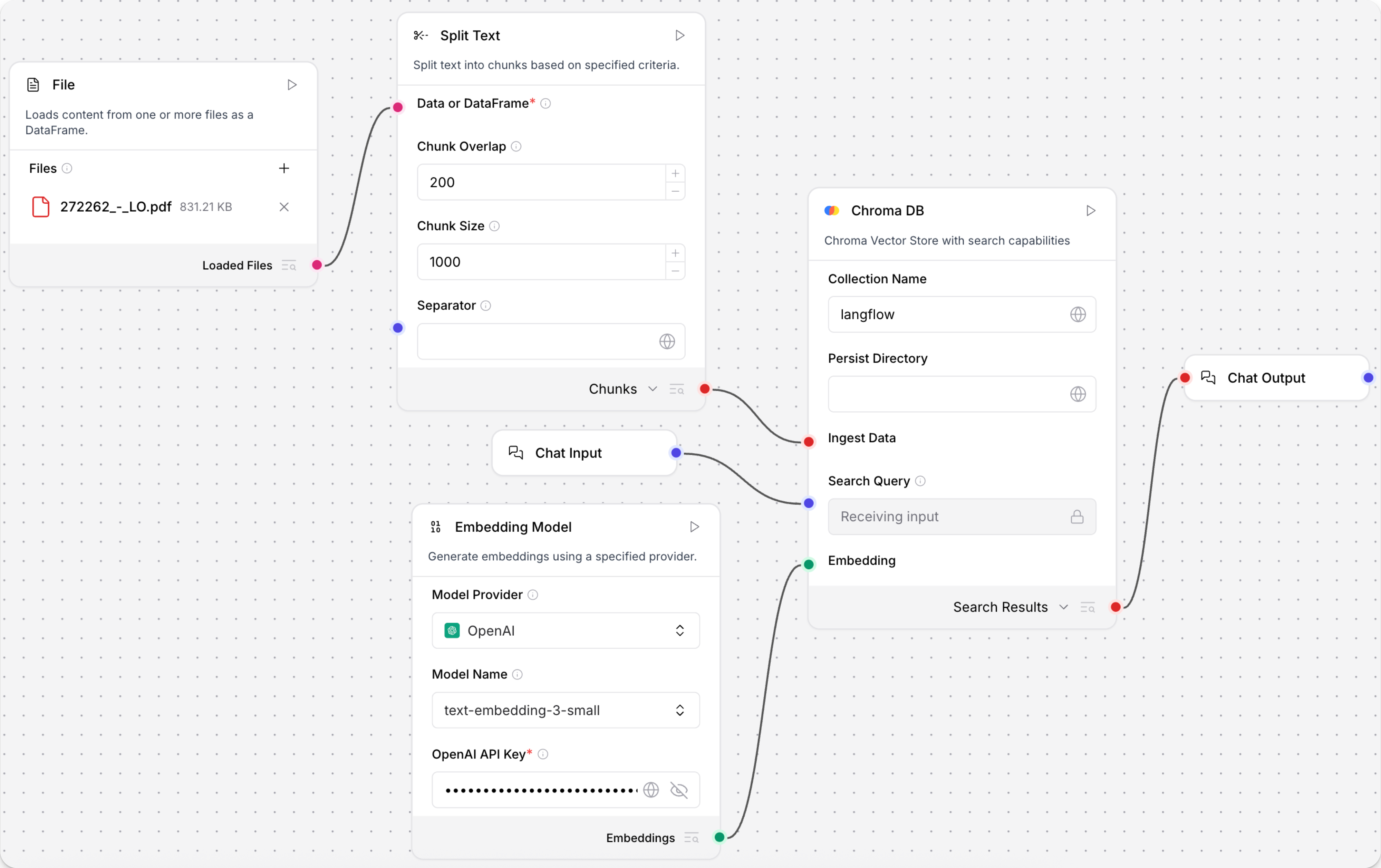
此示例顯示如何在 Flow中使用嵌入模型Components來建立語義搜尋系統。 此 Flow載入文字檔案,將文字分割成區塊,為每個區塊生成嵌入,然後將區塊和嵌入載入到向量儲存中。輸入和輸出Components允許使用者透過聊天介面查詢向量儲存。
-
建立 Flow,新增 File Components,然後選取包含文字資料的檔案,例如 PDF,您可以用來測試 Flow。
-
新增 Embedding Model 核心Components,然後提供有效的 OpenAI API 金鑰。 您可以直接輸入 API 金鑰或使用 全域變數。
我的偏好提供者或模型未列出如果您的偏好嵌入模型提供者或模型不受 Embedding Model 核心Components支援,您可以使用任何其他嵌入模型來替代核心Components。
瀏覽 Bundles 或 搜尋 您的偏好提供者,以找到其他嵌入模型,例如 Hugging Face Embeddings Inference Components。
-
新增 Split Text Components 到您的 Flow。 此Components將文字輸入分割成較小的區塊以處理成嵌入。
-
新增向量儲存Components,例如 Chroma DB Components,到您的 Flow,然後配置Components以連接到您的向量資料庫。 此Components儲存生成的嵌入,以便用於相似性搜尋。
-
連接Components:
- 將 File Components的 Loaded Files 輸出連接到 Split Text Components的 Data or DataFrame 輸入。
- 將 Split Text Components的 Chunks 輸出連接到向量儲存Components的 Ingest Data 輸入。
- 將 Embedding Model Components的 Embeddings 輸出連接到向量儲存Components的 Embedding 輸入。
-
要查詢向量儲存,請新增 Chat Input and Output Components:
- 將 Chat Input Components連接到向量儲存Components的 Search Query 輸入。
- 將向量儲存Components的 Search Results 輸出連接到 Chat Output Components。
-
點擊 Playground,然後輸入搜尋查詢以擷取與您的查詢語義最相似的文字區塊。
Embedding Model 參數
以下參數適用於 Embedding Model 核心Components。 其他嵌入模型Components可能有額外或不同的參數。
某些參數在視覺編輯器中預設為隱藏。 您可以透過 Components的標頭選單 中的 Controls 修改所有參數。
| Name | Display Name | Type | Description |
|---|---|---|---|
| provider | Model Provider | List | 輸入參數。選取嵌入模型提供者。 |
| model | Model Name | List | 輸入參數。選取要使用的嵌入模型。 |
| api_key | OpenAI API Key | Secret[String] | 輸入參數。驗證提供者所需的 API 金鑰。 |
| api_base | API Base URL | String | 輸入參數。API 的基礎 URL。留空為預設值。 |
| dimensions | Dimensions | Integer | 輸入參數。輸出嵌入的維度數。 |
| chunk_size | Chunk Size | Integer | 輸入參數。要處理的文字區塊大小。預設:1000。 |
| request_timeout | Request Timeout | Float | 輸入參數。API 請求的逾時。 |
| max_retries | Max Retries | Integer | 輸入參數。最大重試次數。預設:3。 |
| show_progress_bar | Show Progress Bar | Boolean | 輸入參數。是否在嵌入生成期間顯示進度條。 |
| model_kwargs | Model Kwargs | Dictionary | 輸入參數。要傳遞給模型的額外關鍵字參數。 |
| embeddings | Embeddings | Embeddings | 輸出參數。使用選取提供者生成嵌入的實例。 |
其他嵌入模型
如果您的提供者或模型不受 Embedding Model 核心Components支援,您可以用生成嵌入的任何其他Components來替代此Components。
要找到其他嵌入模型Components,請瀏覽 Bundles 或 搜尋 您的偏好提供者。
將模型與向量儲存配對
根據設計,向量資料對於 LLM 應用程式(如聊天機器人和 agents)至關重要。
雖然您可以單獨使用 LLM 進行通用聊天互動和常見任務,但您可以透過上下文敏感性(如 RAG)和自訂資料集(如內部業務資料)將您的應用程式提升到下一個層級。 這通常需要整合向量資料庫和向量搜尋,以提供額外上下文並定義有意義的查詢。
AgentBuilder 包含可以讀取和寫入向量資料的向量儲存Components,包括嵌入儲存、相似性搜尋、圖形 RAG 遍歷和專用搜尋實例,如 OpenSearch。 由於它們的相互依賴功能,通常在同一 Flow或一系列依賴 Flow中使用向量儲存、語言模型和嵌入模型Components。
要尋找可用的向量儲存Components,請瀏覽 Bundles 或 Search 您的偏好向量資料庫提供者。
示例:向量搜尋 Flow
For a tutorial that uses vector data in a flow, see Create a vector RAG chatbot.
The following example demonstrates how to use vector store components in flows alongside related components like embedding model and language model components. These steps walk through important configuration details, functionality, and best practices for using these components effectively. This is only one example; it isn't a prescriptive guide to all possible use cases or configurations.
-
Create a flow with the Vector Store RAG template.
This template has two subflows. The Load Data subflow loads embeddings and content into a vector database, and the Retriever subflow runs a vector search to retrieve relevant context based on a user's query.
-
Configure the database connection for both Astra DB components, or replace them with another pair of vector store components of your choice. Make sure the components connect to the same vector store, and that the component in the Retriever subflow is able to run a similarity search.
The parameters you set in each vector store component depend on the component's role in your flow. In this example, the Load Data subflow writes to the vector store, whereas the Retriever subflow reads from the vector store. Therefore, search-related parameters are only relevant to the Vector Search component in the Retriever subflow.
For information about specific parameters, see the documentation for your chosen vector store component.
-
To configure the embedding model, do one of the following:
-
Use an OpenAI model: In both OpenAI Embeddings components, enter your OpenAI API key. You can use the default model or select a different OpenAI embedding model.
-
Use another provider: Replace the OpenAI Embeddings components with another pair of embedding model components of your choice, and then configure the parameters and credentials accordingly.
-
Use Astra DB vectorize: If you are using an Astra DB vector store that has a vectorize integration, you can remove both OpenAI Embeddings components. If you do this, the vectorize integration automatically generates embeddings from the Ingest Data (in the Load Data subflow) and Search Query (in the Retriever subflow).
tipIf your vector store already contains embeddings, make sure your embedding model components use the same model as your previous embeddings. Mixing embedding models in the same vector store can produce inaccurate search results.
-
-
Recommended: In the Split Text component, optimize the chunking settings for your embedding model. For example, if your embedding model has a token limit of 512, then the Chunk Size parameter must not exceed that limit.
Additionally, because the Retriever subflow passes the chat input directly to the vector store component for vector search, make sure that your chat input string doesn't exceed your embedding model's limits. For this example, you can enter a query that is within the limits; however, in a production environment, you might need to implement additional checks or preprocessing steps to ensure compliance. For example, use additional components to prepare the chat input before running the vector search, or enforce chat input limits in your application code.
-
In the Language Model component, enter your OpenAI API key, or select a different provider and model to use for the chat portion of the flow.
-
Run the Load Data subflow to populate your vector store. In the File component, select one or more files, and then click Run component on the vector store component in the Load Data subflow.
The Load Data subflow loads files from your local machine, chunks them, generates embeddings for the chunks, and then stores the chunks and their embeddings in the vector database.
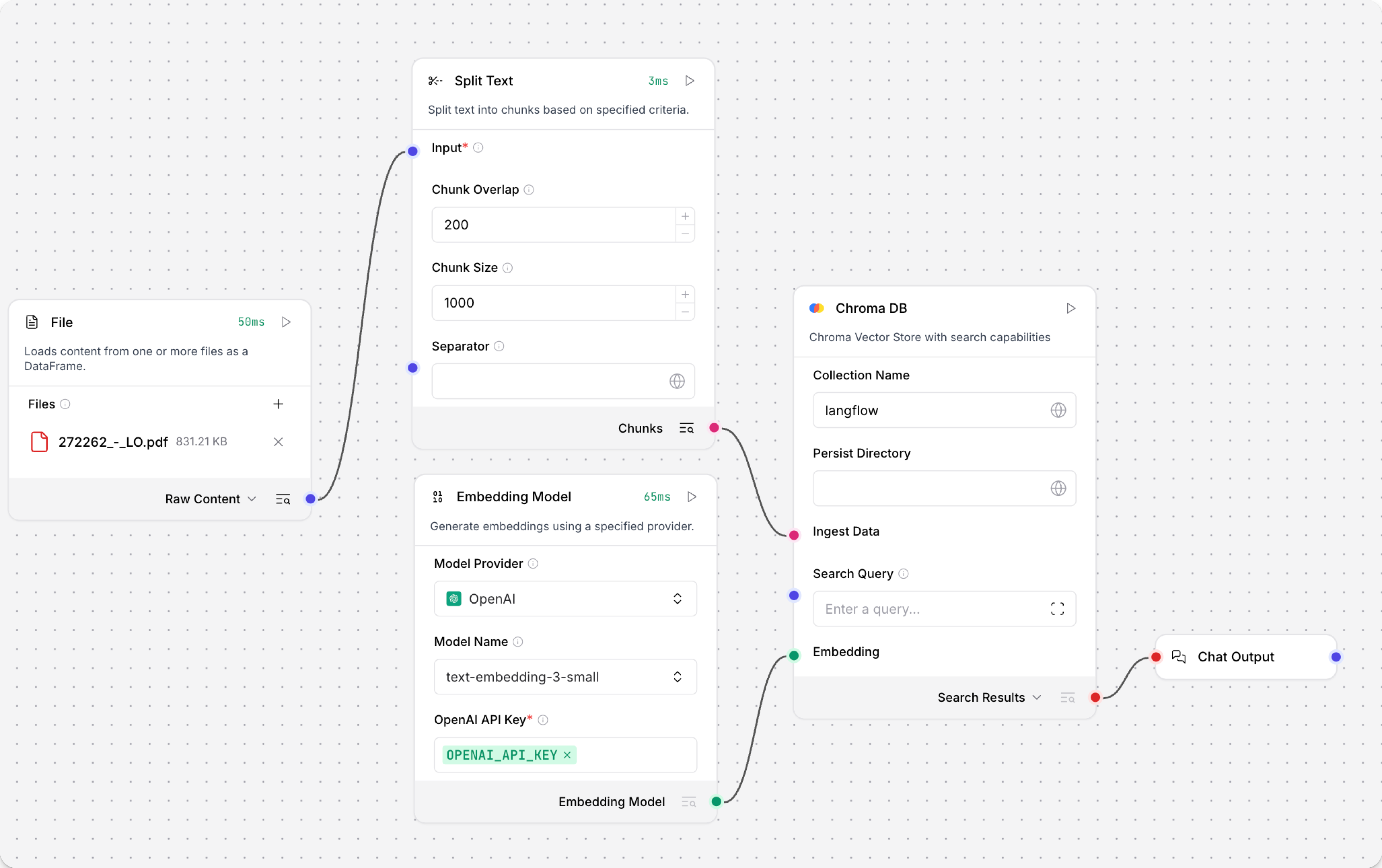
The Load Data subflow is separate from the Retriever subflow because you probably won't run it every time you use the chat. You can run the Load Data subflow as needed to preload or update the data in your vector store. Then, your chat interactions only use the components that are necessary for chat.
If your vector store already contains data that you want to use for vector search, then you don't need to run the Load Data subflow.
-
Open the Playground and start chatting to run the Retriever subflow.
The Retriever subflow generates an embedding from chat input, runs a vector search to retrieve similar content from your vector store, parses the search results into supplemental context for the LLM, and then uses the LLM to generate a natural language response to your query. The LLM uses the vector search results along with its internal training data and tools, such as basic web search and datetime information, to produce the response.
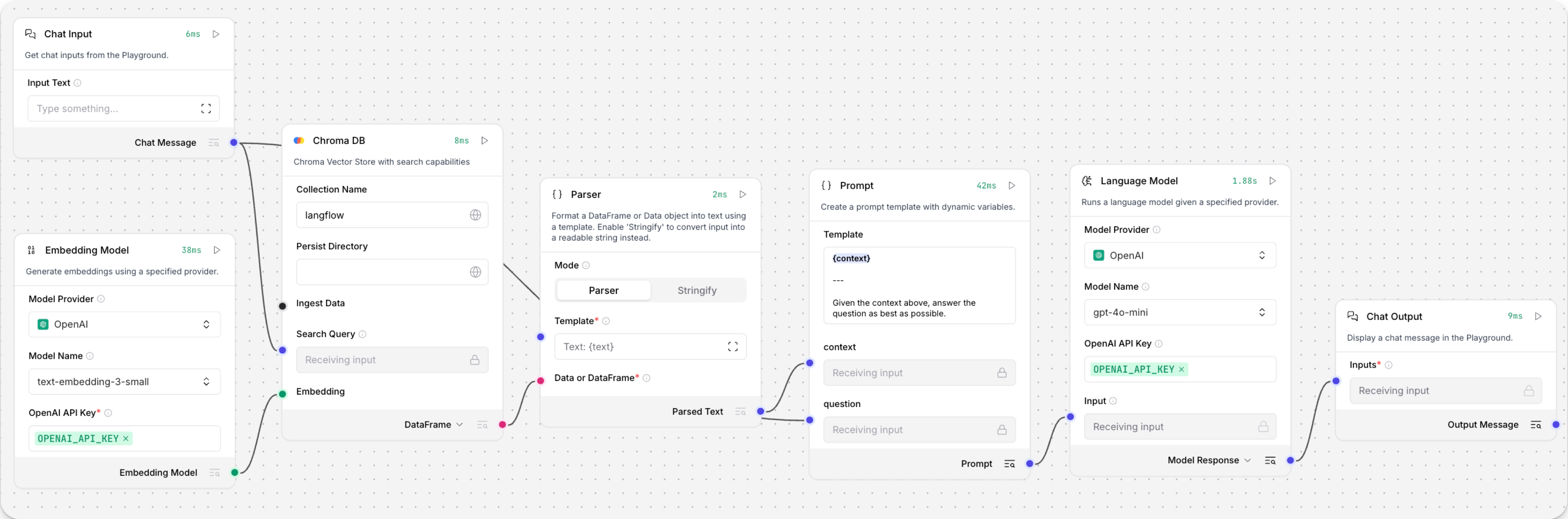
To avoid passing the entire block of raw search results to the LLM, the Parser component extracts
textstrings from the search resultsDataobject, and then passes them to the Prompt Template component inMessageformat. From there, the strings and other template content are compiled into natural language instructions for the LLM.You can use other components for this transformation, such as the Data Operations component, depending on how you want to use the search results.
To view the raw search results, click Inspect output on the vector store component after running the Retriever subflow.
