AgentBuilder API 觸發 Flow
建置 Flow 後,您可能想要在應用程式中執行它,例如行動應用程式或網站中的聊天機器人。
AgentBuilder 提供多種從外部應用程式執行 Flow 的方式:
- 使用 AgentBuilder API 觸發 Flow
- 將嵌入式聊天小工具新增到網站
- 透過 AgentBuilder MCP 伺服器提供 Flow
- 使用 OpenAI Responses 相容 EndPoint 執行 Flow
雖然您可以在隔離的本地 AgentBuilder 實例中使用這些選項,但當您部署 AgentBuilder 伺服器或將 AgentBuilder 打包為應用程式的相依性時,它們通常更有價值。
使用 AgentBuilder API 執行 Flow
AgentBuilder API 是以程式設計方式存取您的 Flow 和 AgentBuilder 伺服器的主要方式。
如需呼叫 AgentBuilder API 的指令碼範例,請參閱快速入門。
產生 API 程式碼片段
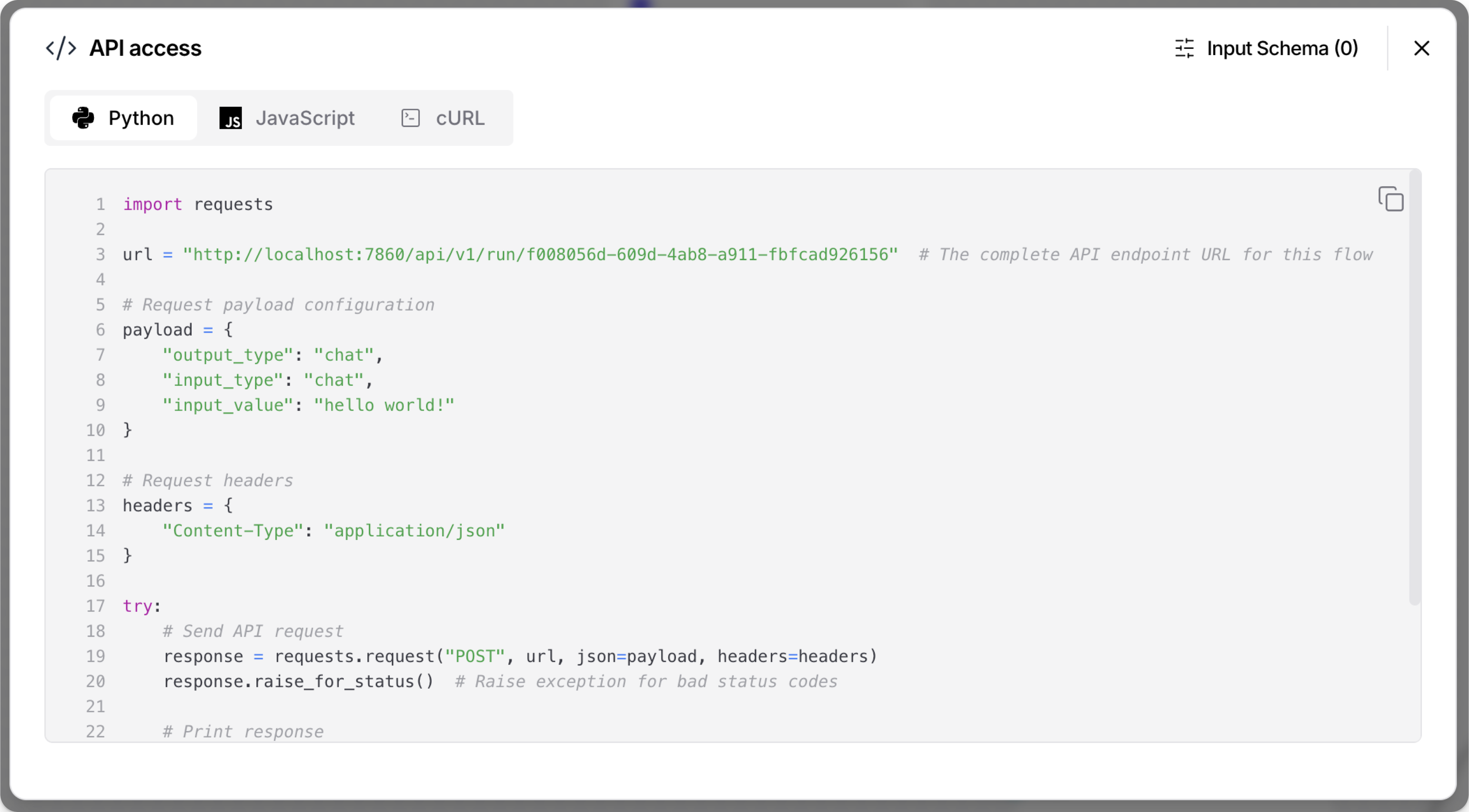
為了幫助您在指令碼中嵌入 AgentBuilder API 請求,AgentBuilder 會自動為您的 Flow 產生 Python、JavaScript 和 curl 程式碼片段。 要取得這些程式碼片段,請執行以下操作:
-
在 AgentBuilder 中,開啟您要嵌入應用程式中的 Flow。
-
按一下 分享,然後選取 API 存取。
這些程式碼片段呼叫
/v1/run/$FLOW_IDEndPoint,並自動填入最小值,如 AgentBuilder 伺服器 URL、 Flow ID、標題和請求參數。WindowsAPI 存取窗格產生的路徑假設 *nix 環境。 如果您使用 Microsoft Windows 或 WSL,您可能需要調整程式碼片段中給定的檔案路徑。
-
選用:按一下 輸入結構描述 以修改程式碼片段中的Components參數,而不變更FLOW本身。
-
複製您要使用的語言的片段。
-
直接執行片段,或在較大指令碼的上下文中使用片段。
如需詳細資訊和其他 AgentBuilder API EndPoint 的範例,請參閱開始使用 AgentBuilder API。
AgentBuilder API 驗證
在 AgentBuilder 1.5 及更高版本中,大多數 API EndPoint 需要使用 AgentBuilder API 金鑰進行驗證。
API 存取 窗格中產生的程式碼片段包含一個指令碼,檢查本地終端機工作階段中設定的 LANGFLOW_API_KEY 環境變數。
此指令碼不會檢查本地終端機工作階段以外任何地方設定的 AgentBuilder API 金鑰。
為了讓此指令碼運作,您必須在您打算執行程式碼片段的終端機工作階段中設定 LANGFLOW_API_KEY 變數,例如 export LANGFLOW_API_KEY="sk..."。
或者,您可以編輯程式碼片段以包含 x-api-key 標題,並確保請求可以驗證到 AgentBuilder API。
如需詳細資訊,請參閱 API 金鑰和驗證 和 開始使用 AgentBuilder API。
Input Schema (tweaks)
Tweaks 是執行時修改Components參數的一次性覆寫,而不是永久修改 Flow 本身。 如需指令碼中 tweaks 的範例,請參閱快速入門。
Tweaks 讓您的 Flow 更動態且可重複使用。
您可以建立一個 Flow,並在每個應用程式的 AgentBuilder API 請求中傳遞應用程式特定的 tweaks,以用於多個應用程式。
在 API 存取 窗格中,按一下 Input Schema 以將 tweaks 新增到 Flow 程式碼片段的請求酬載中。
對 Flow Input Schema 的變更會專門儲存為該 Flow API 存取 程式碼片段的 tweaks。 這些 tweaks 不會變更在工作區中設定的 Flow 參數,也不會套用到其他 Flow。
透過 Input Schema 新增 tweaks 可以幫助您疑難排解手動新增到 AgentBuilder API 請求中的 tweaks 格式問題。
例如,以下 curl 命令包含一個 tweak,可停用FLOW Chat Input Components中的 Store Messages 設定:
_14curl --request POST \_14 --url "http://LANGFLOW_SERVER_ADDRESS/api/v1/run/FLOW_ID" \_14 --header "Content-Type: application/json" \_14 --header "x-api-key: LANGFLOW_API_KEY" \_14 --data '{_14 "input_value": "Text to input to the flow",_14 "output_type": "chat",_14 "input_type": "chat",_14 "tweaks": {_14 "ChatInput-4WKag": {_14 "should_store_message": false_14 }_14 }_14}'
使用 Flow ID 別名
如果您希望請求使用別名而不是實際的 Flow ID,您可以重新命名 Flow 的 /v1/run/$FLOW_ID 端點:
-
在 AgentBuilder 中,開啟 Flow,按一下 分享,然後選取 API 存取。
-
按一下 Input Schema。
-
在 Endpoint Name 欄位中,輸入 Flow ID 的別名,例如易記的、人類可讀的名稱。
名稱只能包含字母、數字、連字號和底線,例如
flow-customer-database-agent。 -
若要儲存變更,請關閉 Input Schema 窗格。
自動產生的程式碼片段現在會使用您的新端點名稱,而不是原始的 Flow ID,例如 url = "http://localhost:7868/api/v1/run/flow-customer-database-agent"。
將 Flow 嵌入網站
對於每個 Flow,AgentBuilder 提供一個程式碼片段,您可以將其插入您網站 HTML 的 <body> 中,以透過嵌入式聊天小工具與您的 Flow 互動。
聊天小工具只支援具有 Chat Input 和 Chat Output Components的 Flow,這些Components是聊天體驗所必需的。 Text Input 和 Text Output Components可以傳送和接收訊息,但它們不包含持續的 LLM 聊天上下文。
嘗試與沒有 Chat Input Components 的 Flow 聊天會觸發 Flow,但回應只會指出輸入為空。
取得 langflow-chat 程式碼片段
要取得 Flow 的嵌入式聊天小工具程式碼片段,請執行以下操作:
- 在 AgentBuilder 中,開啟您要嵌入的 Flow。
- 按一下 分享,然後選取 嵌入到網站。
- 複製程式碼片段並在您網站的 HTML
<body>中使用它。 如需詳細資訊,請參閱使用 React、Angular 或 HTML 嵌入聊天小工具。 - 新增
api_key屬性以確保小工具有權限執行 Flow,如設定 langflow-chat 網頁Components中所述。
聊天小工具實作為從 CDN 載入的 langflow-chat 網頁Components。如需詳細資訊,請參閱 langflow-embedded-chat 儲存庫。
例如,以下 HTML 嵌入了一個聊天小工具,用於託管在 ngrok 上的 AgentBuilder 伺服器中的 Basic Prompting 範本 Flow:
_12<html>_12 <head>_12 <script src="https://cdn.jsdelivr.net/gh/langflow-ai/langflow-embedded-chat@main/dist/build/static/js/bundle.min.js"></script>_12 </head>_12 <body>_12 <langflow-chat_12 host_url="https://c822-73-64-93-151.ngrok-free.app"_12 flow_id="dcbed533-859f-4b99-b1f5-16fce884f28f"_12 api_key="$LANGFLOW_API_KEY"_12 ></langflow-chat>_12 </body>_12</html>
當此程式碼部署到即時網站時,它會呈現為一個回應式聊天機器人。 如果使用者與聊天機器人互動,輸入會觸發指定的 Flow,然後聊天機器人會從 Flow 執行中傳回輸出。
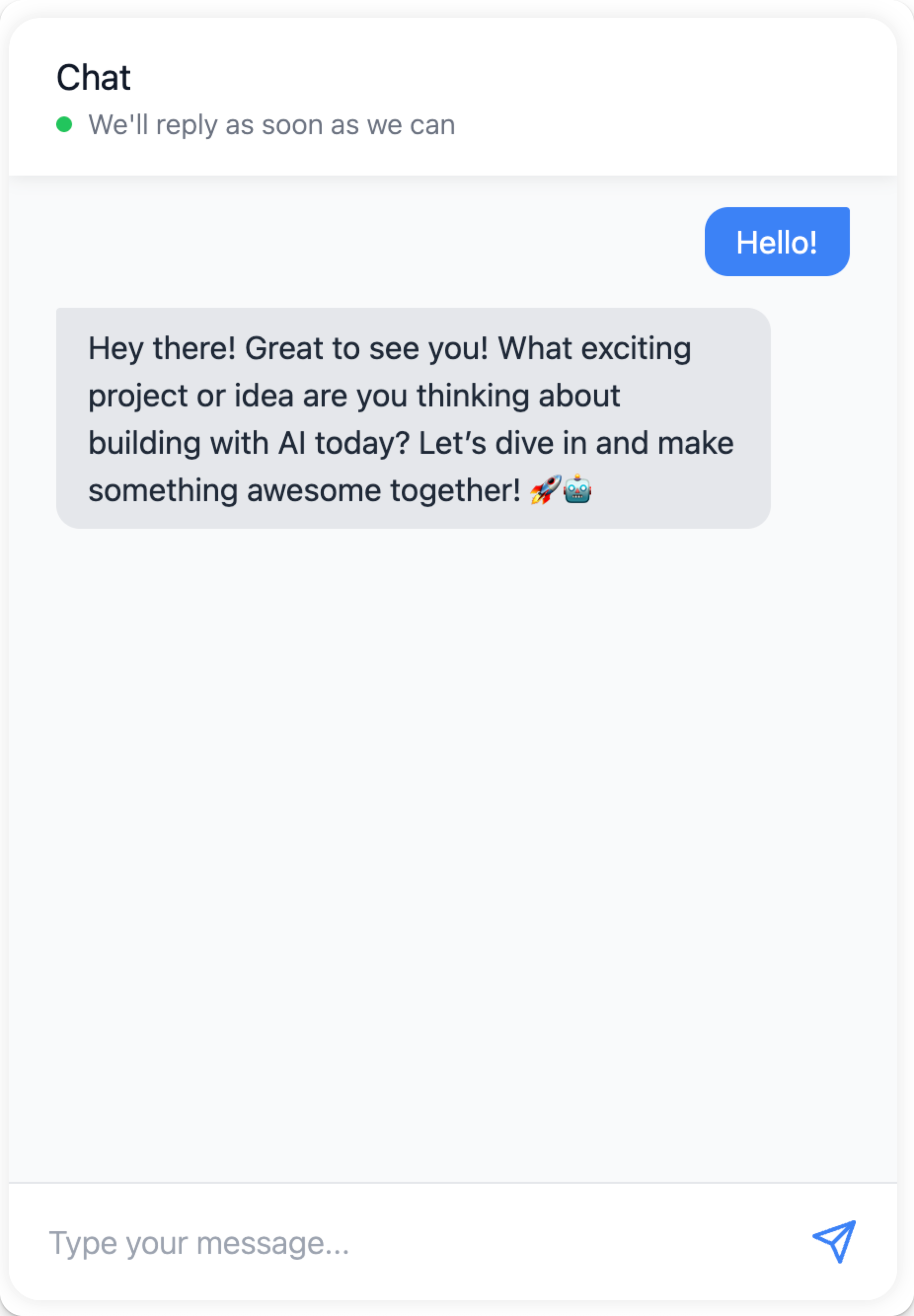
使用 AgentBuilder 嵌入式聊天 CodeSandbox 取得互動式即時示範,其中包含您自己的FLOW嵌入式聊天小工具。 如需詳細資訊,請參閱 langflow-embedded-chat README。
使用 React、Angular 或 HTML 嵌入聊天小工具
以下範例顯示如何在 React、Angular 和純 HTML 中使用嵌入式聊天小工具。
- React
- Angular
- HTML
要在您的 React 應用程式中使用聊天小工具,請建立一個載入小工具指令碼並呈現聊天介面的Components:
-
宣告您的網頁Components,然後將其封裝在 React Components中:
_21//Declaration of langflow-chat web component_21declare global {_21namespace JSX {_21interface IntrinsicElements {_21"langflow-chat": any;_21}_21}_21}_21_21//Definition for langflow-chat React component_21export default function ChatWidget({ className }) {_21return (_21<div className={className}>_21<langflow-chat_21host_url="https://c822-73-64-93-151.ngrok-free.app"_21flow_id="dcbed533-859f-4b99-b1f5-16fce884f28f"_21api_key="$LANGFLOW_API_KEY"_21></langflow-chat>_21</div>_21);_21} -
在您的程式碼中的任何位置放置Components以呈現聊天小工具。
在以下範例中,React 小工具Components位於
docs/src/components/ChatWidget/index.tsx,而index.tsx包含從 CDN 載入聊天小工具程式碼的指令碼,以及上述的宣告和定義:_38import React, { useEffect } from 'react';_38_38// Component to load the chat widget script_38const ChatScriptLoader = () => {_38useEffect(() => {_38if (!document.querySelector('script[src*="langflow-embedded-chat"]')) {_38const script = document.createElement('script');_38script.src = 'https://cdn.jsdelivr.net/gh/langflow-ai/langflow-embedded-chat@main/dist/build/static/js/bundle.min.js';_38script.async = true;_38document.body.appendChild(script);_38}_38}, []);_38_38return null;_38};_38_38//Declaration of langflow-chat web component_38declare global {_38namespace JSX {_38interface IntrinsicElements {_38"langflow-chat": any;_38}_38}_38}_38_38//Definition for langflow-chat React component_38export default function ChatWidget({ className }) {_38return (_38<div className={className}>_38<ChatScriptLoader />_38<langflow-chat_38host_url="https://c822-73-64-93-151.ngrok-free.app"_38flow_id="dcbed533-859f-4b99-b1f5-16fce884f28f"_38api_key="$LANGFLOW_API_KEY"_38></langflow-chat>_38</div>_38);_38} -
匯入
langflow-chatReact Components以使其可在頁面上使用。 使用您的 React Components名稱和路徑修改以下匯入語句:_10import ChatWidget from '@site/src/components/ChatWidget'; -
若要顯示小工具,請在頁面的所需位置呼叫您的
langflow-chatComponents。 使用您的 React Components名稱和所需的className修改以下參考:_10<ChatWidget className="my-chat-widget" />
要在您的 Angular 應用程式中使用聊天小工具,請建立一個載入小工具指令碼並呈現聊天介面的Components。
在 Angular 應用程式中,langflow-chat 是您必須在網站的 .components.ts 中明確允許的自訂網頁Components。
因此,若要使用嵌入式聊天小工具,您必須將 CUSTOM_ELEMENTS_SCHEMA 新增到模組的設定中,然後整合 <langflow-chat> 元素。
Angular 要求您明確允許自訂網頁Components,如 langflow-chat,在您的網站中。
因此,您必須將 <langflow-chat> 元素新增到您的 Angular 範本並設定 Angular 以辨識它。
您必須將 CUSTOM_ELEMENTS_SCHEMA 新增到模組的設定中才能啟用此功能。
-
在您的 Angular 應用程式中,編輯您要新增
langflow-chat網頁Components的.module.ts檔案。 -
在
.module.ts的頂部,從@angular/core匯入CUSTOM_ELEMENTS_SCHEMA:_10import { NgModule, CUSTOM_ELEMENTS_SCHEMA } from '@angular/core'; -
在
@NgModule裝飾器中,將CUSTOM_ELEMENTS_SCHEMA新增到schemas陣列:_16import { NgModule, CUSTOM_ELEMENTS_SCHEMA } from '@angular/core';_16import { BrowserModule } from '@angular/platform-browser';_16import { AppComponent } from './app.component';_16_16@NgModule({_16declarations: [_16AppComponent_16],_16imports: [_16BrowserModule_16],_16schemas: [CUSTOM_ELEMENTS_SCHEMA],_16providers: [],_16bootstrap: [AppComponent]_16})_16export class AppModule { } -
編輯您要使用嵌入式聊天小工具的
.component.ts檔案。 -
在
@Component裝飾器中,將<langflow-chat>元素新增到template鍵:_24import { Component } from '@angular/core';_24_24@Component({_24selector: 'app-root',_24template: `_24<div class="container">_24<h1>AgentBuilder Chat Test</h1>_24<langflow-chat_24host_url="https://c822-73-64-93-151.ngrok-free.app"_24flow_id="dcbed533-859f-4b99-b1f5-16fce884f28f"_24api_key="$LANGFLOW_API_KEY"_24></langflow-chat>_24</div>_24`,_24styles: [`_24.container {_24padding: 20px;_24text-align: center;_24}_24`]_24})_24export class AppComponent {_24title = 'AgentBuilder Chat Test';_24}
_12<html lang="en">_12<head>_12<script src="https://cdn.jsdelivr.net/gh/langflow-ai/langflow-embedded-chat@v1.0.7/dist/build/static/js/bundle.min.js"></script>_12</head>_12<body>_12<langflow-chat_12 host_url="https://c822-73-64-93-151.ngrok-free.app"_12 flow_id="dcbed533-859f-4b99-b1f5-16fce884f28f"_12 api_key="$LANGFLOW_API_KEY"_12 ></langflow-chat>_12</body>_12</html>
設定 langflow-chat 網頁Components
要在您的 HTML 中使用嵌入式聊天小工具,langflow-chat 網頁Components必須包含以下最小輸入(在 React 中也稱為 props):
host_url:您的 AgentBuilder 伺服器 URL。必須是HTTPS。不要包含結尾斜槓 (/)。flow_id:您要嵌入的FLOW ID。api_key:一個 AgentBuilder API 金鑰。 建議使用此屬性以確保小工具有權限執行FLOW。
最小輸入會自動填入 AgentBuilder 產生的 嵌入到網站 程式碼片段 中。
您可以使用其他輸入(props)來修改嵌入式聊天小工具。 如需所有 props、類型和描述的清單,請參閱 langflow-embedded-chat README。
範例:AgentBuilder API 金鑰屬性
api_key 屬性儲存 AgentBuilder API 金鑰,聊天小工具可以用它來驗證基礎 AgentBuilder API 請求。
AgentBuilder 團隊建議遵循處理敏感憑證的業界最佳實務。 例如,安全地儲存您的 API 金鑰,然後使用環境變數擷取:
_10<langflow-chat_10 host_url="https://c822-73-64-93-151.ngrok-free.app"_10 flow_id="dcbed533-859f-4b99-b1f5-16fce884f28f"_10 api_key="$LANGFLOW_API_KEY"_10></langflow-chat>
範例:樣式屬性
有許多屬性可用來自訂嵌入式聊天小工具的樣式和定位。
其中許多屬性的類型為 JSON,並且根據您嵌入 langflow-chat 網頁Components的位置,需要特定的格式。
在 React 和純 HTML 中,JSON 屬性表示為 JSON 物件或字串化 JSON,例如 \{"key":"value"\}:
_17<langflow-chat_17 host_url="https://c822-73-64-93-151.ngrok-free.app"_17 flow_id="dcbed533-859f-4b99-b1f5-16fce884f28f"_17 api_key="$LANGFLOW_API_KEY"_17 chat_window_style='{_17 "backgroundColor": "#1a0d0d",_17 "border": "4px solid #b30000",_17 "borderRadius": "16px",_17 "boxShadow": "0 8px 32px #b30000",_17 "color": "#fff",_17 "fontFamily": "Georgia, serif",_17 "padding": "16px"_17 }'_17 window_title="Custom Styled Chat"_17 height="600"_17 width="400"_17></langflow-chat>
對於 Angular 應用程式,使用 屬性繫結語法 將 JSON 屬性作為 JavaScript 物件傳遞。 例如:
_30import { Component } from '@angular/core';_30_30@Component({_30 selector: 'app-root',_30 template: `_30 <div class="container">_30 <h1>Langflow Chat Test</h1>_30 <langflow-chat_30 host_url="https://c822-73-64-93-151.ngrok-free.app"_30 flow_id="dcbed533-859f-4b99-b1f5-16fce884f28f"_30 api_key="$LANGFLOW_API_KEY"_30 [chat_window_style]='{"backgroundColor": "#ffffff"}'_30 [bot_message_style]='{"color": "#000000"}'_30 [user_message_style]='{"color": "#000000"}'_30 height="600"_30 width="400"_30 chat_position="bottom-right"_30 ></langflow-chat>_30 </div>_30 `,_30 styles: [`_30 .container {_30 padding: 20px;_30 text-align: center;_30 }_30 `]_30})_30export class AppComponent {_30 title = 'Langflow Chat Test';_30}
範例:工作階段 ID 屬性
以下範例為嵌入式聊天小工具啟動的FLOW執行新增自訂 工作階段 ID,以幫助識別:
_10<langflow-chat_10 host_url="https://c822-73-64-93-151.ngrok-free.app"_10 flow_id="dcbed533-859f-4b99-b1f5-16fce884f28f"_10 api_key="$LANGFLOW_API_KEY"_10 session_id="$SESSION_ID"_10></langflow-chat>
範例:Tweaks 屬性
使用 tweaks 屬性在執行時修改FLOW參數。
tweaks 物件的可用鍵取決於您透過嵌入式聊天小工具提供的FLOW。
在 React 和純 HTML 中,tweaks 宣告為 JSON 物件,類似於您將它們傳遞給 AgentBuilder API 端點的方式,例如 /v1/run/$FLOW_ID。
例如:
_10<langflow-chat_10 host_url="https://c822-73-64-93-151.ngrok-free.app"_10 flow_id="dcbed533-859f-4b99-b1f5-16fce884f28f"_10 api_key="$LANGFLOW_API_KEY"_10 tweaks='{_10 "model_name": "llama-3.1-8b-instant"_10 }'_10></langflow-chat>
對於 Angular 應用程式,使用 屬性繫結語法 將 JSON 屬性作為 JavaScript 物件傳遞。 例如:
_25import { Component } from '@angular/core';_25_25@Component({_25 selector: 'app-root',_25 template: `_25 <div class="container">_25 <h1>Langflow Chat Test</h1>_25 <langflow-chat_25 host_url="https://c822-73-64-93-151.ngrok-free.app"_25 flow_id="dcbed533-859f-4b99-b1f5-16fce884f28f"_25 api_key="$LANGFLOW_API_KEY"_25 [tweaks]='{"model_name": "llama-3.1-8b-instant"}'_25 ></langflow-chat>_25 </div>_25 `,_25 styles: [`_25 .container {_25 padding: 20px;_25 text-align: center;_25 }_25 `]_25})_25export class AppComponent {_25 title = 'Langflow Chat Test';_25}
透過 AgentBuilder MCP 伺服器提供 Flow
每個 AgentBuilder 專案 都有一個 MCP 伺服器,將專案的 Flow 公開為 工具,MCP 客戶端 可以用它們來產生回應。
除了透過 AgentBuilder MCP 伺服器提供 Flow 之外,您還可以使用 AgentBuilder 作為 MCP 客戶端來存取任何 MCP 伺服器,包括您的 AgentBuilder MCP 伺服器。
與 AgentBuilder MCP 伺服器的互動透過 AgentBuilder API 的 /mcp 端點進行。
如需詳細資訊,請參閱 將 AgentBuilder 用作 MCP 伺服器 和 將 AgentBuilder 用作 MCP 客戶端。
使用 OpenAI Responses 相容端點執行 Flow
AgentBuilder 在 /api/v1/responses 包含一個 OpenAI Responses API 相容端點,讓您能夠以最小的修改使用現有的 OpenAI 客戶端程式庫和程式碼。
如需詳細資訊,請參閱 OpenAI Responses API。
