建立可以擷取檔案的聊天機器人
本教學示範如何建構一個可以讀取並回答您上傳檔案問題的聊天機器人,例如會議筆記或求職申請。
例如,您可以上傳一份合約並詢問,「此協議中的終止條款是什麼?」或上傳一份簡歷並詢問,「此候選人是否有行銷分析經驗?」
本教學的主要重點是示範如何將檔案作為輸入提供給 AgentBuilder Flow,以便您的聊天機器人可以在其回應中使用這些檔案的內容。
先決條件
- 運行中的 AgentBuilder 伺服器
- 建立 AgentBuilder API 金鑰
- 建立 OpenAI API 金鑰
本教學使用 OpenAI LLM。如果您想使用不同的提供者,您需要該提供者的有效憑證。
建立接受檔案輸入的 Flow
要擷取檔案,您的 Flow 必須有一個 File Components連接到接收輸入的Components,例如 Prompt Template 或 Agent Components。
以下步驟修改 Basic Prompting 範本以接受檔案輸入:
-
在 AgentBuilder 中,點擊 New Flow,然後選取 Basic Prompting 範本。
-
在 Language Model Components中,輸入您的 OpenAI API 金鑰。
如果您想使用不同的提供者或模型,請相應編輯 Model Provider、Model Name 和 API Key 欄位。
-
要驗證您的 API 金鑰是否有效,點擊 Playground,然後向 LLM 詢問一個問題。 LLM 應該根據 Prompt Template Components的 Template 欄位中的規格回應。
-
退出 Playground,然後修改 Prompt Template Components以除了聊天輸入外還接受檔案輸入。 要執行此操作,請編輯 Template 欄位,然後將預設提示替換為以下文字:
_10ChatInput:_10{chat-input}_10File:_10{file}tip您可以使用任何字串來命名您的範本變數。 這些字串成為 Prompt Template Components上的欄位(輸入連接埠)的名稱。
在本教學中,變數以連接到它們的Components命名:chat-input 用於 Chat Input Components,file 用於 File Components。
-
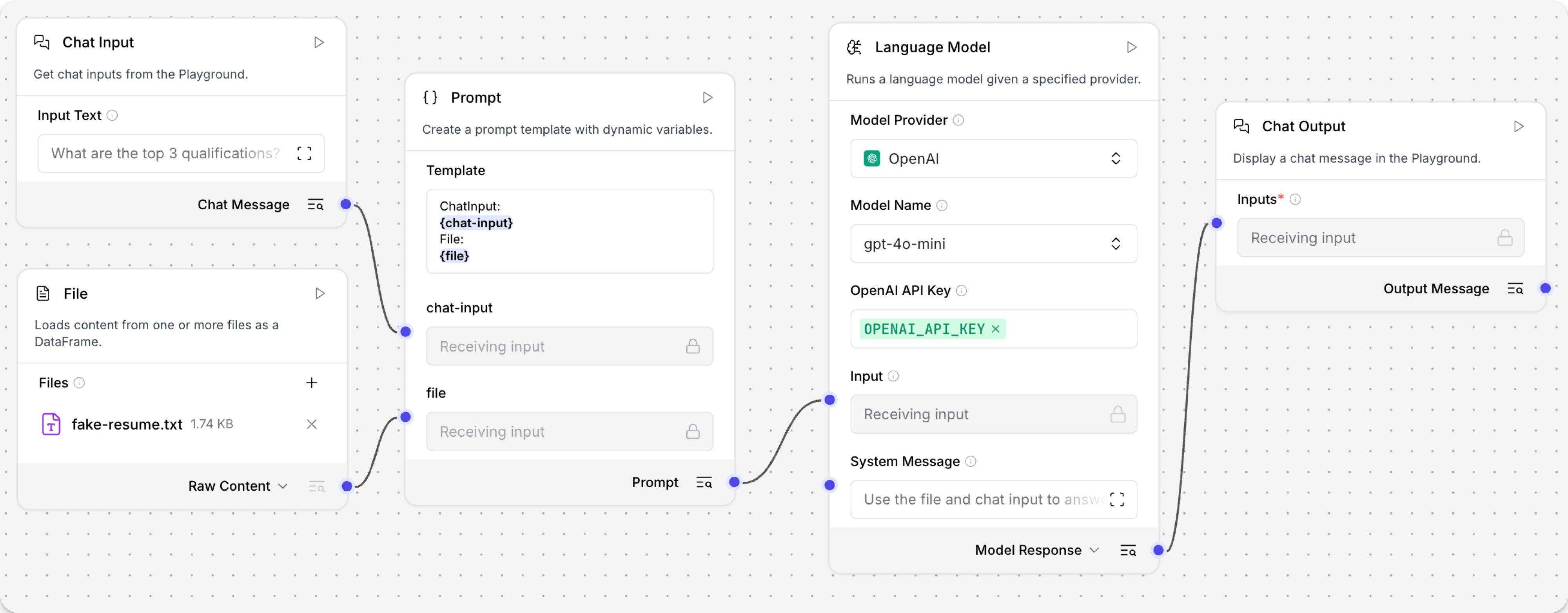
將 File Components 新增到 Flow,然後將 Raw Content 輸出連接埠連接到 Prompt Template Components的 file 輸入連接埠。 要連接連接埠,請從一個連接埠點擊並拖曳到另一個。
您可以在執行 Flow 之前將檔案直接新增到 File Components以預載輸入,或者您可以在執行時載入檔案。本教學的下一節涵蓋執行時檔案上傳。
此時您的 Flow 有五個Components。Chat Input 和 File Components連接到 Prompt Template Components的輸入連接埠。然後,Prompt Template Components的輸出連接埠連接到 Language Model Components的輸入連接埠。最後,Language Model Components的輸出連接埠連接到 Chat Output Components,它將最終回應返回給使用者。
從 Python 應用程式向您的 Flow 傳送請求
本教學的這一節演示如何從應用程式向 Flow 傳送檔案輸入。
要執行此操作,您的應用程式必須將包含您要上傳的檔案和文字提示的 POST /run 請求傳送到您的 AgentBuilder 伺服器。
結果包括 Flow 執行的結果和 LLM 的回應。
此範例使用本地 AgentBuilder 實例,並要求 LLM 評估範例簡歷。 如果您手邊沒有簡歷,您可以下載 fake-resume.txt。
有關在 Python、JavaScript 和 curl 中建構檔案上傳請求的幫助,請參閱 AgentBuilder File Upload Utility。
-
要建構請求,請收集以下資訊:
AGENTBUILDER_SERVER_ADDRESS:您的 AgentBuilder 伺服器的網域。預設值是127.0.0.1:7860。您可以從FLOW的 API access 窗格 上的程式碼片段獲取此值。FLOW_ID:您的 Flow 的 UUID 或自訂 EndPoint 名稱。您可以從 Flow 的 API access 窗格 上的程式碼片段獲取此值。FILE_COMPONENT_ID:您的 Flow 中 File Components的 UUID,例如File-KZP68。要尋找Components ID,請在 AgentBuilder 中開啟您的 Flow,點擊 File Components,然後點擊 Controls。Components ID 位於 Controls 窗格的頂部。CHAT_INPUT:您要傳送到 Flow 的 Chat Input 的訊息,例如Evaluate this resume for a job opening in my Marketing department.FILE_NAME和FILE_PATH:您要傳送到FLOW的本地檔案的名稱和路徑。AGENTBUILDER_API_KEY:有效的 AgentBuilder API 金鑰。
-
將以下腳本複製到 Python 檔案中,然後將佔位符替換為您在上一步收集的資訊:
_51# Python example using requests_51import requests_51import json_51_51# 1. Set the upload URL_51url = "http://AGENTBUILDER_SERVER_ADDRESS/api/v2/files/"_51_51# 2. Prepare the file and payload_51payload = {}_51files = [_51('file', ('FILE_PATH', open('FILE_NAME', 'rb'), 'application/octet-stream'))_51]_51headers = {_51'Accept': 'application/json',_51'x-api-key': 'AGENTBUILDER_API_KEY'_51}_51_51# 3. Upload the file to AgentBuilder_51response = requests.request("POST", url, headers=headers, data=payload, files=files)_51print(response.text)_51_51# 4. Get the uploaded file path from the response_51uploaded_data = response.json()_51uploaded_path = uploaded_data.get('path')_51_51# 5. Call the AgentBuilder run endpoint with the uploaded file path_51run_url = "http://AGENTBUILDER_SERVER_ADDRESS/api/v1/run/FLOW_ID"_51run_payload = {_51"input_value": "CHAT_INPUT",_51"output_type": "chat",_51"input_type": "chat",_51"tweaks": {_51"FILE_COMPONENT_ID": {_51"path": uploaded_path_51}_51}_51}_51run_headers = {_51'Content-Type': 'application/json',_51'Accept': 'application/json',_51'x-api-key': 'AGENTBUILDER_API_KEY'_51}_51run_response = requests.post(run_url, headers=run_headers, data=json.dumps(run_payload))_51AgentBuilder_data = run_response.json()_51# Output only the message_51message = None_51try:_51message = AgentBuilder_data['outputs'][0]['outputs'][0]['results']['message']['data']['text']_51except (KeyError, IndexError, TypeError):_51pass_51print(message)此腳本包含兩個請求。
第一個請求將檔案(例如
fake-resume.txt)上傳到您的 AgentBuilder 伺服器的/v2/filesEndPoint。此請求返回一個檔案路徑,可以在後續 AgentBuilder 請求中引用,例如02791d46-812f-4988-ab1c-7c430214f8d5/fake-resume.txt第二個請求將聊天訊息傳送到 AgentBuilder Flow 的
/v1/run/EndPoint。tweaks參數包含上傳檔案的路徑作為變數uploaded_path,並將此檔案直接傳送到 File Components。 -
儲存並執行腳本以傳送請求並測試 Flow。
初始輸出包含來自檔案上傳 EndPoint 的 JSON 回應物件,包括 AgentBuilder 儲存檔案的內部路徑。 然後,LLM 檢索檔案並評估其內容,在此情況下是簡歷對職位的適合性。
結果
以下是本教學 Flow 的範例回應。由於 LLM 的性質和您的輸入變化,您的回應可能不同。
_23{"id":"793ba3d8-5e7a-4499-8b89-d9a7b6325fee","name":"fake-resume (1)","path":"02791d46-812f-4988-ab1c-7c430214f8d5/fake-resume.txt","size":1779,"provider":null}_23The resume for Emily J. Wilson presents a strong candidate for a position in your Marketing department. Here are some key points to consider:_23_23### Strengths:_231. **Experience**: With over 8 years in marketing, Emily has held progressively responsible positions, culminating in her current role as Marketing Director. This indicates a solid foundation in the field._23_232. **Quantifiable Achievements**: The resume highlights specific accomplishments, such as a 25% increase in brand recognition and a 30% sales increase after launching new product lines. These metrics demonstrate her ability to drive results._23_233. **Diverse Skill Set**: Emily's skills encompass various aspects of marketing, including strategy development, team management, social media marketing, event planning, and data analysis. This versatility can be beneficial in a dynamic marketing environment._23_234. **Educational Background**: Her MBA and a Bachelor's degree in Marketing provide a strong academic foundation, which is often valued in marketing roles._23_235. **Certifications**: The Certified Marketing Professional (CMP) and Google Analytics Certification indicate a commitment to professional development and staying current with industry standards._23_23### Areas for Improvement:_231. **Specificity in Skills**: While the skills listed are relevant, providing examples of how she has applied these skills in her previous roles could strengthen her resume further._23_232. **References**: While stating that references are available upon request is standard, including a couple of testimonials or notable endorsements could enhance credibility._23_233. **Formatting**: Ensure that the resume is visually appealing and easy to read. Clear headings and bullet points help in quickly identifying key information._23_23### Conclusion:_23Overall, Emily J. Wilson's resume reflects a well-rounded marketing professional with a proven track record of success. If her experience aligns with the specific needs of your Marketing department, she could be a valuable addition to your team. Consider inviting her for an interview to further assess her fit for the role.
下一步
要繼續建構本教學,請嘗試這些下一步。
在執行時處理多個載入的檔案
要在單一 Flow 執行中處理多個檔案,請為每個要擷取的檔案新增一個單獨的 File Components。然後,修改您的腳本以上傳每個檔案、檢索每個返回的檔案路徑,然後將唯一的檔案路徑傳遞給每個 File Components ID。
例如,您可以修改 tweaks 以接受多個 File Components。
以下程式碼只是範例;它不是工作程式碼:
_13## set multiple file paths_13file_paths = {_13 FILE_COMPONENT_1: uploaded_path_1,_13 FILE_COMPONENT_2: uploaded_path_2_13}_13_13def chat_with_flow(input_message, file_paths):_13 """Compare the contents of these two files."""_13 run_url = f"{AGENTBUILDER_SERVER_ADDRESS}/api/v1/run/{FLOW_ID}"_13 # Prepare tweaks with both file paths_13 tweaks = {}_13 for component_id, file_path in file_paths.items():_13 tweaks[component_id] = {"path": file_path}
您也可以使用 Directory Components 載入目錄中的所有檔案,或將封存檔案傳遞給 File Components。
在執行時上傳外部檔案
要從不是您的本地環境的另一台機器上傳檔案,您的 AgentBuilder 伺服器必須首先可透過網際網路存取。然後,經過驗證的使用者可以將檔案上傳到您的公共 AgentBuilder 伺服器的 /v2/files/ EndPoint,如教學中所示。有關更多資訊,請參閱 AgentBuilder 部署概觀。
在聊天會話之外預載檔案
您可以在 Flow 中的任何地方使用 File Components載入檔案,而不僅僅是在聊天會話中。
在視覺編輯器中,您可以透過從您的本地機器選取檔案或 AgentBuilder 檔案管理 來預載檔案到 File Components。
例如,您可以為提示範本預載指示檔案,或者您可以預載向量儲存與您要在 Retrieval Augmented Generation (RAG) Flow 中查詢的文件。
有關 File Components和其他資料載入Components的更多資訊,請參閱 Data components。
先決條件
- 運行中的 AgentBuilder 伺服器
- 建立 AgentBuilder API 金鑰
- 建立 OpenAI API 金鑰
本教學使用 OpenAI LLM。如果您想使用不同的提供者,您需要該提供者的有效憑證。
建立接受檔案輸入的 Flow
要擷取檔案,您的 Flow 必須有一個 File Components連接到接收輸入的Components,例如 Prompt Template 或 Agent Components。
以下步驟修改 Basic Prompting 範本以接受檔案輸入:
-
在 AgentBuilder 中,點擊 New Flow,然後選取 Basic Prompting 範本。
-
在 Language Model Components中,輸入您的 OpenAI API 金鑰。
如果您想使用不同的提供者或模型,請相應編輯 Model Provider、Model Name 和 API Key 欄位。
-
要驗證您的 API 金鑰是否有效,點擊 Playground,然後向 LLM 詢問一個問題。 LLM 應該根據 Prompt Template Components的 Template 欄位中的規格回應。
-
退出 Playground,然後修改 Prompt Template Components以除了聊天輸入外還接受檔案輸入。 要執行此操作,請編輯 Template 欄位,然後將預設提示替換為以下文字:
_10ChatInput:_10{chat-input}_10File:_10{file}tip您可以使用任何字串來命名您的範本變數。 這些字串成為 Prompt Template Components上的欄位(輸入連接埠)的名稱。
在本教學中,變數以連接到它們的Components命名:chat-input 用於 Chat Input Components,file 用於 File Components。
-
將 File Components 新增到 Flow,然後將 Raw Content 輸出連接埠連接到 Prompt Template Components的 file 輸入連接埠。 要連接連接埠,請從一個連接埠點擊並拖曳到另一個。
您可以在執行 Flow 之前將檔案直接新增到 File Components以預載輸入,或者您可以在執行時載入檔案。本教學的下一節涵蓋執行時檔案上傳。
此時您的 Flow 有五個Components。Chat Input 和 File Components連接到 Prompt Template Components的輸入連接埠。然後,Prompt Template Components的輸出連接埠連接到 Language Model Components的輸入連接埠。最後,Language Model Components的輸出連接埠連接到 Chat Output Components,它將最終回應返回給使用者。
從 Python 應用程式向您的 Flow 傳送請求
本教學的這一節演示如何從應用程式向 Flow 傳送檔案輸入。
要執行此操作,您的應用程式必須將包含您要上傳的檔案和文字提示的 POST /run 請求傳送到您的 AgentBuilder 伺服器。
結果包括 Flow 執行的結果和 LLM 的回應。
此範例使用本地 AgentBuilder 實例,並要求 LLM 評估範例簡歷。 如果您手邊沒有簡歷,您可以下載 fake-resume.txt。
有關在 Python、JavaScript 和 curl 中建構檔案上傳請求的幫助,請參閱 AgentBuilder File Upload Utility。
-
要建構請求,請收集以下資訊:
AGENTBUILDER_SERVER_ADDRESS:您的 AgentBuilder 伺服器的網域。預設值是127.0.0.1:7860。您可以從FLOW的 API access 窗格 上的程式碼片段獲取此值。FLOW_ID:您的 Flow 的 UUID 或自訂 EndPoint 名稱。您可以從 Flow 的 API access 窗格 上的程式碼片段獲取此值。FILE_COMPONENT_ID:您的 Flow 中 File Components的 UUID,例如File-KZP68。要尋找Components ID,請在 AgentBuilder 中開啟您的 Flow,點擊 File Components,然後點擊 Controls。Components ID 位於 Controls 窗格的頂部。CHAT_INPUT:您要傳送到 Flow 的 Chat Input 的訊息,例如Evaluate this resume for a job opening in my Marketing department.FILE_NAME和FILE_PATH:您要傳送到FLOW的本地檔案的名稱和路徑。AGENTBUILDER_API_KEY:有效的 AgentBuilder API 金鑰。
-
將以下腳本複製到 Python 檔案中,然後將佔位符替換為您在上一步收集的資訊:
_51# Python example using requests_51import requests_51import json_51_51# 1. Set the upload URL_51url = "http://AGENTBUILDER_SERVER_ADDRESS/api/v2/files/"_51_51# 2. Prepare the file and payload_51payload = {}_51files = [_51('file', ('FILE_PATH', open('FILE_NAME', 'rb'), 'application/octet-stream'))_51]_51headers = {_51'Accept': 'application/json',_51'x-api-key': 'AGENTBUILDER_API_KEY'_51}_51_51# 3. Upload the file to AgentBuilder_51response = requests.request("POST", url, headers=headers, data=payload, files=files)_51print(response.text)_51_51# 4. Get the uploaded file path from the response_51uploaded_data = response.json()_51uploaded_path = uploaded_data.get('path')_51_51# 5. Call the AgentBuilder run endpoint with the uploaded file path_51run_url = "http://AGENTBUILDER_SERVER_ADDRESS/api/v1/run/FLOW_ID"_51run_payload = {_51"input_value": "CHAT_INPUT",_51"output_type": "chat",_51"input_type": "chat",_51"tweaks": {_51"FILE_COMPONENT_ID": {_51"path": uploaded_path_51}_51}_51}_51run_headers = {_51'Content-Type': 'application/json',_51'Accept': 'application/json',_51'x-api-key': 'AGENTBUILDER_API_KEY'_51}_51run_response = requests.post(run_url, headers=run_headers, data=json.dumps(run_payload))_51AgentBuilder_data = run_response.json()_51# Output only the message_51message = None_51try:_51message = AgentBuilder_data['outputs'][0]['outputs'][0]['results']['message']['data']['text']_51except (KeyError, IndexError, TypeError):_51pass_51print(message)此腳本包含兩個請求。
第一個請求將檔案(例如
fake-resume.txt)上傳到您的 AgentBuilder 伺服器的/v2/filesEndPoint。此請求返回一個檔案路徑,可以在後續 AgentBuilder 請求中引用,例如02791d46-812f-4988-ab1c-7c430214f8d5/fake-resume.txt第二個請求將聊天訊息傳送到 AgentBuilder Flow 的
/v1/run/EndPoint。tweaks參數包含上傳檔案的路徑作為變數uploaded_path,並將此檔案直接傳送到 File Components。 -
儲存並執行腳本以傳送請求並測試 Flow。
初始輸出包含來自檔案上傳 EndPoint 的 JSON 回應物件,包括 AgentBuilder 儲存檔案的內部路徑。 然後,LLM 檢索檔案並評估其內容,在此情況下是簡歷對職位的適合性。
結果
以下是本教學 Flow 的範例回應。由於 LLM 的性質和您的輸入變化,您的回應可能不同。
_23{"id":"793ba3d8-5e7a-4499-8b89-d9a7b6325fee","name":"fake-resume (1)","path":"02791d46-812f-4988-ab1c-7c430214f8d5/fake-resume.txt","size":1779,"provider":null}_23The resume for Emily J. Wilson presents a strong candidate for a position in your Marketing department. Here are some key points to consider:_23_23### Strengths:_231. **Experience**: With over 8 years in marketing, Emily has held progressively responsible positions, culminating in her current role as Marketing Director. This indicates a solid foundation in the field._23_232. **Quantifiable Achievements**: The resume highlights specific accomplishments, such as a 25% increase in brand recognition and a 30% sales increase after launching new product lines. These metrics demonstrate her ability to drive results._23_233. **Diverse Skill Set**: Emily's skills encompass various aspects of marketing, including strategy development, team management, social media marketing, event planning, and data analysis. This versatility can be beneficial in a dynamic marketing environment._23_234. **Educational Background**: Her MBA and a Bachelor's degree in Marketing provide a strong academic foundation, which is often valued in marketing roles._23_235. **Certifications**: The Certified Marketing Professional (CMP) and Google Analytics Certification indicate a commitment to professional development and staying current with industry standards._23_23### Areas for Improvement:_231. **Specificity in Skills**: While the skills listed are relevant, providing examples of how she has applied these skills in her previous roles could strengthen her resume further._23_232. **References**: While stating that references are available upon request is standard, including a couple of testimonials or notable endorsements could enhance credibility._23_233. **Formatting**: Ensure that the resume is visually appealing and easy to read. Clear headings and bullet points help in quickly identifying key information._23_23### Conclusion:_23Overall, Emily J. Wilson's resume reflects a well-rounded marketing professional with a proven track record of success. If her experience aligns with the specific needs of your Marketing department, she could be a valuable addition to your team. Consider inviting her for an interview to further assess her fit for the role.
下一步
要繼續建構本教學,請嘗試這些下一步。
在執行時處理多個載入的檔案
要在單一 Flow 執行中處理多個檔案,請為每個要擷取的檔案新增一個單獨的 File Components。然後,修改您的腳本以上傳每個檔案、檢索每個返回的檔案路徑,然後將唯一的檔案路徑傳遞給每個 File Components ID。
例如,您可以修改 tweaks 以接受多個 File Components。
以下程式碼只是範例;它不是工作程式碼:
_13## set multiple file paths_13file_paths = {_13 FILE_COMPONENT_1: uploaded_path_1,_13 FILE_COMPONENT_2: uploaded_path_2_13}_13_13def chat_with_flow(input_message, file_paths):_13 """Compare the contents of these two files."""_13 run_url = f"{AGENTBUILDER_SERVER_ADDRESS}/api/v1/run/{FLOW_ID}"_13 # Prepare tweaks with both file paths_13 tweaks = {}_13 for component_id, file_path in file_paths.items():_13 tweaks[component_id] = {"path": file_path}
您也可以使用 Directory Components 載入目錄中的所有檔案,或將封存檔案傳遞給 File Components。
在執行時上傳外部檔案
要從不是您的本地環境的另一台機器上傳檔案,您的 AgentBuilder 伺服器必須首先可透過網際網路存取。然後,經過驗證的使用者可以將檔案上傳到您的公共 AgentBuilder 伺服器的 /v2/files/ EndPoint,如教學中所示。有關更多資訊,請參閱 AgentBuilder 部署概觀。
在聊天會話之外預載檔案
您可以在 Flow 中的任何地方使用 File Components載入檔案,而不僅僅是在聊天會話中。
在視覺編輯器中,您可以透過從您的本地機器選取檔案或 AgentBuilder 檔案管理 來預載檔案到 File Components。
例如,您可以為提示範本預載指示檔案,或者您可以預載向量儲存與您要在 Retrieval Augmented Generation (RAG) Flow 中查詢的文件。
有關 File Components和其他資料載入Components的更多資訊,請參閱 Data components。
