建立向量 RAG 聊天機器人
本教學演示如何使用 AgentBuilder 建立一個聊天機器人應用程式,使用 Retrieval Augmented Generation (RAG) 將您的資料作為向量嵌入向量資料庫,然後與資料聊天。
先決條件
- 運行中的 AgentBuilder 伺服器
- 建立 AgentBuilder API 金鑰
- 建立 OpenAI API 金鑰
- 安裝 AgentBuilder JavaScript 客戶端
- 熟悉向量搜尋概念和應用程式,例如向量資料庫和 RAG
建立向量 RAG Flow
-
在 AgentBuilder 中,點擊 New Flow,然後選取 Vector Store RAG 範本。
關於 Vector Store RAG 範本
此範本有兩個 Flow。
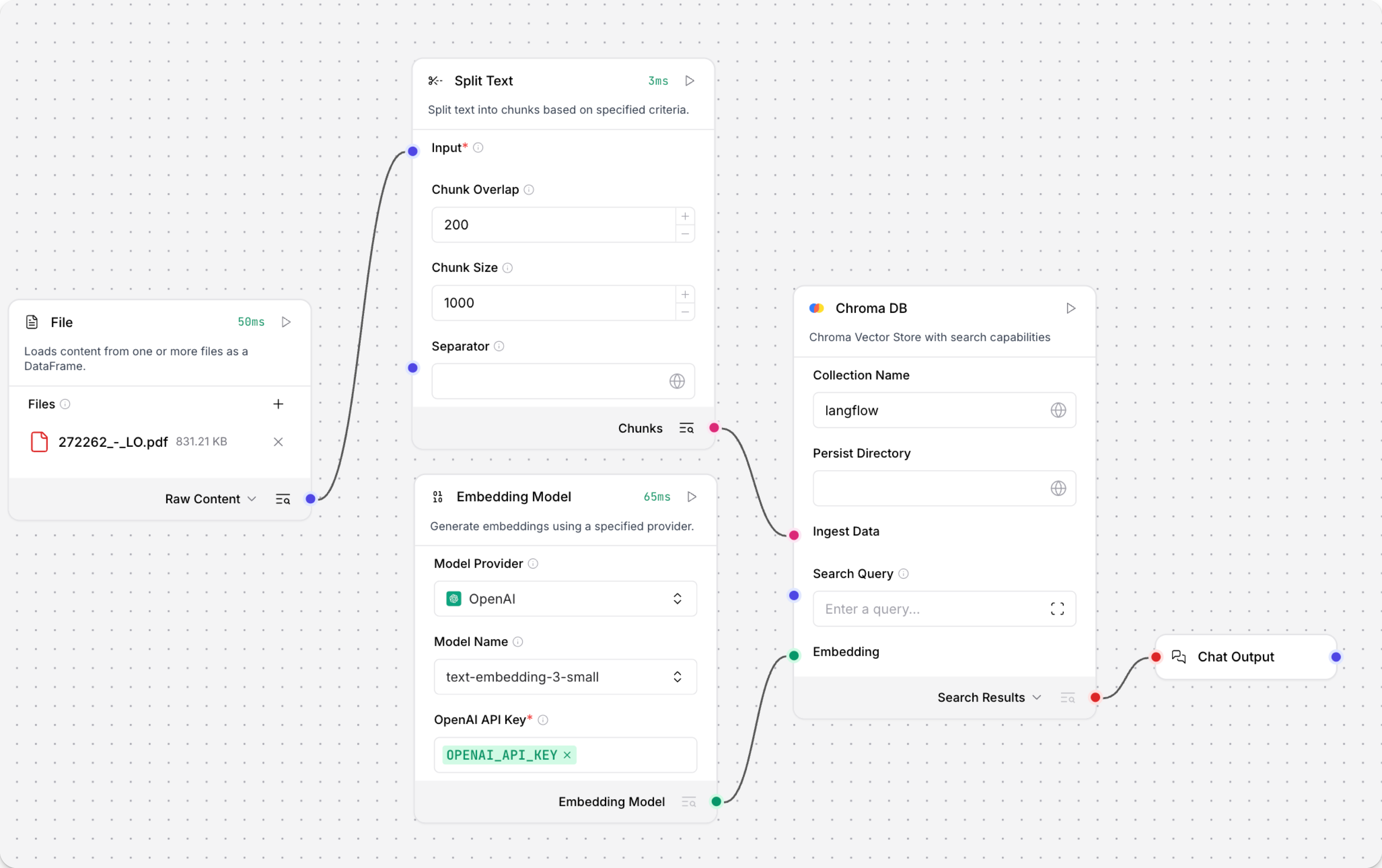
Load Data Flow 使用來自檔案的資料填充向量儲存。 此資料用於回應提交到 Retriever Flow 的查詢。
具體來說,Load Data Flow 從本地檔案擷取資料,將資料分割成區塊,在您的向量資料庫中載入和索引資料,然後為區塊計算嵌入。嵌入也與載入的資料一起儲存。此 Flow 只需要在您需要將資料載入向量資料庫時執行。
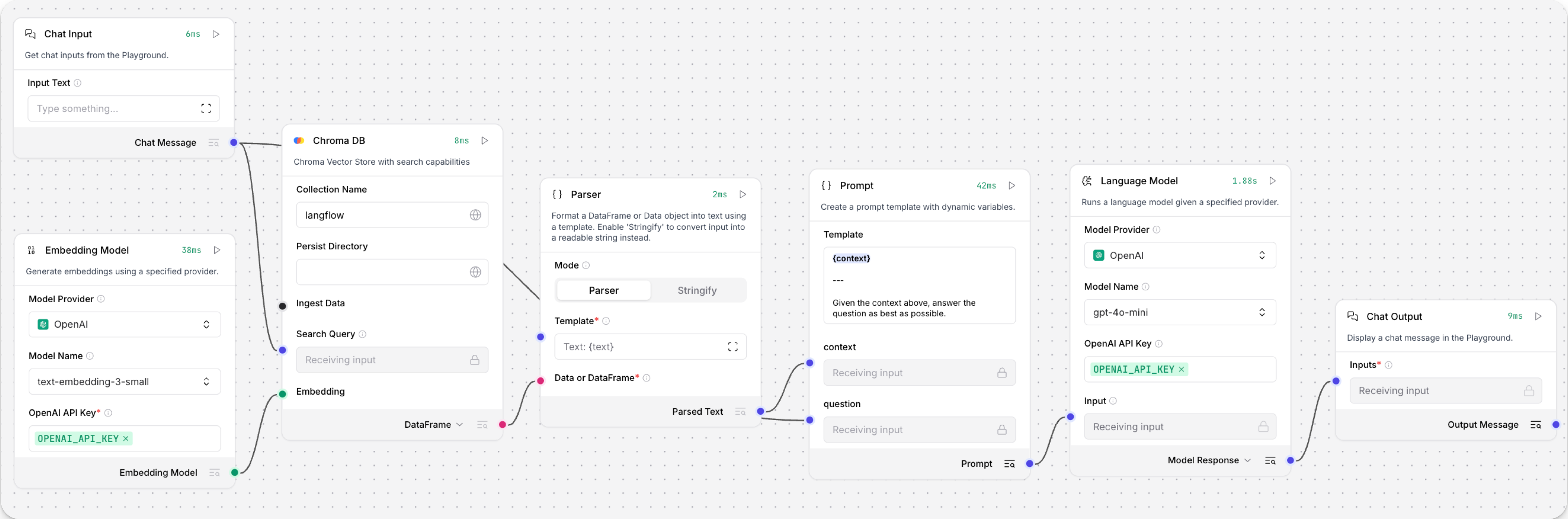
Retriever Flow 接收聊天輸入,為輸入生成嵌入,然後使用多個Components將區塊重建為文字,並透過比較新嵌入與儲存的嵌入來尋找相似資料來生成回應。
-
將您的 OpenAI API 金鑰新增到兩個 OpenAI Embeddings Components。
-
可選:將兩個 Astra DB 向量儲存Components替換為 Chroma DB 或您選擇的另一個向量儲存Components。 本教學使用 Chroma DB。
Load Data Flow 應該有 File、Split Text、Embedding Model、向量儲存(例如 Chroma DB)和 Chat Output Components:
Retriever Flow 應該有 Chat Input、Embedding Model、向量儲存、Parser、Prompt、Language Model 和 Chat Output Components:
Flow 已準備好使用。 繼續教學以學習如何使用載入 Flow 將資料載入您的向量儲存,然後在聊天機器人應用程式中呼叫聊天 Flow。
載入資料並生成嵌入
要載入資料並生成嵌入,您可以使用視覺編輯器或 /v2/files EndPoint。
視覺編輯器選項更簡單,但它只推薦用於建立 Flow 的使用者與載入資料到資料庫的使用者相同的情況。
在許多使用者載入資料或您需要以程式設計方式載入資料的情況下,使用 AgentBuilder API 選項。
- 視覺編輯器
- AgentBuilder API
- 在您的 RAG 聊天機器人 Flow 中,點擊 File Components,然後點擊 File。
- 選取您要上傳的本地檔案,然後點擊 Open。 檔案被載入到您的 AgentBuilder 伺服器。
- 要將資料載入您的向量資料庫,點擊向量儲存Components,然後點擊 Run component 以執行選取的Components和所有先前的依賴Components。
要以程式設計方式載入資料,請使用 /v2/files/ 和 /v1/run/$FLOW_ID EndPoint。第一個 EndPoint 將檔案載入到您的 AgentBuilder 伺服器,然後返回上傳的檔案路徑。第二個 EndPoint 執行 Load Data Flow,引用上傳的檔案路徑,以將資料區塊化、嵌入並載入到向量儲存。
以下腳本演示此過程。 有關建立此腳本的幫助,請使用 AgentBuilder File Upload Utility。
_37// Node 18+ example using global fetch, FormData, and Blob_37import fs from 'fs/promises';_37_37// 1. Prepare the form data with the file to upload_37const fileBuffer = await fs.readFile('FILE_NAME');_37const data = new FormData();_37data.append('file', new Blob([fileBuffer]), 'FILE_NAME');_37const headers = { 'x-api-key': 'AGENTBUILDER_API_KEY' };_37_37// 2. Upload the file to AgentBuilder_37const uploadRes = await fetch('AGENTBUILDER_SERVER_ADDRESS/api/v2/files/', {_37 method: 'POST',_37 headers,_37 body: data_37});_37const uploadData = await uploadRes.json();_37const uploadedPath = uploadData.path;_37_37// 3. Call the AgentBuilder run endpoint with the uploaded file path_37const payload = {_37 input_value: "Analyze this file",_37 output_type: "chat",_37 input_type: "text",_37 tweaks: {_37 'FILE_COMPONENT_NAME': {_37 path: uploadedPath_37 }_37 }_37};_37const runRes = await fetch('AGENTBUILDER_SERVER_ADDRESS/api/v1/run/FLOW_ID', {_37 method: 'POST',_37 headers: { 'Content-Type': 'application/json', 'x-api-key': 'AGENTBUILDER_API_KEY' },_37 body: JSON.stringify(payload)_37});_37const AgentBuilderData = await runRes.json();_37// Output only the message_37console.log(AgentBuilderData.outputs?.[0]?.outputs?.[0]?.results?.message?.data?.text);
當 Flow 執行時, Flow 擷取選取的檔案,將資料區塊化,將資料載入向量儲存資料庫,然後為區塊生成嵌入,這些嵌入也儲存在向量儲存中。
您的資料庫現在包含具有向量嵌入的資料,LLM 可以將其用作上下文來回應查詢,如教學的下一節演示。
從 JavaScript 應用程式與您的 Flow 聊天
要與向量資料庫中的資料聊天,請建立一個以程式設計方式執行 Retriever Flow 的聊天機器人應用程式。
本教學使用 JavaScript 作為演示目的。
-
要建構聊天機器人,請收集以下資訊:
AGENTBUILDER_SERVER_ADDRESS:您的 AgentBuilder 伺服器的網域。預設值為127.0.0.1:7860。您可以從FLOW的 API access 窗格上的程式碼片段中獲取此值。FLOW_ID:您的 Flow 的 UUID 或自訂 EndPoint 名稱。您可以從 Flow 的 API access 窗格上的程式碼片段中獲取此值。AGENTBUILDER_API_KEY:有效的 AgentBuilder API 金鑰。
-
將以下腳本複製到 JavaScript 檔案中,然後將佔位符替換為您在上一步收集的資訊:
_49const readline = require('readline');_49const { AgentBuilderClient } = require('@datastax/AgentBuilder-client');_49_49const API_KEY = 'AGENTBUILDER_API_KEY';_49const SERVER = 'AGENTBUILDER_SERVER_ADDRESS';_49const FLOW_ID = 'FLOW_ID';_49_49const rl = readline.createInterface({ input: process.stdin, output: process.stdout });_49_49// Initialize the AgentBuilder client_49const client = new AgentBuilderClient({_49baseUrl: SERVER,_49apiKey: API_KEY_49});_49_49async function sendMessage(message) {_49try {_49const response = await client.flow(FLOW_ID).run(message, {_49session_id: 'user_1'_49});_49_49// Use the convenience method to get the chat output text_49return response.chatOutputText() || 'No response';_49} catch (error) {_49return `Error: ${error.message}`;_49}_49}_49_49function chat() {_49console.log('🤖 AgentBuilder RAG Chatbot (type "quit" to exit)\n');_49_49const ask = () => {_49rl.question('👤 You: ', async (input) => {_49if (['quit', 'exit', 'bye'].includes(input.trim().toLowerCase())) {_49console.log('👋 Goodbye!');_49rl.close();_49return;_49}_49_49const response = await sendMessage(input.trim());_49console.log(`🤖 Assistant: ${response}\n`);_49ask();_49});_49};_49_49ask();_49}_49_49chat();腳本建立一個 Node 應用程式,與向量資料庫中的內容聊天,使用
chat輸入和輸出類型與您的 Flow 通訊。 聊天會在多個訊息中維持持續的對話上下文。如果您使用text類型輸入和輸出,每個請求都是獨立的文字字串。tipAgentBuilder TypeScript 客戶端 有一個
chatOutputText()便利方法,可以簡化處理 AgentBuilder 的複雜 JSON 回應結構。 無需手動導航多層巢狀物件與data.outputs[0].outputs[0].results.message.data.text,客戶端會自動提取訊息文字並優雅地處理潛在未定義的值。 -
儲存並執行腳本以發送請求並測試 Flow。
Result
以下是本教學 Flow 的範例回應。由於 LLM 的性質和您的輸入變化,您的回應可能不同。
_10👤 You: Do you have any documents about engines?_10🤖 Assistant: Yes, the provided text contains several warnings and guidelines related to engine installation, maintenance, and selection. It emphasizes the importance of using the correct engine for specific applications, ensuring all components are in good condition, and following safety precautions to prevent fire or explosion. If you need more specific information or details, please let me know!_10_10👤 You: It should be about a Briggs and Stratton engine._10🤖 Assistant: The text provides important safety and installation guidelines for Briggs & Stratton engines. It emphasizes that these engines should not be used on 3-wheel All-Terrain Vehicles (ATVs), motor bikes, aircraft products, or vehicles intended for competitive events, as such uses are not approved by Briggs & Stratton._10_10If you have any specific questions about Briggs & Stratton engines or need further information, feel free to ask!
下一步
有關建構或擴展本教學的更多資訊,請參閱以下內容:
