將應用程式連接到 Agent
本教學示範如何將 JavaScript 應用程式連接到 AgentBuilder Agent。
使用 Agent,您的應用程式可以利用任何連接的工具來檢索更多上下文和及時資料,而無需變更任何應用程式程式碼。工具由 Agent 的內部 LLM 選取來解決問題和回答問題。
先決條件
- 運行中的 AgentBuilder 伺服器
- 建立 AgentBuilder API 金鑰
- 安裝 AgentBuilder JavaScript 客戶端
- 建立 OpenAI API 金鑰
本教學使用 OpenAI LLM。如果您想使用不同的提供者,您需要該提供者的有效憑證。
建立 Agent Flow
以下步驟修改 Simple Agent 範本,將 Directory Components 和 Web Search Components 作為 Agent Components的工具連接。 Directory Components從您的本地機器上的目標目錄載入所有給定類型的檔案,Web Search Components執行 DuckDuckGo 搜尋。 當作為工具連接到 Agent Components時,Agent 在處理請求時可以選擇使用這些Components。
-
在 AgentBuilder 中,點擊 New Flow,然後選取 Simple Agent 範本。
-
移除 URL 和 Calculator 工具,然後將 Directory 和 Web Search Components新增到您的FLOW。
-
在 Directory Components的 Path 欄位中,輸入您想要使 Agent Components可用的目錄路徑和檔案類型。
建立 Agent Flow
當作為工具連接到 Agent Components時,Agent 在處理請求時可以選擇使用這些Components。
在本教學中,Agent 需要存取客戶購買記錄,所以目錄名稱是 customer_orders,檔案類型是 .csv。在本教學的稍後部分,Agent 將被提示在客戶資料中尋找 email 值。
您可以調整教學以適合您的資料,或者,要跟隨教學,您可以下載 customer-orders.csv 並將其儲存在您本地機器上的 customer_orders 資料夾中。
-
在 Directory 和 Web Search Components的標頭選單 中,啟用 Tool Mode,以便您可以將Components與 Agent 一起使用。
-
將 Directory 和 Web Search Components的 Toolset 連接埠連接到 Agent Components的 Tools 連接埠。
-
在 Agent Components中,輸入您的 OpenAI API 金鑰。
如果您想使用不同的提供者或模型,請相應編輯 Model Provider、Model Name 和 API Key 欄位。
-
要測試FLOW,點擊 Playground,然後向 LLM 詢問一個問題,例如
Recommend 3 used items for carol.davis@example.com, based on previous orders.給定範例提示,LLM 會根據
customer_orders.csv中的先前訂單回應推薦和網路連結的項目。Playground 列印 Agent 的思考鏈,因為它選取要使用的工具並與這些工具提供的功能互動。 例如,Agent 可以使用 Directory Components的
as_dataframe工具來檢索 DataFrame,以及 Web Search Components的perform_search工具來尋找相關項目的連結。
將 Prompt Template Components新增到FLOW
在此範例中,應用程式將客戶的電子郵件地址傳送到 AgentBuilder Agent。Agent 比較客戶在 Directory Components中的先前訂單,在網路上搜尋這些項目的二手版本,並返回三個結果。
-
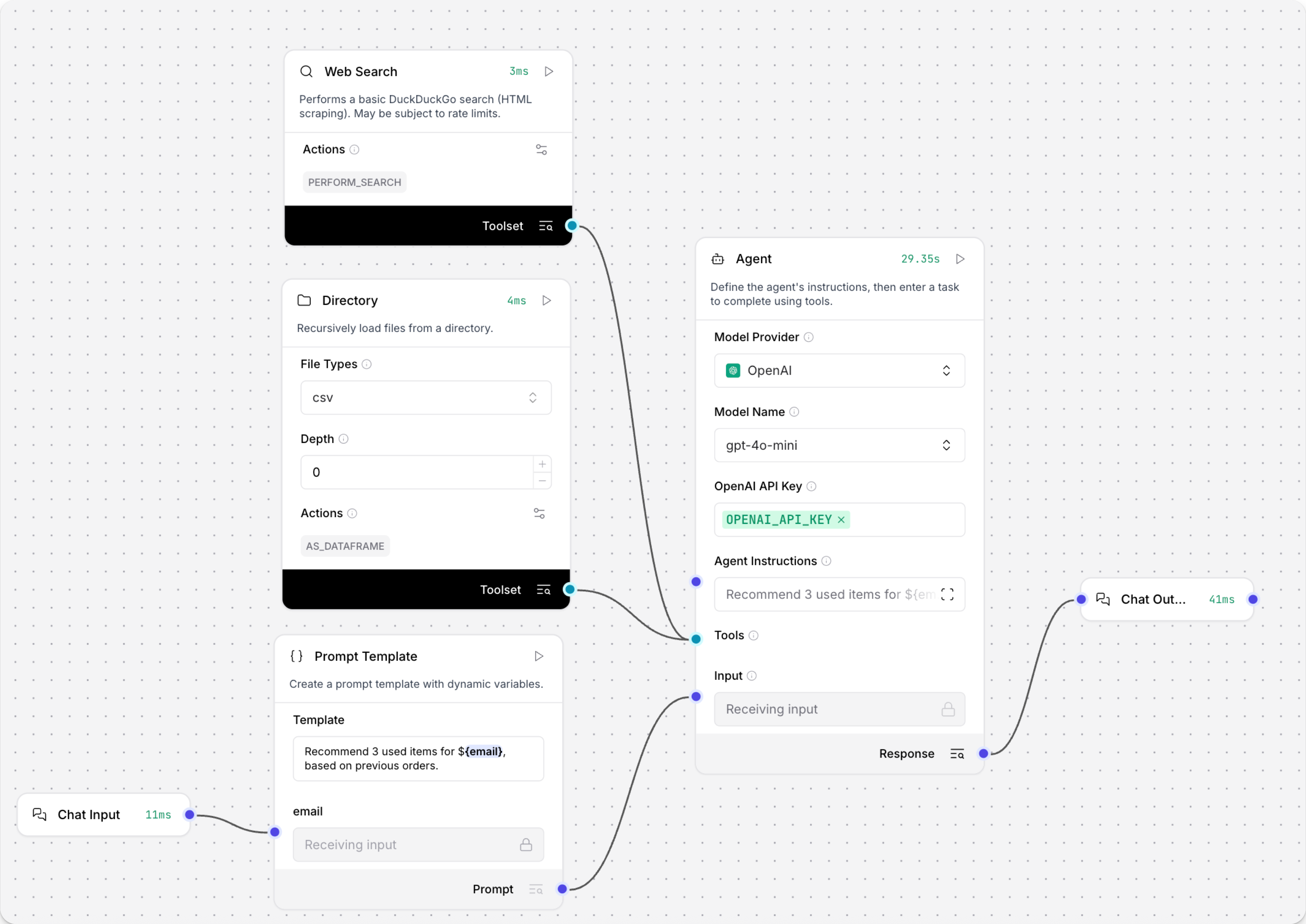
要將電子郵件地址作為值包含在您的FLOW中,請在 Chat Input 和 Agent Components之間將 Prompt Template Components 新增到您的FLOW。
-
在 Prompt Template Components的 Template 欄位中,輸入
Recommend 3 used items for {email}, based on previous orders.在花括號中新增{email}值會在 Prompt Template Components中建立新的輸入,並連接到{email}連接埠的Components提供該變數的值。 這為使用者的電子郵件建立一個進入FLOW的點從您的請求。 如果您沒有使用customer_orders.csv範例檔案,請修改輸入以搜尋您資料集中的值。此時您的FLOW有六個Components。Chat Input Components連接到 Prompt Template Components的 email 輸入連接埠。然後,Prompt Template Components的輸出連接到 Agent Components的 System Message 輸入連接埠。Directory 和 Web Search Components連接到 Agent Components的 Tools 連接埠。最後,Agent Components的輸出連接到 Chat Output Components,它將最終回應返回給應用程式。
從 JavaScript 應用程式向您的FLOW傳送請求
您的FLOW運作後,將其連接到 JavaScript 應用程式以使用 Agent 的回應。
-
要建構連接到您的FLOW的 JavaScript 應用程式,請收集以下資訊:
AGENTBUILDER_SERVER_ADDRESS:您的 AgentBuilder 伺服器的網域。預設值是127.0.0.1:7860。您可以從FLOW的 API access 窗格 上的程式碼片段獲取此值。FLOW_ID:您的FLOW的 UUID 或自訂 EndPoint 名稱。您可以從FLOW的 API access 窗格 上的程式碼片段獲取此值。AGENTBUILDER_API_KEY:有效的 AgentBuilder API 金鑰。
-
將以下腳本複製到 JavaScript 檔案中,然後將佔位符替換為您在上一步收集的資訊。 如果您使用
customer_orders.csv範例檔案,您可以使用範例電子郵件地址按原樣執行此範例。 如果沒有,請修改const email = "isabella.rodriguez@example.com"以搜尋您資料集中的值。_60import { AgentBuilderClient } from "@datastax/AgentBuilder-client";_60_60const AGENTBUILDER_SERVER_ADDRESS = 'AGENTBUILDER_SERVER_ADDRESS';_60const FLOW_ID = 'FLOW_ID';_60const AGENTBUILDER_API_KEY = 'AGENTBUILDER_API_KEY';_60const email = "isabella.rodriguez@example.com";_60_60async function runAgentFlow(): Promise<void> {_60try {_60// 初始化 AgentBuilder 客戶端_60const client = new AgentBuilderClient({_60baseUrl: AGENTBUILDER_SERVER_ADDRESS,_60apiKey: AGENTBUILDER_API_KEY_60});_60_60console.log(`連接到 AgentBuilder 伺服器於: ${AGENTBUILDER_SERVER_ADDRESS} `);_60console.log(`Flow ID: ${FLOW_ID}`);_60console.log(`Email: ${email}`);_60_60// 獲取FLOW實例_60const flow = client.flow(FLOW_ID);_60_60// 使用電子郵件作為輸入執行FLOW_60console.log('\n傳送請求到 Agent...');_60const response = await flow.run(email, {_60session_id: email // 使用電子郵件作為會話 ID 以提供上下文_60});_60_60console.log('\n=== 來自 AgentBuilder 的回應 ===');_60console.log('Session ID:', response.sessionId);_60_60// 從聊天訊息中提取 URL_60const chatMessage = response.chatOutputText();_60console.log('\n=== 來自聊天訊息的 URL ===');_60const messageUrls = chatMessage.match(/https?:\/\/[^\s"')\]]+/g) || [];_60const cleanMessageUrls = [...new Set(messageUrls)].map(url => url.trim());_60console.log('來自訊息的 URL:');_60cleanMessageUrls.slice(0, 3).forEach(url => console.log(url));_60_60} catch (error) {_60console.error('執行FLOW時發生錯誤:', error);_60_60// 提供錯誤訊息_60if (error instanceof Error) {_60if (error.message.includes('fetch')) {_60console.error('\n確保您的 AgentBuilder 伺服器正在執行並可在以下位置存取:', AGENTBUILDER_SERVER_ADDRESS);_60}_60if (error.message.includes('401') || error.message.includes('403')) {_60console.error('\n檢查您的 API 金鑰配置');_60}_60if (error.message.includes('404')) {_60console.error('\n檢查您的 Flow ID - 確保它存在且正確');_60}_60}_60}_60}_60_60// 執行函數_60console.log('啟動 AgentBuilder Agent...\n');_60runAgentFlow().catch(console.error); -
儲存並執行腳本以傳送請求並測試FLOW。
您的應用程式接收三個基於客戶在您的本地 CSV 中的先前訂單的推薦二手項目的 URL,所有這些都無需變更任何程式碼。
結果
以下是本教學FLOW的範例回應。由於 LLM 的性質和您的輸入變化,您的回應可能不同。
_15啟動 AgentBuilder Agent..._15_15連接到 AgentBuilder 伺服器於: http://localhost:7860_15Flow ID: local-db-search_15Email: isabella.rodriguez@example.com_15_15傳送請求到 Agent..._15_15=== 來自 AgentBuilder 的回應 ===_15Session ID: isabella.rodriguez@example.com_15_15URLs found:_15https://www.facebook.com/marketplace/258164108225783/electronics/_15https://www.facebook.com/marketplace/458332108944152/furniture/_15https://www.facebook.com/marketplace/613732137493719/kitchen-cabinets/ -
要快速檢查到您的FLOW的流量,請開啟 Playground。 新會話以使用者的電子郵件地址命名。 保持會話區分有助於 Agent 維持上下文。有關會話 ID 的更多資訊,請參閱 Session ID。
下一步
有關建構或擴充本教學的更多資訊,請參閱以下內容:
