資料
資料Components從各種來源將資料帶入您的 Flow,例如檔案、API 端點和 URL。 例如:
-
載入檔案:使用 File Components 和 Directory Components 從檔案或目錄匯入資料。
-
搜尋網路:使用如 News Search Components、RSS Reader Components、Web Search Components 和 URL Components 等Components從網路擷取資料。
-
進行 API 呼叫:使用 API Request Components 和 Webhook Components 使用 API 觸發FLOW或執行動作。
-
執行 SQL 查詢:使用 SQL Database Components 查詢 SQL 資料庫。
每個Components為擷取、處理和類型檢查執行不同的命令。 有些Components是您提供的命令的最小包裝器,而其他Components包括內建腳本,根據變數輸入擷取和處理資料。 此外,有些Components返回原始資料,而其他Components可以在輸出前轉換、重新結構化或驗證資料。 這意味著一些類似的Components可能產生不同的結果。
資料Components與可以執行額外解析、轉換和驗證的 處理Components 搭配良好。
這可以包括基本操作,如以特定格式儲存檔案,或更複雜的任務,如使用 Text Splitter Components將大型文件分解為較小的區塊,然後為向量搜尋生成嵌入。
在FLOW中使用資料Components
資料Components經常在FLOW中使用,因為它們提供執行常見功能的通用方式。
您可以使用這些Components在 Flow中作為隔離步驟執行其基礎功能,或將它們連接到 Agent Components作為工具。
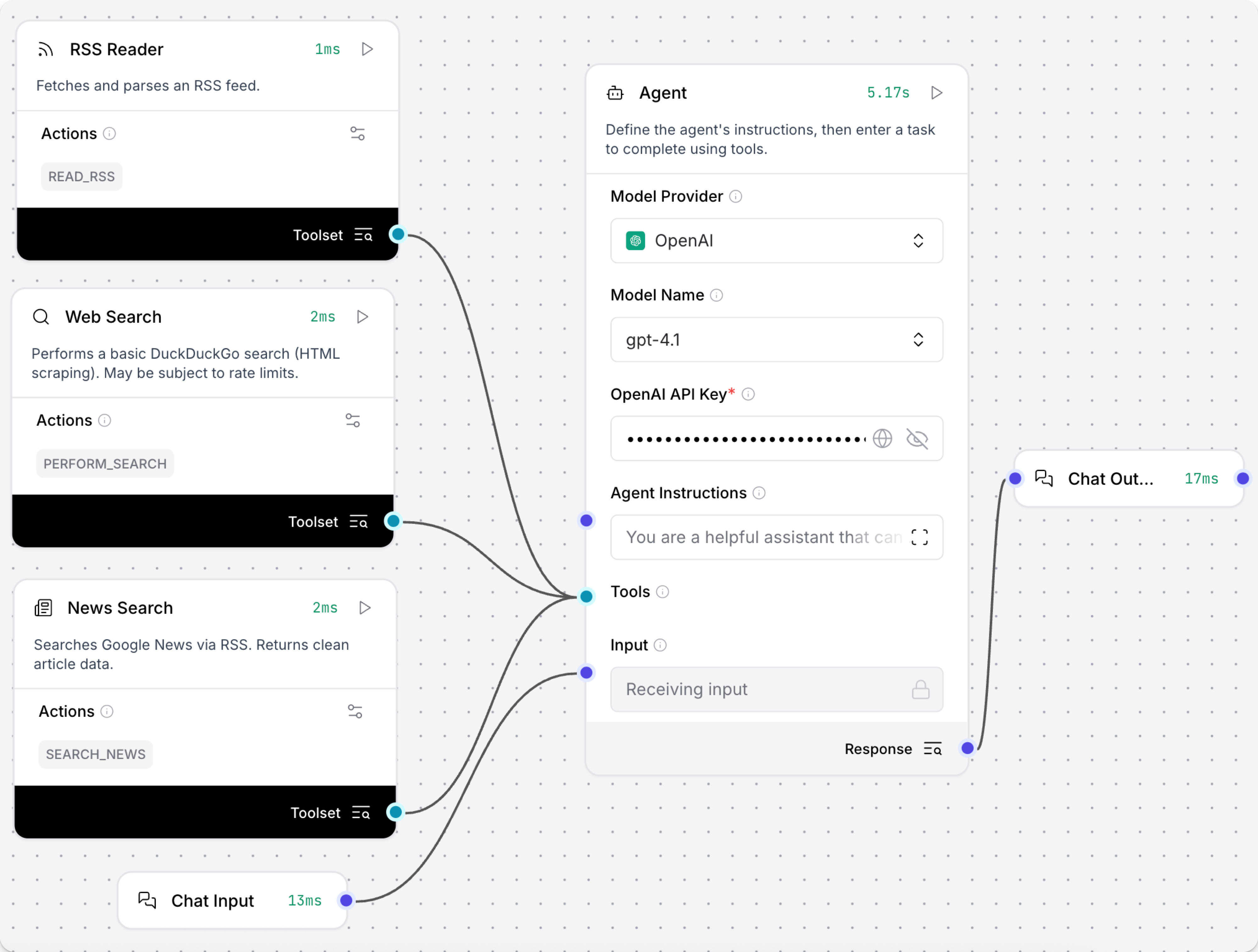
有關示例 Flow,請參閱以下內容:
-
建立可以擷取檔案的聊天機器人:學習如何使用 File Components將檔案載入作為聊天機器人的上下文。 檔案和使用者輸入都傳遞給 LLM,因此您可以詢問有關您上傳的檔案的問題。
-
建立向量 RAG 聊天機器人:學習如何擷取檔案以用於檢索增強生成 (RAG),然後設定可以將擷取的檔案用作上下文的聊天機器人。 本教學中的兩個FLOW準備檔案以用於 RAG,然後讓您的 LLM 使用向量搜尋在聊天會話期間擷取上下文相關資料。
-
為 Agent 配置工具:學習如何將任何Components用作 Agent 的工具。 當用作工具時,Agent 根據使用者的查詢自主決定何時呼叫Components。
-
使用 webhook 觸發FLOW:學習如何使用 Webhook Components回應外部事件觸發FLOW運行。
API Request
API Request Components使用 URL 或 curl 命令建構和發送 HTTP 請求:
- URL 模式:輸入一個或多個逗號分隔的 URL,然後為每個 URL 的請求選取方法。
- curl 模式:輸入要執行的 curl 命令。
您可以在Components的參數中啟用額外的請求選項和欄位。
返回包含回應的 Data 物件。
有關提供者特定的 API Components,請參閱 Bundles。
API Request 參數
某些參數在視覺編輯器中預設為隱藏。 您可以透過 Components的標頭選單 中的 Controls 修改所有參數。
| Name | Display Name | Info |
|---|---|---|
| mode | Mode | Input parameter. Set the mode to either URL or curl. |
| urls | URL | Input parameter. Enter one or more comma-separated URLs for the request. |
| curl | curl | Input parameter. curl mode only. Enter a complete curl command. Other component parameters are populated from the command arguments. |
| method | Method | Input parameter. The HTTP method to use. |
| query_params | Query Parameters | Input parameter. The query parameters to append to the URL. |
| body | Body | Input parameter. The body to send with POST, PATCH, and PUT requests as a dictionary. |
| headers | Headers | Input parameter. The headers to send with the request as a dictionary. |
| timeout | Timeout | Input parameter. The timeout to use for the request. |
| follow_redirects | Follow Redirects | Input parameter. Whether to follow HTTP redirects. The default is enabled (true). If disabled (false), HTTP redirects aren't followed. |
| save_to_file | Save to File | Input parameter. Whether to save the API response to a temporary file. Default: Disabled (false) |
| include_httpx_metadata | Include HTTPx Metadata | Input parameter. Whether to include properties such as headers, status_code, response_headers, and redirection_history in the output. Default: Disabled (false) |
Directory
Directory Components遞歸載入目錄中的檔案,並提供檔案類型、深度和並發選項。
檔案必須是支援的類型和大小才能載入。
Directory 參數
某些參數在視覺編輯器中預設為隱藏。 您可以透過 Components的標頭選單 中的 Controls 修改所有參數。
| Name | Type | Description |
|---|---|---|
| path | MessageTextInput | 輸入參數。載入檔案的目錄路徑。預設:目前目錄 (.) |
| types | MessageTextInput | 輸入參數。要載入的檔案類型。選取一個或多個,或留空以嘗試載入所有檔案。 |
| depth | IntInput | 輸入參數。搜尋檔案的深度。 |
| max_concurrency | IntInput | 輸入參數。載入多個檔案的最大並發數。 |
| load_hidden | BoolInput | 輸入參數。如果為 true,載入隱藏檔案。 |
| recursive | BoolInput | 輸入參數。如果為 true,搜尋是遞歸的。 |
| silent_errors | BoolInput | 輸入參數。如果為 true,錯誤不會引發例外。 |
| use_multithreading | BoolInput | 輸入參數。如果為 true,使用多執行緒。 |
File
File Components載入和解析檔案,將內容轉換為 Data、DataFrame 或 Message 物件。
它支援多種檔案類型,提供平行處理和錯誤處理的參數,並支援使用 Docling 程式庫進行進階解析。
您可以在視覺編輯器中或執行階段將檔案新增到 File Components,並且可以一次上傳多個檔案。 有關上傳檔案和在FLOW中使用檔案的更多資訊,請參閱檔案管理和建立可以擷取檔案的聊天機器人。
File type and size limits
預設情況下,最大檔案大小為 1024 MB。
要修改此值,請變更 LANGFLOW_MAX_FILE_SIZE_UPLOAD 環境變數。
Supported file types
File Components支援以下檔案類型。 使用封存和壓縮格式來綁定多個檔案,或使用 Directory Components 載入目錄中的所有檔案。
.bz2.csv.docx.gz.htm.html.json.js.md.mdx.pdf.py.sh.sql.tar.tgz.ts.tsx.txt.xml.yaml.yml.zip
如果您需要載入不支援的檔案類型,您必須使用支援該檔案類型且可能在 AgentBuilder 外部解析它的不同Components,或在上傳前將其轉換為支援的類型。
對於影像,請參閱上傳影像。
對於影片,請參閱 Twelve Labs 和 YouTube Bundles。
File 參數
某些參數在視覺編輯器中預設為隱藏。 您可以透過 Components的標頭選單 中的 Controls 修改所有參數。
| Name | Display Name | Info |
|---|---|---|
| path | Files | 輸入參數。要載入的檔案路徑。可以是本機或在 AgentBuilder 檔案管理 中。支援個別檔案和綁定封存。 |
| file_path | Server File Path | 輸入參數。具有指向 AgentBuilder 檔案管理 中檔案的 file_path 屬性的 Data 物件,或具有檔案路徑的 Message 物件。取代 Files (path) 但支援相同的檔案類型。 |
| separator | Separator | 輸入參數。在 Message 格式中多個輸出之間使用的分隔符。 |
| silent_errors | Silent Errors | 輸入參數。如果為 true,Components中的錯誤不會引發例外。預設:停用 (false)。 |
| delete_server_file_after_processing | Delete Server File After Processing | 輸入參數。如果為 true (預設),處理後刪除 Server File Path (file_path)。 |
| ignore_unsupported_extensions | Ignore Unsupported Extensions | 輸入參數。如果啟用 (true),具有不支援擴展名的檔案被接受但不處理。如果停用 (false),File Components可能會在提供不支援的檔案類型時拋出錯誤。預設為 true。 |
| ignore_unspecified_files | Ignore Unspecified Files | 輸入參數。如果為 true,沒有 file_path 屬性的 Data 被忽略。如果為 false (預設),當未指定檔案時Components會出錯。 |
| concurrency_multithreading | Processing Concurrency | 輸入參數。如果上傳多個檔案,要並發處理的檔案數。預設為 1。大於 1 的值為 2 個或更多檔案啟用平行處理。對於單一檔案上傳和進階解析被忽略。 |
| advanced_parser | Advanced Parser | 輸入參數。如果為 true,啟用進階解析。僅適用於相容檔案類型的單一檔案上傳。預設:停用 (false)。 |
進階解析
從 AgentBuilder 1.6 版本開始,File Components支援使用 Docling 程式庫進行進階文件解析,適用於支援的檔案類型。
要使用進階解析,請執行以下操作:
-
視需要完成以下先決條件:
-
安裝 AgentBuilder 1.6 或更高版本:早期版本不支援 File Components的進階解析。
-
在 macOS Intel (x86_64) 上安裝 Docling 依賴:Docling 依賴預設不會安裝在 macOS Intel (x86_64) 上。使用 Docling 安裝指南 安裝 Docling 依賴。
對於所有其他作業系統,Docling 依賴預設會安裝。
-
為 Windows 啟用開發者模式:
如果您在 Windows 上運行 AgentBuilder Desktop,您必須 啟用開發者模式 才能使用 Docling Components。 此設定的位置取決於您的 Windows OS 版本。 在您的 Windows 設定中找到 For developers,或在 Windows 搜尋列中搜尋 "Developer",然後啟用 Developer mode。 您可能需要重新啟動您的電腦或 AgentBuilder 來套用變更。
AgentBuilder OSS on Windows 不需要開發者模式。
-
-
將一個有效檔案新增到 File Components。
進階解析限制-
進階解析僅處理一個檔案。 如果您選取多個檔案,File Components僅處理第一個檔案,忽略任何其他檔案。 要使用進階解析處理多個檔案,請將每個檔案傳遞到單獨的 File Components,或使用專用的 Docling Components。
-
進階解析可以處理 File Components支援的所有檔案類型,除了
.csv、.xlsx和.parquet檔案,因為它是為文件處理設計的,例如從 PDF 擷取文字。 對於結構化資料分析,請使用 Parser Components。
-
-
啟用 Advanced Parsing。
-
按一下Components標頭選單中的 Controls 以配置進階解析參數,預設會隱藏這些參數:
Name Display Name Info pipeline Pipeline 輸入參數,進階解析。使用的 Docling 管道,麼是 standard(預設,推薦) 或vlm(可能產生不一致的結果)。ocr_engine OCR Engine 輸入參數,進階解析。如果 pipeline是standard,使用的 OCR 解析器。選項是None(預設) 或EasyOCR。None表示不使用 OCR 引擎,這可能會對某些文件產生不一致或損壞的結果。此設定對vlm管道沒有影響。md_image_placeholder Markdown Image Placeholder 輸入參數,進階解析。如果輸出類型是 Markdown,定義影像檔案的佔位符。預設: <!-- image -->。md_page_break_placeholder Markdown Page Break Placeholder 輸入參數,進階解析。如果輸出類型是 Markdown,定義分頁符的佔位符。預設: ""(空字串)。doc_key Document Key 輸入參數,進階解析。用於 DoclingDocument欄位的鍵,該欄位保存從來源文件擷取的結構化資訊。請參閱 Docling Document 以取得詳細資訊。預設:doc。tip如需其他 Docling 功能,包括其他Components和 OCR 解析器,請使用 Docling bundle。
File 輸出
File Components的輸出取決於載入的檔案數量以及是否啟用進階解析。 如果有多個選項可用,您可以在Components的輸出連接埠附近設定輸出類型。
- 沒有檔案
- 一個檔案且未啟用進階解析
- 一個檔案且啟用進階解析
- 多個檔案
如果您在沒有選取檔案的情況下運行 File Components,它會拋出錯誤,或者如果啟用 Silent Errors,則不產生輸出。
如果停用進階解析並上傳一個檔案,則有以下輸出類型可用:
-
Structured Content:僅適用於
.csv、.xlsx、.parquet和.json檔案。 -
Raw Content:包含檔案原始文字內容的
Message。 -
File Path:包含 AgentBuilder 檔案管理 中檔案路徑的
Message。
如果啟用進階解析並上傳一個檔案,則有以下輸出類型可用:
-
Structured Output:包含 Docling 處理的文件資料的
DataFrame,包括文字元素、頁碼和中繼資料。 -
Markdown:包含上傳文件內容的
Message,格式為 Markdown,並帶有影像佔位符。 -
File Path:包含 AgentBuilder 檔案管理 中檔案路徑的
Message。
News Search
News Search Components透過 RSS 搜尋 Google News,然後返回包含文章標題、連結、出版日期和摘要的乾淨文章資料作為 DataFrame。
Components的 clean_html 方法使用 BeautifulSoup 程式庫解析 HTML 內容,移除 HTML 標記,並剝離空白以輸出乾淨資料。
對於其他 RSS 來源,請使用 RSS Reader Components,對於其他搜尋請使用 Web Search Components 或提供者特定的 Bundles。
當作為 Flow中的標準Components使用時,News Search Components必須連接到接受 DataFrame 輸入的Components。
您可以直接將 News Search Components連接到相容Components,或使用 處理Components 在Components之間轉換或擷取不同類型的資料。
當與 Agent Components在 Tool Mode 中使用時,News Search Components可以直接連接到 Agent Components的 Tools 連接埠,而無需轉換資料。
Agent 根據使用者的查詢決定是否使用 News Search Components,並且可以直接處理 DataFrame 輸出。
News Search 參數
某些參數在視覺編輯器中預設為隱藏。 您可以透過 Components的標頭選單 中的 Controls 修改所有參數。
| Name | Display Name | Info |
|---|---|---|
| query | Search Query | 輸入參數。新聞文章的搜尋關鍵字。 |
| hl | Language (hl) | 輸入參數。語言代碼,例如 en-US, fr, de。預設:en-US。 |
| gl | Country (gl) | 輸入參數。國家代碼,例如 US, FR, DE。預設:US。 |
| ceid | Country:Language (ceid) | 輸入參數。語言,例如 US:en, FR:fr。預設:US:en。 |
| topic | Topic | 輸入參數。以下之一:WORLD、NATION、BUSINESS、TECHNOLOGY、ENTERTAINMENT、SCIENCE、SPORTS、HEALTH。 |
| location | Location (Geo) | 輸入參數。基於位置的新聞的城市、州或國家。留空以進行關鍵字搜尋。 |
| timeout | Timeout | 輸入參數。請求的逾時秒數。 |
| articles | News Articles | 輸出參數。具有關鍵欄位 title、link、published 和 summary 的 DataFrame。 |
RSS Reader
RSS Reader Components從任何有效的 RSS 來源 URL 擷取和解析 RSS 來源,然後將來源內容作為包含文章標題、連結、出版日期和摘要的 DataFrame 返回。
當作為 Flow中的標準Components使用時,RSS Reader Components必須連接到接受 DataFrame 輸入的Components。
您可以直接將 RSS Reader Components連接到相容Components,或使用 處理Components 在Components之間轉換或擷取不同類型的資料。
當與 Agent Components在 Tool Mode 中使用時,RSS Reader Components可以直接連接到 Agent Components的 Tools 連接埠,而無需轉換資料。
Agent 根據使用者的查詢決定是否使用 RSS Reader Components,並且可以直接處理 DataFrame 輸出。
RSS Reader 參數
| Name | Display Name | Info |
|---|---|---|
| rss_url | RSS Feed URL | 輸入參數。要解析的 RSS 來源 URL,例如 https://rss.nytimes.com/services/xml/rss/nyt/HomePage.xml。 |
| timeout | Timeout | 輸入參數。RSS 來源請求的逾時秒數。預設:5。 |
| articles | Articles | 輸出參數。包含關鍵欄位 title、link、published 和 summary 的 DataFrame。 |
SQL Database
SQL Database Components在 SQLAlchemy 相容的資料庫 上執行 SQL 查詢。 它支援任何 SQLAlchemy 相容的資料庫,例如 PostgreSQL、MySQL 和 SQLite。
對於 CQL 查詢,請參閱 DataStax bundle。
使用自然語言提示查詢 SQL 資料庫
以下示例演示如何在FLOW中使用 SQL Database Components,然後修改Components以透過 Agent Components支援自然語言查詢。
這允許您對任何查詢使用相同的 SQL Database Components,而不是將其限制為單一手動輸入的查詢或要求使用者、應用程式或其他Components提供有效的 SQL 語法作為輸入。 使用者不需要掌握 SQL 語法,因為 Agent Components將使用者的自然語言提示轉譯為 SQL 查詢,將查詢傳遞給 SQL Database Components,然後將結果返回給使用者。
此外,來自應用程式和其他Components的輸入不必擷取和轉換為確切的 SQL 查詢。 相反,您只需要為 Agent 提供足夠的上下文,讓它理解應該根據傳入資料建立和運行 SQL 查詢。
-
使用您自己的範例資料庫或建立測試資料庫。
建立測試 SQL 資料庫
-
建立名為
test.db的資料庫:_10sqlite3 test.db -
將一些值新增到資料庫:
_13sqlite3 test.db "_13CREATE TABLE users (_13id INTEGER PRIMARY KEY,_13name TEXT,_13email TEXT,_13age INTEGER_13);_13_13INSERT INTO users (name, email, age) VALUES_13('John Doe', 'john@example.com', 30),_13('Jane Smith', 'jane@example.com', 25),_13('Bob Johnson', 'bob@example.com', 35);_13" -
驗證資料庫已建立並包含您的資料:
_10sqlite3 test.db "SELECT * FROM users;"結果應該列出您在上一步輸入的文字資料:
_101|John Doe|john@example.com_102|Jane Smith|jane@example.com_103|John Doe|john@example.com_104|Jane Smith|jane@example.com
-
-
將 SQL Database Components新增到您的 Flow。
-
在 Database URL 欄位中,新增資料庫的連接字串,例如
sqlite:///test.db。此時,您可以在 SQL Query 欄位中輸入 SQL 查詢,或使用 port 從另一個Components傳遞查詢,例如 Chat Input Components。 如果您需要更多空間,按一下 Expand 以開啟全螢幕文字欄位。
但是,要使此Components在 agent context 中的動態性更高,請使用 Agent Components將自然語言輸入轉換為 SQL 查詢,如以下步驟所述。
-
按一下 SQL Database Components以公開 Components的標頭選單,然後啟用 Tool Mode。
您現在可以將此Components用作 Agent 的工具。 在 Tool Mode 中,SQL Database Components中未設定查詢,因為如果 Agent 確定需要工具來完成使用者的請求,它會產生並發送一個查詢。 如需更多資訊,請參閱 Configure tools for agents。
-
將 Agent Components新增到您的 Flow,並輸入您的 OpenAI API 金鑰。
預設模型是 OpenAI 模型。 如果您想要使用不同的模型,請編輯 Model Provider、Model Name 和 API Key 欄位。
如果您需要執行高度專業化的查詢,請考慮選取針對進階 SQL 查詢等任務訓練的模型。 如果您的偏好模型不在 Agent Components的內建模型清單中,將 Model Provider 設定為 Connect other models,然後連接任何 語言模型Components。
-
將 SQL Database Components的 Toolset 輸出連接到 Agent Components的 Tools 輸入。
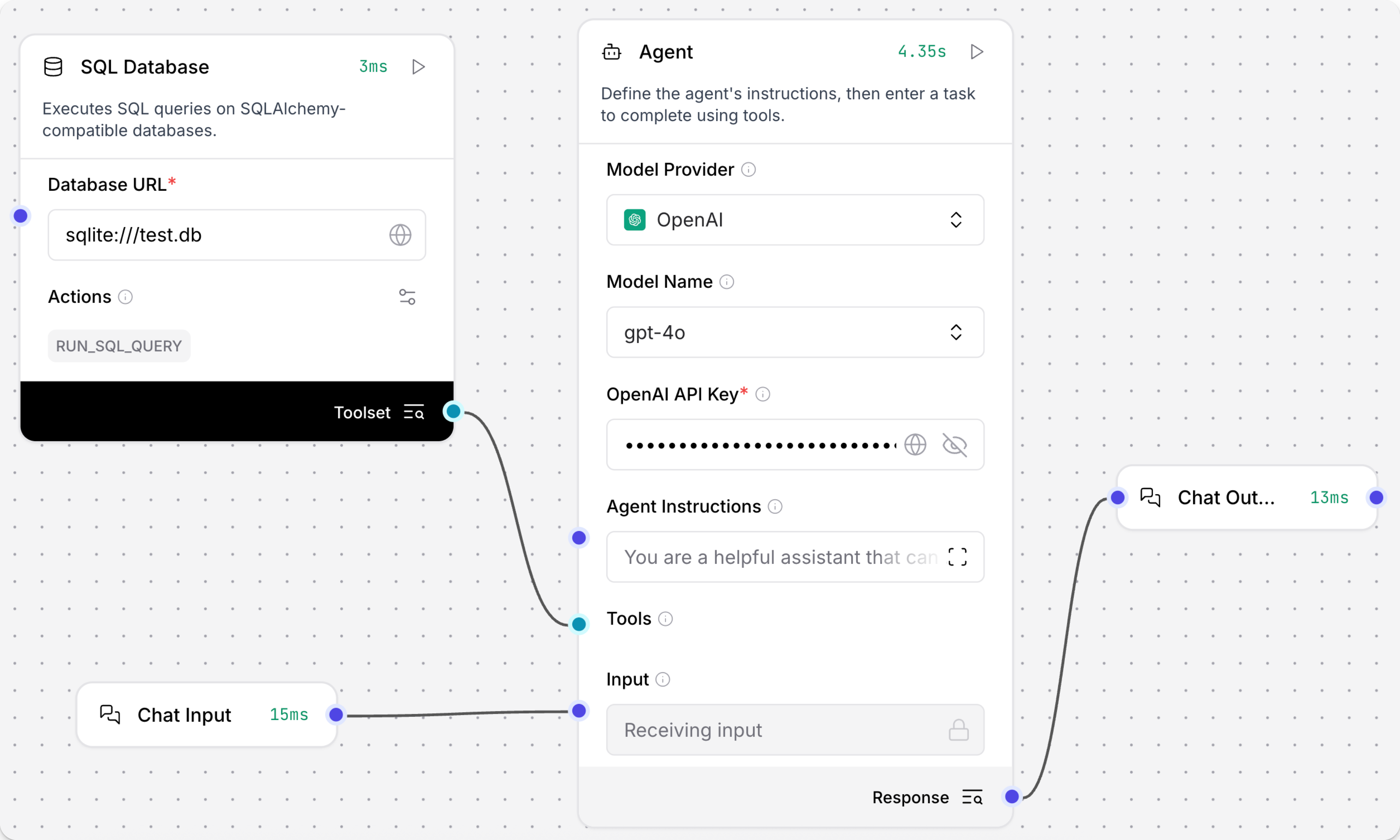
-
按一下 Playground,然後詢問 Agent 關於您資料庫中資料的問題,例如
Which users are in my database?Agent 確定需要查詢資料庫來回答問題,使用 LLM 產生 SQL 查詢,然後使用 SQL Database Components的
RUN_SQL_QUERY動作在您的資料庫上運行查詢。 最後,它以對話格式返回結果,除非您提供指示返回原始結果或不同的格式。以下示例查詢了一個資料很少的測試資料庫,但使用更強大的資料集,您可以提出更詳細或複雜的問題。
_10Here are the users in your database:_10_101. **John Doe** - Email: john@example.com_102. **Jane Smith** - Email: jane@example.com_103. **John Doe** - Email: john@example.com_104. **Jane Smith** - Email: jane@example.com_10_10It seems there are duplicate entries for the users.
SQL Database 參數
某些參數在視覺編輯器中預設為隱藏。 您可以透過 Components的標頭選單 中的 Controls 修改所有參數。
| Name | Display Name | Info |
|---|---|---|
| database_url | Database URL | 輸入參數。SQLAlchemy 相容的資料庫連接 URL。 |
| query | SQL Query | 輸入參數。要執行的 SQL 查詢,可以直接輸入、從另一個Components傳入,或在 Tool Mode 中由 Agent Components自動提供。 |
| include_columns | Include Columns | 輸入參數。是否在結果中包含欄位名稱。預設為啟用 (true)。 |
| add_error | Add Error | 輸入參數。如果啟用,會將任何錯誤訊息新增到結果中 (如果有返回)。預設為停用 (false)。 |
| run_sql_query | Result Table | 輸出參數。查詢結果作為 DataFrame。 |
URL
URL Components從一個或多個 URL 擷取內容,處理內容,並以各種格式返回。 它以遞歸方式跟隨連結到給定的深度,並支援以純文字或原始 HTML 輸出。
URL 參數
某些參數在視覺編輯器中預設為隱藏。 您可以透過 Components的標頭選單 中的 Controls 修改所有參數。
可用參數的一些範例包括以下內容:
| Name | Display Name | Info |
|---|---|---|
| urls | URLs | 輸入參數。一個或多個要遞歸爬取的 URL。在視覺編輯器中,按一下 Add URL 以新增多個 URL。 |
| max_depth | Depth | 輸入參數。控制連結遍歷:爬蟲從初始頁面「點擊」多少次遠離。深度為 1 將爬取限制為僅給定 URL 的第一頁。深度為 2 表示爬蟲爬取第一頁加上從第一頁直接連結的每一頁,然後停止。此設定專門控制連結遍歷;它不會限制 URL 路徑區段的數量或網域。 |
| prevent_outside | Prevent Outside | 輸入參數。如果啟用,僅爬取根 URL 相同網域內的 URL。這可以防止爬蟲存取從爬取頁面連結的給定 URL 網域外的網站,即使它們被連結。 |
| use_async | Use Async | 輸入參數。如果啟用,使用非同步載入,這可能會顯著加快速度,但可能會使用更多系統資源。 |
| format | Output Format | 輸入參數。將所需的輸出格式設定為 Text 或 HTML。預設為 Text。如需更多資訊,請參閱 URL output。 |
| timeout | Timeout | 輸入參數。請求的逾時秒數。 |
| headers | Headers | 輸入參數。請求所需的標頭,如果需要驗證或其他方式。 |
還有其他輸入參數可用於錯誤處理和編碼。
URL 輸出
有兩個設定在不同階段控制 URL Components的輸出:
-
Output Format:此選用參數控制從爬取頁面擷取的內容:
- Text (預設):Components僅從爬取頁面的 HTML 擷取文字。
- HTML:Components擷取爬取頁面的整個原始 HTML 內容。
-
Output data type:在Components的輸出欄位中 (靠近輸出連接埠) 您可以選取傳遞給其他Components時傳出資料的結構:
當作為 Flow中的標準Components使用時,URL Components必須連接到接受選取輸出資料類型 (DataFrame 或 Message) 的Components。
您可以直接將 URL Components連接到相容Components,或使用 Type Convert Components 在資料類型不相容的情況下將輸出轉換為另一種類型,然後將資料傳遞給其他Components。
像 Type Convert Components這樣的處理Components對於 URL Components很有用,因為它可以從爬取頁面擷取大量資料。 例如,如果您只想將特定欄位傳遞給其他Components,您可以使用 Parser Components 從爬取頁面擷取僅該資料,然後將資料傳遞給其他Components。
當與 Agent Components在 Tool Mode 中使用時,URL Components可以直接連接到 Agent Components的 Tools 連接埠,而無需轉換資料。
Agent 根據使用者的查詢決定是否使用 URL Components,並且可以直接處理 DataFrame 或 Message 輸出。
Web Search
Web Search Components使用 DuckDuckGo 的 HTML 抓取介面執行基本網路搜尋。 對於其他搜尋 API,請參閱 Bundles。
Web Search Components使用可能會受到速率限制的網路抓取。
對於生產使用,請考慮使用具有更強大 API 支援的其他搜尋Components,例如提供者特定的 bundles。
在FLOW中使用 Web Search Components
以下步驟演示在FLOW中使用 Web Search Components的一種方式:
-
基於 Basic Prompting 範本建立 Flow。
-
新增 Web Search Components,然後輸入搜尋查詢,例如
environmental news。 -
新增 Type Convert Components,將 Output Type 設定為 Message,然後將 Web Search Components的輸出連接到 Type Convert Components的輸入。
預設情況下,Web Search Components輸出
DataFrame。 因為 Prompt Template Components僅接受Message資料,所以需要此轉換,以便 Flow將搜尋結果傳遞給 Prompt Template Components。 如需更多資訊,請參閱 Web Search output。 -
在 Prompt Template Components的 Template 欄位中,新增如
{searchresults}或{context}的變數。這會在 Prompt Template Components中新增欄位,您可以用來將轉換後的搜尋結果傳遞給提示。 如需更多資訊,請參閱 Define variables in prompts。
-
將 Type Convert Components的輸出連接到 Prompt Template Components上的新變數欄位。
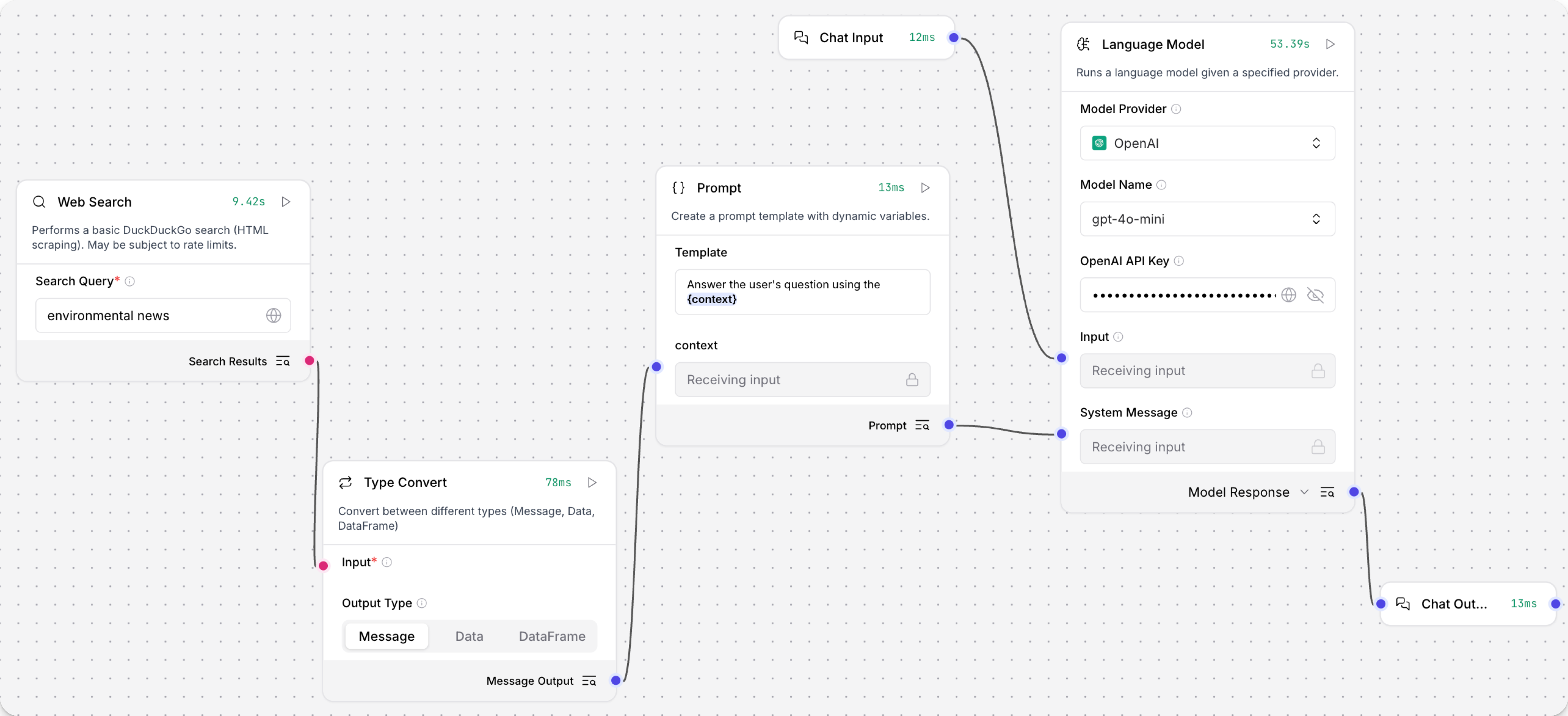
-
在 Language Model Components中,新增您的 OpenAI API 金鑰,或選取不同的提供者和模型。
-
按一下 Playground,然後輸入
latest news。LLM 處理請求,包括透過 Prompt Template Components傳遞的上下文,然後在 Playground 聊天介面中列印回應。
Result
以下是可能的回應範例。 您的回應可能會根據網路的當前狀態、您的特定查詢、模型以及其他因素而有所不同。
_10Here are some of the latest news articles related to the environment:_10Ozone Pollution and Global Warming: A recent study highlights that ozone pollution is a significant global environmental concern, threatening human health and crop production while exacerbating global warming. Read more_10...
Web Search 參數
| Name | Display Name | Info |
|---|---|---|
| query | Search Query | 輸入參數。要搜尋的關鍵字。 |
| timeout | Timeout | 輸入參數。網路搜尋請求的逾時秒數。預設:5。 |
| results | Search Results | 輸出參數。返回包含 title、links 和 snippets 的 DataFrame。如需更多資訊,請參閱 Web Search output。 |
Web Search 輸出
Web Search Components輸出包含關鍵欄位 title、links 和 snippets 的 DataFrame。
當作為 Flow中的標準Components使用時,Web Search Components必須連接到接受 DataFrame 輸入的Components,或您必須使用 Type Convert Components 將輸出轉換為 Data 或 Message 類型,然後將資料傳遞給其他Components。
當與 Agent Components在 Tool Mode 中使用時,Web Search Components可以直接連接到 Agent Components的 Tools 連接埠,而無需轉換資料。
Agent 根據使用者的查詢決定是否使用 Web Search Components,並且可以直接處理 DataFrame 輸出。
Webhook
Webhook Components定義一個 webhook 觸發器,當它接收到 HTTP POST 請求時運行FLOW。
觸發 webhook
當您將 Webhook Components新增到 Flow時,Flow的 API Access 窗格 中會新增 Webhook curl 標籤。 此標籤自動產生 HTTP POST 請求程式碼片段,您可以用來透過 Webhook Components觸發您的 Flow。 例如:
_10curl -X POST \_10 "http://$LANGFLOW_SERVER_ADDRESS/api/v1/webhook/$FLOW_ID" \_10 -H 'Content-Type: application/json' \_10 -H 'x-api-key: $LANGFLOW_API_KEY' \_10 -d '{"any": "data"}'
如需更多資訊,請參閱 Trigger flows with webhooks。
Webhook 參數
| Name | Display Name | Description |
|---|---|---|
| data | Payload | 輸入參數。透過 HTTP POST 請求從外部系統接收 payload。 |
| curl | curl | 輸入參數。為此 webhook 製作請求的 curl 命令範本。 |
| endpoint | Endpoint | 輸入參數。此 webhook 接收請求的端點 URL。 |
| output_data | Data | 輸出參數。來自 webhook 輸入的處理資料。如果未提供輸入,返回空的 Data 物件。如果輸入不是有效的 JSON,Webhook Components會將其包裝在 payload 物件中,以便接受作為輸入來觸發FLOW。 |
其他資料Components
AgentBuilder 的核心Components旨在通用並支援各種使用案例。 核心Components通常不會限於單一提供者。
如果核心Components不符合您的需求,您可以在 Bundles 中找到提供者特定的Components。
例如,DataStax bundle 包含 CQL 查詢的Components,而 Google bundle 包含 Google Search API 的Components。
舊版資料Components
舊版Components不再受支援,並且可能在未來版本中被移除。 您可以繼續在現有 Flow 中使用它們,但建議您盡快將它們替換為受支援的Components。 建議的替換方案包含在 Flow 中Components上的 Legacy 橫幅中。 它們也會在發行說明和 AgentBuilder 文件中盡可能提供。
如果您不確定如何替換舊版Components,請按提供者、服務或Components名稱 Search Components。 Components可能已被棄用,取而代之的是完全新的Components、類似的Components,或同一類別中同一Components的較新版本。
如果沒有明顯的替換方案,請考慮另一個Components是否可以適應您的使用案例。 例如,許多 Core components 提供通用功能,可以支援多個提供者和使用案例,例如 API Request Components。
如果這些選項都不可行,您可以使用舊版Components的程式碼建立自己的自訂Components,或在 GitHub 上開始討論 關於舊版Components。
為了阻止在新 Flow 中使用舊版Components,這些Components預設為隱藏。 在視覺編輯器中,您可以點擊 Component settings 來切換 Legacy 篩選器。
以下資料Components處於舊版狀態:
- Load CSV
- Load JSON
將這些Components替換為 File Components,它支援載入 CSV 和 JSON 檔案,以及許多其他檔案類型。
