DataStax
Bundles 包含支援特定第三方整合的自訂Components,與 AgentBuilder 搭配使用。
此頁面描述 DataStax bundle 中可用的Components,包括讀取和寫入 Astra DB 資料庫的Components。
Astra DB
建議您在配置 Astra DB Components之前建立所需的資料庫、金鑰空間和集合。
您可以透過此Components建立新的資料庫和集合,但在 AgentBuilder 視覺化編輯器中(而非在執行階段)才能這樣做,而且您必須等待資料庫或集合初始化完成才能繼續進行 Flow配置。 此外,並非所有資料庫和集合配置選項都可以透過 Astra DB Components取得,例如混合搜尋選項、PCU 群組、向量化整合管理,以及多區域部署。
Astra DB Components讀取和寫入 Astra DB Serverless 資料庫,使用 AstraDBVectorStore 實例來呼叫 Data API 和 DevOps API。
關於向量儲存實例
Because AgentBuilder is based on LangChain, vector store components use an instance of LangChain vector store to drive the underlying read and write functions. These instances are provider-specific and configured according to the component's parameters, such as the connection string, index name, and schema.
In component code, this is often instantiated as vector_store, but some vector store components use a different name, such as the provider name.
Some LangChain classes don't expose all possible options as component parameters. Depending on the provider, these options might use default values or allow modification through environment variables, if they are supported in AgentBuilder. For information about specific options, see the LangChain API reference and vector store provider's documentation.
Astra DB 參數
您可以檢查向量儲存Components的參數,以了解它接受的輸入、支援的功能以及如何配置它。
某些參數在視覺編輯器中預設為隱藏。 您可以透過 Components的標頭選單 中的 Controls 修改所有參數。
某些參數是條件性的,只有在您設定其他參數或為其他參數選取特定選項後才可用。 條件參數在您設定所需的依賴項之前,可能不會在 Controls 窗格中顯示。
如需接受值和功能的資訊,請參閱 Astra DB Serverless 文件 或檢查Components程式碼。
| Name | Display Name | Info |
|---|---|---|
| token | Astra DB Application Token | 輸入參數。具有存取向量資料庫權限的 Astra 應用程式權杖。一旦連線驗證完成,其他欄位將會填入您現有的資料庫和集合。如果您想要透過此Components建立資料庫,應用程式權杖必須具有組織管理員權限。 |
| environment | Environment | 輸入參數。Astra DB API 端點的環境。通常總是 prod。 |
| database_name | Database | 輸入參數。您想要此Components連線的資料庫名稱。或者,您可以選取 New Database 來建立新資料庫,然後等待資料庫初始化完成,再設定剩餘參數。 |
| endpoint | Astra DB API Endpoint | 輸入參數。多區域資料庫的 API 端點,為您的最近資料中心選取。取得多區域資料庫的區域清單。選取資料庫時會自動填入此欄位,預設為主要區域的端點。 |
| keyspace | Keyspace | 輸入參數。資料庫中包含 collection_name 中指定集合的金鑰空間。預設:default_keyspace。 |
| collection_name | Collection | 輸入參數。您想要在此 Flow中使用的集合名稱。或者,您可以選取 New Collection 來建立新的集合,並使用有限的配置選項。若要確保集合以正確的嵌入提供者和搜尋功能配置,建議在 Astra Portal 或使用 Data API 之前 建立集合。如需詳細資訊,請參閱 管理 Astra DB Serverless 中的集合。 |
| embedding_model | Embedding Model | 輸入參數。附加 嵌入模型Components 以生成嵌入。僅在指定的集合沒有 向量化整合 時可用。如果向量化整合存在,Components會自動使用集合的整合模型。 |
| ingest_data | Ingest Data | 輸入參數。要載入到指定集合的記錄。接受 Data 或 DataFrame 輸入。 |
| search_query | Search Query | 輸入參數。向量搜尋的查詢字串。 |
| cache_vector_store | Cache Vector Store | 輸入參數。是否在 AgentBuilder 記憶體中快取向量儲存以加快讀取速度。預設:啟用 (true)。 |
| search_method | Search Method | 輸入參數。要使用的搜尋方法,不是 Hybrid Search 就是 Vector Search。您的集合必須配置為支援所選選項,預設取決於您的集合支援什麼。所有 Astra DB Serverless(Vector)資料庫中的向量啟用集合都支援向量搜尋,但混合搜尋需要您在建立集合時設定特定集合設定。這些選項僅在以程式設計方式建立集合時可用。如需詳細資訊,請參閱 Astra DB Serverless 中的資料查找方式 和 建立支援混合搜尋的集合。 |
| reranker | Reranker | 輸入參數。混合搜尋的重新排名模型,視集合配置而定。此參數僅適用於支援混合搜尋的集合。要確定集合是否支援混合搜尋,取得集合中繼資料,然後檢查 lexical 和 rerank 是否都為 "enabled": true。 |
| lexical_terms | Lexical Terms | 輸入參數。混合搜尋的關鍵字空間分隔字串,例如 features, data, attributes, characteristics。此參數僅在集合支援混合搜尋時可用。如需詳細資訊,請參閱 混合搜尋範例。 |
| number_of_results | Number of Search Results | 輸入參數。要返回的搜尋結果數量。預設:4。 |
| search_type | Search Type | 輸入參數。要使用的搜尋類型,不是 Similarity(預設)、Similarity with score threshold,就是 MMR (Max Marginal Relevance)。 |
| search_score_threshold | Search Score Threshold | 輸入參數。Similarity with score threshold 搜尋類型的向量搜尋結果的最小相似性分數閾值。預設:0。 |
| advanced_search_filter | Search Metadata Filter | 輸入參數。除了向量或混合搜尋之外要套用的可選中繼資料篩選器字典。 |
| autodetect_collection | Autodetect Collection | 輸入參數。提供應用程式權杖和 API 端點後,是否自動擷取可用集合清單。 |
| content_field | Content Field | 輸入參數。寫入時,此參數指定文件中包含您想要生成嵌入之文字字串的欄位名稱。 |
| deletion_field | Deletion Based On Field | 輸入參數。提供時,目標集合中具有匹配輸入中繼資料欄位值的中繼資料欄位值的文件會在載入新記錄之前刪除。用於寫入與 upsert(覆寫)。 |
| ignore_invalid_documents | Ignore Invalid Documents | 輸入參數。寫入時是否忽略無效文件。如果停用 (false),則會為無效文件引發錯誤。預設:啟用 (true)。 |
| astradb_vectorstore_kwargs | AstraDBVectorStore Parameters | 輸入參數。AstraDBVectorStore 實例的額外可選參數字典。 |
Astra DB examples
Example: Vector RAG
For a tutorial that uses vector data in a flow, see Create a vector RAG chatbot.
The following example demonstrates how to use vector store components in flows alongside related components like embedding model and language model components. These steps walk through important configuration details, functionality, and best practices for using these components effectively. This is only one example; it isn't a prescriptive guide to all possible use cases or configurations.
-
Create a flow with the Vector Store RAG template.
This template has two subflows. The Load Data subflow loads embeddings and content into a vector database, and the Retriever subflow runs a vector search to retrieve relevant context based on a user's query.
-
Configure the database connection for both Astra DB components, or replace them with another pair of vector store components of your choice. Make sure the components connect to the same vector store, and that the component in the Retriever subflow is able to run a similarity search.
The parameters you set in each vector store component depend on the component's role in your flow. In this example, the Load Data subflow writes to the vector store, whereas the Retriever subflow reads from the vector store. Therefore, search-related parameters are only relevant to the Vector Search component in the Retriever subflow.
For information about specific parameters, see the documentation for your chosen vector store component.
-
To configure the embedding model, do one of the following:
-
Use an OpenAI model: In both OpenAI Embeddings components, enter your OpenAI API key. You can use the default model or select a different OpenAI embedding model.
-
Use another provider: Replace the OpenAI Embeddings components with another pair of embedding model components of your choice, and then configure the parameters and credentials accordingly.
-
Use Astra DB vectorize: If you are using an Astra DB vector store that has a vectorize integration, you can remove both OpenAI Embeddings components. If you do this, the vectorize integration automatically generates embeddings from the Ingest Data (in the Load Data subflow) and Search Query (in the Retriever subflow).
tipIf your vector store already contains embeddings, make sure your embedding model components use the same model as your previous embeddings. Mixing embedding models in the same vector store can produce inaccurate search results.
-
-
Recommended: In the Split Text component, optimize the chunking settings for your embedding model. For example, if your embedding model has a token limit of 512, then the Chunk Size parameter must not exceed that limit.
Additionally, because the Retriever subflow passes the chat input directly to the vector store component for vector search, make sure that your chat input string doesn't exceed your embedding model's limits. For this example, you can enter a query that is within the limits; however, in a production environment, you might need to implement additional checks or preprocessing steps to ensure compliance. For example, use additional components to prepare the chat input before running the vector search, or enforce chat input limits in your application code.
-
In the Language Model component, enter your OpenAI API key, or select a different provider and model to use for the chat portion of the flow.
-
Run the Load Data subflow to populate your vector store. In the File component, select one or more files, and then click Run component on the vector store component in the Load Data subflow.
The Load Data subflow loads files from your local machine, chunks them, generates embeddings for the chunks, and then stores the chunks and their embeddings in the vector database.
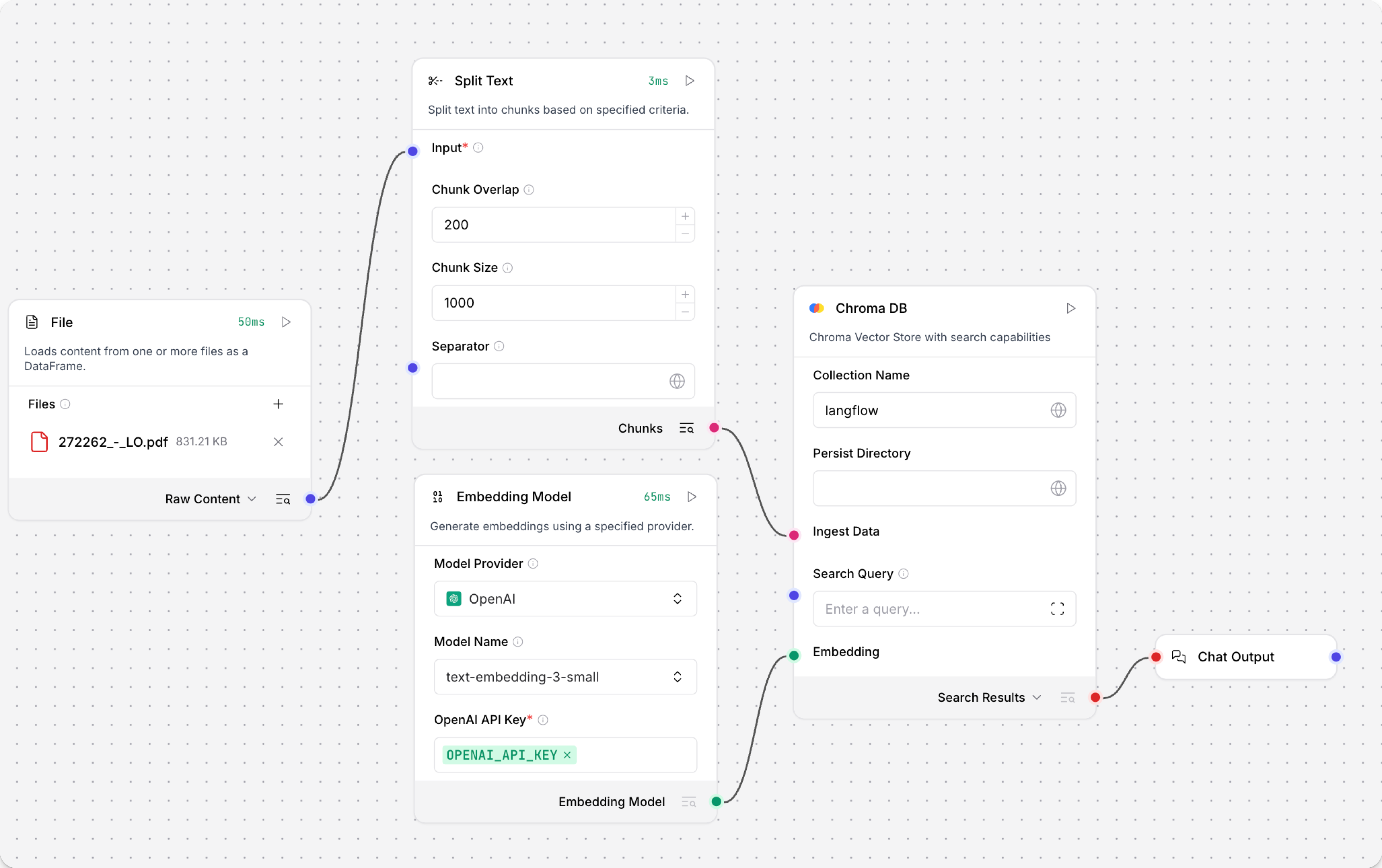
The Load Data subflow is separate from the Retriever subflow because you probably won't run it every time you use the chat. You can run the Load Data subflow as needed to preload or update the data in your vector store. Then, your chat interactions only use the components that are necessary for chat.
If your vector store already contains data that you want to use for vector search, then you don't need to run the Load Data subflow.
-
Open the Playground and start chatting to run the Retriever subflow.
The Retriever subflow generates an embedding from chat input, runs a vector search to retrieve similar content from your vector store, parses the search results into supplemental context for the LLM, and then uses the LLM to generate a natural language response to your query. The LLM uses the vector search results along with its internal training data and tools, such as basic web search and datetime information, to produce the response.
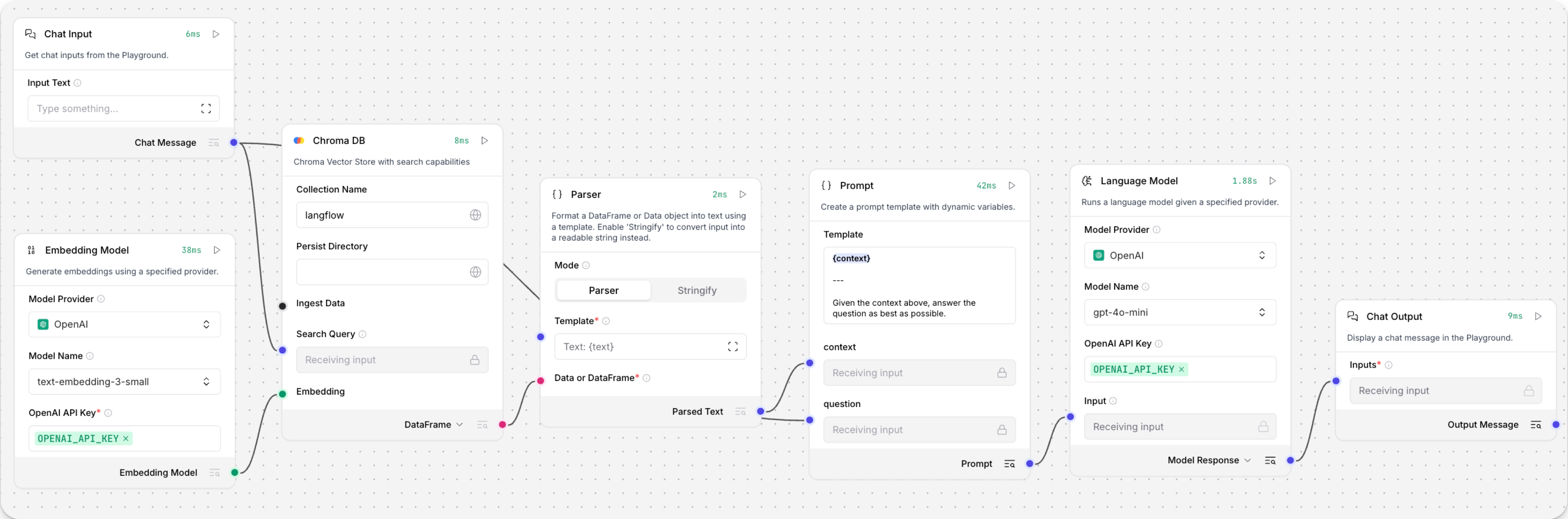
To avoid passing the entire block of raw search results to the LLM, the Parser component extracts
textstrings from the search resultsDataobject, and then passes them to the Prompt Template component inMessageformat. From there, the strings and other template content are compiled into natural language instructions for the LLM.You can use other components for this transformation, such as the Data Operations component, depending on how you want to use the search results.
To view the raw search results, click Inspect output on the vector store component after running the Retriever subflow.
Example: Hybrid search
The Astra DB component supports the Data API's hybrid search feature. Hybrid search performs a vector similarity search and a lexical search, compares the results of both searches, and then returns the most relevant results overall.
To use hybrid search through the Astra DB component, do the following:
-
Use the Data API to create a collection that supports hybrid search if you don't already have one.
Although you can create a collection through the Astra DB component, you have more control and insight into the collection settings when using the Data API for this operation.
-
Create a flow based on the Hybrid Search RAG template, which includes an Astra DB component that is pre-configured for hybrid search.
After loading the template, check for Upgrade available alerts on the components. If any components have an upgrade pending, upgrade and reconnect them before continuing.
-
In the Language Model components, add your OpenAI API key. If you want to use a different provider or model, see Language model components.
-
刪除連接到 Structured Output Components的 Input Message 連接埠的 Language Model Components,然後將 Chat Input Components連接到該連接埠。
-
配置 Astra DB 向量儲存Components:
- 輸入您的 Astra DB 應用程式權杖。
- 在 Database 欄位中,選取您的資料庫。
- 在 Collection 欄位中,選取支援混合搜尋的集合。
一旦選取支援混合搜尋的集合,其他參數會自動更新以允許混合搜尋選項。
-
將第一個 Parser Components的 Parsed Text 輸出連接到 Astra DB Components的 Lexical Terms 輸入。 此輸入僅在連接支援混合搜尋與重新排名的集合後才會出現。
-
更新 Structured Output 範本:
-
點擊 Structured Output Components以公開 Components的標頭選單,然後點擊 Controls。
-
找到 Format Instructions 列,點擊 Expand,然後將提示替換為以下文字:
_10You are a database query planner that takes a user's requests, and then converts to a search against the subject matter in question._10You should convert the query into:_101. A list of keywords to use against a Lucene text analyzer index, no more than 4. Strictly unigrams._102. A question to use as the basis for a QA embedding engine._10Avoid common keywords associated with the user's subject matter. -
點擊 Finish Editing,然後點擊 Close 以儲存對Components的變更。
-
-
開啟 Playground,然後輸入您會詢問資料庫的自然語言問題。
在此範例中,您的輸入會同時發送到 Astra DB 和 Structured Output Components:
-
直接發送到 Astra DB Components的 Search Query 連接埠的輸入會用作相似性搜尋的字串。 會使用集合的 Astra DB 向量化整合從查詢字串生成嵌入。
-
發送到 Structured Output Components的輸入會由 Structured Output、Language Model 和 Parser Components處理,以提取用於混合搜尋詞彙搜尋部分的空格分隔
keywords。
完整的混合搜尋查詢會使用 Data API 的
find_and_rerank命令針對您的資料庫執行。 API 的回應會作為DataFrame輸出,然後由另一個 Parser Components轉換為文字字串Message。 最後,Chat Output Components會將Message回應列印到 Playground。 -
-
選用:退出 Playground,然後點擊每個個別Components的 Inspect Output 以了解詞彙關鍵字是如何建構的,並檢視來自 Data API 的原始回應。 這對於除錯某些Components沒有如預期從另一個Components接收輸入的 Flow很有幫助。
-
Structured Output Components:輸出是將輸出結構描述應用於 LLM 對輸入訊息和格式指示的回應而產生的
Data物件。 以下範例基於上述關鍵字提取指示:_101. Keywords: features, data, attributes, characteristics_102. Question: What characteristics can be identified in my data? -
Parser Components:輸出是從結構化輸出
Data中提取的關鍵字字串,然後用作混合搜尋的詞彙術語。 -
Astra DB Components:輸出是 Data API 返回的混合搜尋結果的
DataFrame。
-
Astra DB 輸出
如果您使用向量儲存Components查詢您的向量資料庫,它會產生搜尋結果,您可以將其作為 Data 物件清單或表格 DataFrame 傳遞給FLOW中的下游Components。
如果支援兩種類型,您可以在視覺編輯器中向量儲存Components的輸出連接埠附近設定格式。
向量儲存連線連接埠
Astra DB Components有一個額外的 Vector Store Connection 輸出。
此輸出只能連接到 VectorStore 輸入連接埠,並且原本是為了與專用的 Graph RAG Components搭配使用。
唯一支援此輸入的非舊版Components是 Graph RAG Components,它可以是 Astra DB Components的 Graph RAG 擴充。 相反地,請使用包含向量儲存連線和 Graph RAG 功能的 Astra DB Graph Components。
Astra DB CQL
Astra DB CQL Components允許 agent 從 Astra DB 中的 CQL 表格查詢資料。
輸出是包含來自 Astra DB CQL 表格的查詢結果的 Data 物件清單。每個 Data 物件包含投影欄位指定的文件欄位。由 number_of_results 參數限制。
Astra DB CQL 參數
某些參數在視覺編輯器中預設為隱藏。 您可以透過 Components的標頭選單 中的 Controls 修改所有參數。
| Name | Type | Description |
|---|---|---|
| Tool Name | String | 輸入參數。用於在 agent 的提示中引用工具的名稱。 |
| Tool Description | String | 輸入參數。工具的簡要描述,以指導模型使用它。 |
| Keyspace | String | 輸入參數。金鑰空間的名稱。 |
| Table Name | String | 輸入參數。要查詢的 Astra DB CQL 表格名稱。 |
| Token | SecretString | 輸入參數。Astra DB 的驗證權杖。 |
| API Endpoint | String | 輸入參數。Astra DB API 端點。 |
| Projection Fields | String | 輸入參數。要返回的屬性,以逗號分隔。預設:"*"。 |
| Partition Keys | Dict | 輸入參數。模型必須填寫的必要參數才能查詢工具。 |
| Clustering Keys | Dict | 輸入參數。模型可以填寫的可選參數以精煉查詢。必要參數應以驚嘆號標記,例如 !customer_id。 |
| Static Filters | Dict | 輸入參數。用於過濾查詢結果的屬性-值配對。 |
| Limit | String | 輸入參數。要返回的記錄數量。 |
Astra DB Tool
Astra DB Tool Components用於在 Astra DB 集合中搜尋資料,包括混合搜尋、向量搜尋和常規篩選器型搜尋。 專門搜尋需要集合預先配置為支援所需參數。
輸出包含來自 Astra DB 的查詢結果的 Data 物件清單。每個 Data 物件包含投影屬性指定的文件欄位。由 number_of_results 參數和 Astra DB Data API 的上限限制,視搜尋類型而定。
您可以使用Components直接在 Flow中執行查詢作為隔離步驟,或將其連接到 agent 的工具 以允許 agent 根據需要查詢 Astra DB 集合資料來回應使用者查詢。 如需詳細資訊,請參閱 使用 AgentBuilder agents。
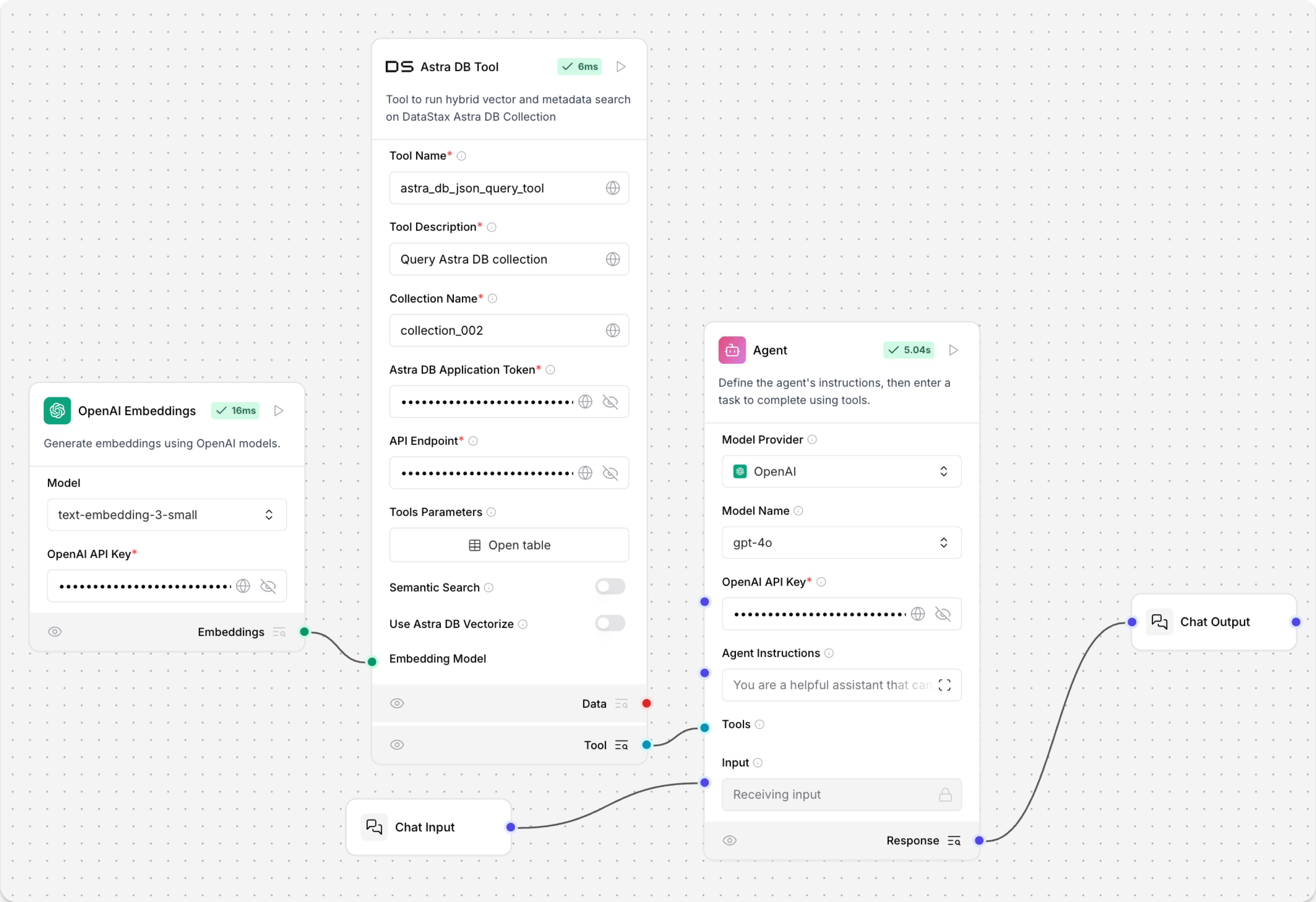
Astra DB Tool 參數
以下是 Astra DB Tool Components整體的參數。
Collection Name、Astra DB Application Token 和 Astra DB API Endpoint 的值可在您的 Astra DB 部署中找到。如需詳細資訊,請參閱 Astra DB Serverless 文件。
| Name | Type | Description |
|---|---|---|
| Tool Name | String | 輸入參數。用於在 agent 的提示中引用工具的名稱。 |
| Tool Description | String | 輸入參數。工具的簡要描述。這有助於模型決定何時使用它。 |
| Keyspace Name | String | 輸入參數。Astra DB 中金鑰空間的名稱。預設:default_keyspace |
| Collection Name | String | 輸入參數。要查詢的 Astra DB 集合名稱。 |
| Token | SecretString | 輸入參數。存取 Astra DB 的驗證權杖。 |
| API Endpoint | String | 輸入參數。Astra DB API 端點。 |
| Projection Fields | String | 輸入參數。要從匹配文件中返回的屬性逗號分隔清單。預設是預設投影 *,它返回除保留欄位如 $vector 外的所有屬性。 |
| Tool Parameters | Dict | 輸入參數。Astra DB Data API find 篩選器 成為 agent 的工具。這些篩選器 可能 用於搜尋,如果 agent 選取它們。請參閱 定義工具特定參數。 |
| Static Filters | Dict | 輸入參數。用於過濾查詢結果的屬性-值配對。等同於 Astra DB Data API find 篩選器。Static Filters 會包含在 每個 查詢中。使用 Static Filters 而不使用語意搜尋來執行常規篩選搜尋。 |
| Number of Results | Int | 輸入參數。要返回的文件數量上限。 |
| Semantic Search | Boolean | 輸入參數。是否透過生成向量嵌入從聊天輸入執行相似性搜尋,並遵循 Semantic Search Instruction。預設:false。如果為 true,您必須連接 嵌入模型Components 或在您的集合上預先啟用向量化。 |
| Use Astra DB Vectorize | Boolean | 輸入參數。執行語意搜尋時是否使用 Astra DB 向量化功能。預設:false。如果為 true,您必須在集合上預先啟用向量化。 |
| Embedding Model | Embedding | 輸入參數。要連接嵌入模型Components以從輸入文字生成向量以進行語意搜尋的連接埠。這可以在 Semantic Search 為 true 時使用,有或沒有向量化。請務必使用與集合中現有嵌入維度相符的模型。 |
| Semantic Search Instruction | String | 輸入參數。用於相似性搜尋的查詢。預設:"Find documents similar to the query."。此指示用於指導模型執行語意搜尋。 |
定義工具特定參數
Tool Parameters 是您在 Astra DB Tool Components中建立的小型函數。 它們為 LLM 提供預定義的方式來與集合中的資料互動。
如果沒有這些篩選器,LLM 就沒有集合資料的概念或哪些屬性很重要。
在執行階段,LLM 可以決定哪些篩選器與當前查詢相關。
Tool Parameters 中的篩選器並不總是被應用。 如果您想要為 每個 查詢強制執行篩選器,請使用 Static Filters 參數。 您可以使用 Tool Parameters 和 Static Filters 來設定一些必要的篩選器和一些可選的篩選器。
在 Astra DB Tool Components的 Tool Parameters 欄位中,您可以建立篩選器來查詢集合中的文件。
當用作 Tool Mode 與 agent 時,這些篩選器告訴 agent 哪些文件屬性最重要,哪些是必要的,在搜尋中應該使用哪些運算子。
篩選器成為 LLM 在執行期間可以使用的參數,並透過 Description 欄位提供每個參數的更好理解。
在 Tool Parameters 窗格中,點擊 Add a new row,然後編輯列中的每個儲存格。
例如,以下篩選器允許 LLM 按唯一 customer_id 值篩選:
- Name:
customer_id - Attribute Name: 如果屬性匹配資料庫中的欄位名稱,則留空。
- Description:
"The unique identifier of the customer to filter by"。 - Is Metadata: 如果值儲存在中繼資料欄位中,請選取 False。
- Is Mandatory: 設定為 True 以使篩選器成為必要。
- Is Timestamp: 對於此範例,請選取 False,因為值是 ID,不是時間戳記。
- Operator:
$eq以尋找完全匹配。
Tool Parameters 窗格中每個列的可用欄位如下:
| Parameter | Description |
|---|---|
| Name | 公開給 LLM 的參數名稱。它可以與基礎欄位名稱相同,或更具描述性的標籤。LLM 使用此名稱以及描述來推斷在執行期間提供什麼值。 |
| Attribute Name | 當參數名稱與資料庫中的實際欄位或屬性不同時,使用此設定將使用者面向名稱映射到正確的屬性。例如,要對時間戳記欄位應用範圍篩選,請定義兩個單獨的參數,例如 start_date 和 end_date,它們都參考相同的時間戳記屬性。 |
| Description | 向 LLM 提供參數應該如何使用的指示。清晰且具體的指導有助於 LLM 提供有效輸入。例如,如果欄位如 specialty 以小寫儲存,描述應該指示輸入必須是小寫。 |
| Is Metadata | 使用 LangChain 或 AgentBuilder 載入資料時,其他屬性可能會儲存在中繼資料物件下。如果目標屬性以此方式儲存,請啟用此選項。它會調整篩選器以生成格式為 {"metadata.<attribute_name>": "<value>"} 的篩選器。 |
| Is Timestamp | 對於日期或時間型篩選,請啟用此選項以自動將值轉換為 Astrapy 用戶端預期的時間戳記格式。這可確保與基礎 API 的相容性,而無需手動格式化。 |
| Operator | 定義應用於屬性的篩選邏輯。您可以使用任何有效的 Data API 篩選運算子。例如,要對時間戳記屬性篩選時間範圍,請使用 $gt 運算子的參數(大於)和 $lt 運算子的另一個參數(小於)。 |
Astra DB Graph
Astra DB Graph Components使用 AstraDBGraphVectorStore,這是 LangChain graph vector store 的實例,用於在 Astra DB 集合中進行圖形遍歷和基於圖形的文件檢索。它也支援寫入向量儲存。
如需詳細資訊,請參閱 使用 LangChain 和 GraphRetriever 建置 Graph RAG 系統。
如果您使用向量儲存Components查詢您的向量資料庫,它會產生搜尋結果,您可以將其作為 Data 物件清單或表格 DataFrame 傳遞給FLOW中的下游Components。
如果支援兩種類型,您可以在視覺編輯器中向量儲存Components的輸出連接埠附近設定格式。
Astra DB Graph 參數
您可以檢查向量儲存Components的參數,以了解它接受的輸入、支援的功能以及如何配置它。
某些參數在視覺編輯器中預設為隱藏。 您可以透過 Components的標頭選單 中的 Controls 修改所有參數。
某些參數是條件性的,只有在您設定其他參數或為其他參數選取特定選項後才可用。 條件參數在您設定所需的依賴項之前,可能不會在 Controls 窗格中顯示。
如需接受值和功能的資訊,請參閱 Astra DB Serverless 文件 或檢查 Components程式碼。
| Name | Display Name | Info |
|---|---|---|
| token | Astra DB Application Token | 輸入參數。具有存取向量資料庫權限的 Astra 應用程式權杖。一旦連線驗證完成,其他欄位將會填入您現有的資料庫和集合。如果您想要透過此Components建立資料庫,應用程式權杖必須具有組織管理員權限。 |
| api_endpoint | API Endpoint | 輸入參數。您資料庫的 API 端點。 |
| keyspace | Keyspace | 輸入參數。您資料庫中包含 collection_name 中指定集合的金鑰空間。預設:default_keyspace。 |
| collection_name | Collection | 輸入參數。您想要在此 Flow中使用的集合名稱。對於寫入操作,如果匹配的集合不存在,則會建立新的集合。 |
| metadata_incoming_links_key | Metadata Incoming Links Key | 輸入參數。向量儲存中傳入連結的中繼資料金鑰。 |
| ingest_data | Ingest Data | 輸入參數。要載入到向量儲存的記錄。僅與寫入相關。 |
| search_input | Search Query | 輸入參數。相似性搜尋的查詢字串。僅與讀取相關。 |
| cache_vector_store | Cache Vector Store | 輸入參數。是否在 AgentBuilder 記憶體中快取向量儲存以加快讀取速度。預設:啟用 (true)。 |
| embedding_model | Embedding Model | 輸入參數。連接 嵌入模型Components 以生成嵌入。如果集合有 向量化整合,請勿連接嵌入模型Components。 |
| metric | Metric | 輸入參數。用於相似性搜尋計算的指標,不是 cosine(預設)、dot_product,就是 euclidean。這是集合設定。 |
| batch_size | Batch Size | 輸入參數。可選的單一批次中要處理的記錄數量。 |
| bulk_insert_batch_concurrency | Bulk Insert Batch Concurrency | 輸入參數。大量寫入操作的可選並發層級。 |
| bulk_insert_overwrite_concurrency | Bulk Insert Overwrite Concurrency | 輸入參數。允許 upsert(覆寫現有記錄)的大量寫入操作的可選並發層級。 |
| bulk_delete_concurrency | Bulk Delete Concurrency | 輸入參數。大量刪除操作的可選並發層級。 |
| setup_mode | Setup Mode | 輸入參數。設定向量儲存的配置模式,不是 Sync(預設)就是 Off。 |
| pre_delete_collection | Pre Delete Collection | 輸入參數。是否在建立新集合之前刪除集合。預設:停用 (false)。 |
| metadata_indexing_include | Metadata Indexing Include | 輸入參數。如果您想要在 僅 建立集合時啟用 選擇性索引,則要索引的中繼資料欄位清單。不適用於現有集合。每個集合只能設定一個 *_indexing_* 參數。如果所有 *_indexing_* 參數都未設定,則所有欄位都會被索引(預設索引)。 |
| metadata_indexing_exclude | Metadata Indexing Exclude | 輸入參數。如果您想要在 僅 建立集合時啟用選擇性索引,則要從索引中排除的中繼資料欄位清單。不適用於現有集合。每個集合只能設定一個 *_indexing_* 參數。如果所有 *_indexing_* 參數都未設定,則所有欄位都會被索引(預設索引)。 |
| collection_indexing_policy | Collection Indexing Policy | 輸入參數。要在 僅 建立集合時定義索引政策的字典。不適用於現有集合。每個集合只能設定一個 *_indexing_* 參數。如果所有 *_indexing_* 參數都未設定,則所有欄位都會被索引(預設索引)。當您需要在子欄位上設定索引或複雜的索引定義與清單不相容時,使用 collection_indexing_policy 字典。 |
| number_of_results | Number of Results | 輸入參數。要返回的搜尋結果數量。預設:4。僅與讀取相關。 |
| search_type | Search Type | 輸入參數。要使用的搜尋類型,不是 Similarity、Similarity with score threshold,就是 MMR (Max Marginal Relevance)、Graph Traversal,或 MMR (Max Marginal Relevance) Graph Traversal(預設)。僅與讀取相關。 |
| search_score_threshold | Search Score Threshold | 輸入參數。如果 search_type 是 Similarity with score threshold,則搜尋結果的最小相似性分數閾值。預設:0。 |
| search_filter | Search Metadata Filter | 輸入參數。除了向量搜尋之外要套用的可選中繼資料篩選器字典。 |
Graph RAG
Graph RAG Components使用 GraphRetriever 的實例進行 Graph RAG 遍歷,在 Astra DB 向量儲存中啟用基於圖形的文件檢索。
如需詳細資訊,請參閱 DataStax Graph RAG 文件。
此Components可以是 Astra DB 向量儲存Components 的 Graph RAG 擴充。 然而,Astra DB Graph Components 包含向量儲存連線和 Graph RAG 功能的兩者。
Graph RAG 參數
您可以檢查向量儲存Components的參數,以了解它接受的輸入、支援的功能以及如何配置它。
某些參數在視覺編輯器中預設為隱藏。 您可以透過 Components的標頭選單 中的 Controls 修改所有參數。
某些參數是條件性的,只有在您設定其他參數或為其他參數選取特定選項後才可用。 條件參數在您設定所需的依賴項之前,可能不會在 Controls 窗格中顯示。
| Name | Display Name | Info |
|---|---|---|
| embedding_model | Embedding Model | 輸入參數。指定要使用的嵌入模型。如果連接的向量儲存有 向量化整合,則不需要。 |
| vector_store | Vector Store Connection | 輸入參數。從 Astra DB Components 的 Vector Store Connection 輸出繼承的 AstraDbVectorStore 實例。 |
| edge_definition | Edge Definition | 輸入參數。圖形遍歷的 邊緣定義。 |
| strategy | Traversal Strategies | 輸入參數。用於圖形遍歷的策略。策略選項從可用策略動態載入。 |
| search_query | Search Query | 輸入參數。要在向量儲存中搜尋的查詢。 |
| graphrag_strategy_kwargs | Strategy Parameters | 輸入參數。檢索策略 的額外可選參數字典。 |
| search_results | Search Results or DataFrame | 輸出參數。基於圖形的文件檢索結果,作為 Data 物件清單或表格 DataFrame。您可以在Components的輸出連接埠附近設定所需的輸出類型。 |
Hyper-Converged Database (HCD)
Hyper-Converged Database (HCD) Components使用您叢集的 Data API 伺服器來讀取和寫入您的 HCD 向量儲存。
因為基礎函數呼叫 Data API(源自 Astra DB),所以Components使用 AstraDBVectorStore 的實例。
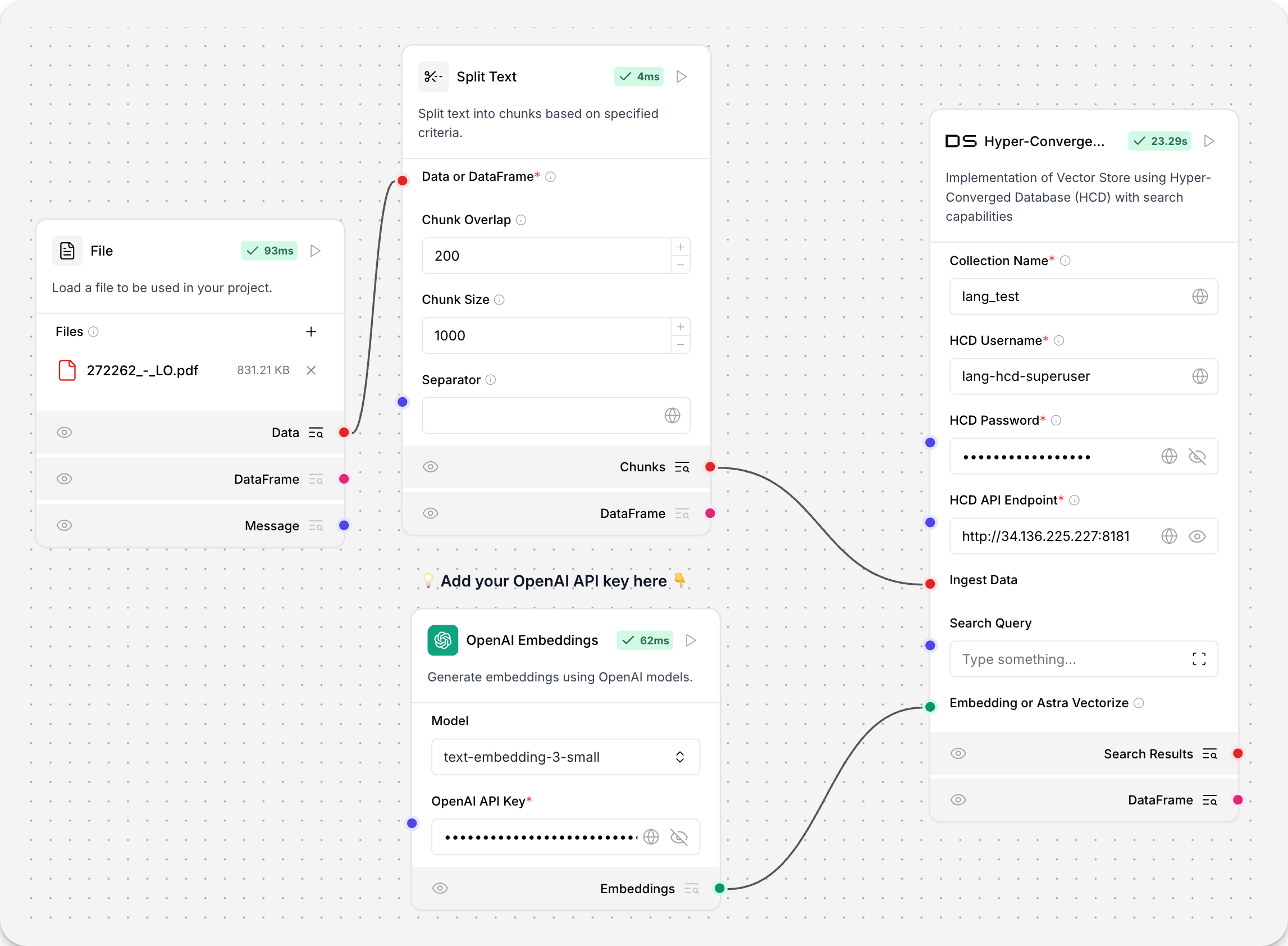
關於向量儲存實例
Because AgentBuilder is based on LangChain, vector store components use an instance of LangChain vector store to drive the underlying read and write functions. These instances are provider-specific and configured according to the component's parameters, such as the connection string, index name, and schema.
In component code, this is often instantiated as vector_store, but some vector store components use a different name, such as the provider name.
Some LangChain classes don't expose all possible options as component parameters. Depending on the provider, these options might use default values or allow modification through environment variables, if they are supported in AgentBuilder. For information about specific options, see the LangChain API reference and vector store provider's documentation.
如果您使用向量儲存Components查詢您的向量資料庫,它會產生搜尋結果,您可以將其作為 Data 物件清單或表格 DataFrame 傳遞給FLOW中的下游Components。
如果支援兩種類型,您可以在視覺編輯器中向量儲存Components的輸出連接埠附近設定格式。
如需 HCD 的詳細資訊,請參閱 HCD 1.2 入門 和 HCD 1.2 中 Data API 入門。
HCD 參數
您可以檢查向量儲存Components的參數,以了解它接受的輸入、支援的功能以及如何配置它。
某些參數在視覺編輯器中預設為隱藏。 您可以透過 Components的標頭選單 中的 Controls 修改所有參數。
某些參數是條件性的,只有在您設定其他參數或為其他參數選取特定選項後才可用。 條件參數在您設定所需的依賴項之前,可能不會在 Controls 窗格中顯示。
| Name | Display Name | Info |
|---|---|---|
| collection_name | Collection Name | 輸入參數。HCD 中向量儲存集合的名稱。對於寫入操作,如果集合不存在,則會建立新的集合。必要。 |
| username | HCD Username | 輸入參數。驗證到您的 HCD 部署的使用者名稱。預設:hcd-superuser。必要。 |
| password | HCD Password | 輸入參數。驗證到您的 HCD 部署的密碼。必要。 |
| api_endpoint | HCD API Endpoint | 輸入參數。您部署的 HCD Data API 端點,格式為 http[s]://CLUSTER_HOST:GATEWAY_PORT,其中 CLUSTER_HOST 是您叢集中任何節點的 IP 位址,GATEWAY_PORT 是您的 API 閘道服務的連接埠號碼。例如,http://192.0.2.250:8181。必要。 |
| ingest_data | Ingest Data | 輸入參數。要載入到向量儲存的記錄。僅與寫入相關。 |
| search_input | Search Input | 輸入參數。相似性搜尋的查詢字串。僅與讀取相關。 |
| namespace | Namespace | 輸入參數。HCD 中包含或將包含 collection_name 中指定集合的命名空間。預設:default_namespace。 |
| ca_certificate | CA Certificate | 輸入參數。HCD TLS 連線的可選 CA 憑證。 |
| metric | Metric | 輸入參數。用於相似性搜尋計算的指標,不是 cosine、dot_product,就是 euclidean。這是集合設定。如果呼叫現有集合,請留空以使用集合的指標。如果寫入操作建立新集合,請指定所需的相似性指標設定。 |
| batch_size | Batch Size | 輸入參數。可選的單一批次中要處理的記錄數量。 |
| bulk_insert_batch_concurrency | Bulk Insert Batch Concurrency | 輸入參數。大量寫入操作的可選並發層級。 |
| bulk_insert_overwrite_concurrency | Bulk Insert Overwrite Concurrency | 輸入參數。允許 upsert(覆寫現有記錄)的大量寫入操作的可選並發層級。 |
| bulk_delete_concurrency | Bulk Delete Concurrency | 輸入參數。大量刪除操作的可選並發層級。 |
| setup_mode | Setup Mode | 輸入參數。設定向量儲存的配置模式,不是 Sync(預設)、Async,就是 Off。 |
| pre_delete_collection | Pre Delete Collection | 輸入參數。是否在建立新集合之前刪除集合。 |
| metadata_indexing_include | Metadata Indexing Include | 輸入參數。如果您想要在 僅 建立集合時啟用 選擇性索引,則要索引的中繼資料欄位清單。不適用於現有集合。每個集合只能設定一個 *_indexing_* 參數。如果所有 *_indexing_* 參數都未設定,則所有欄位都會被索引(預設索引)。 |
| metadata_indexing_exclude | Metadata Indexing Exclude | 輸入參數。如果您想要在 僅 建立集合時啟用選擇性索引,則要從索引中排除的中繼資料欄位清單。不適用於現有集合。每個集合只能設定一個 *_indexing_* 參數。如果所有 *_indexing_* 參數都未設定,則所有欄位都會被索引(預設索引)。 |
| collection_indexing_policy | Collection Indexing Policy | 輸入參數。要在 僅 建立集合時定義索引政策的字典。不適用於現有集合。每個集合只能設定一個 *_indexing_* 參數。如果所有 *_indexing_* 參數都未設定,則所有欄位都會被索引(預設索引)。當您需要在子欄位上設定索引或複雜的索引定義與清單不相容時,使用 collection_indexing_policy 字典。 |
| embedding | Embedding or Astra Vectorize | 輸入參數。透過連接 Embedding Model Components使用的嵌入模型。此Components不支援額外的向量化驗證標頭,因此即使您在現有 HCD 集合上啟用了一個,也不可能使用向量化整合。 |
| number_of_results | Number of Results | 輸入參數。要返回的搜尋結果數量。預設:4。僅與讀取相關。 |
| search_type | Search Type | 輸入參數。要使用的搜尋類型,不是 Similarity(預設)、Similarity with score threshold,就是 MMR (Max Marginal Relevance)。僅與讀取相關。 |
| search_score_threshold | Search Score Threshold | 輸入參數。如果 search_type 是 Similarity with score threshold,則搜尋結果的最小相似性分數閾值。預設:0。 |
| search_filter | Search Metadata Filter | 輸入參數。除了向量搜尋之外要套用的可選中繼資料篩選器字典。 |
其他 DataStax Components
DataStax bundle 中還包含以下Components。
Astra DB Chat Memory
Astra DB Chat Memory Components使用 Astra DB 資料庫檢索和儲存聊天訊息。
聊天記憶會作為 Memory 資料類型在記憶體儲存Components之間傳遞。
具體來說,Components建立 AstraDBChatMessageHistory 的實例,這是一個 LangChain 聊天訊息歷史類別,使用 Astra DB 進行儲存。
Astra DB Chat Memory Components不建議用於大多數記憶體儲存,因為記憶體往往是長 JSON 物件或字串,通常超過 Astra DB 支援的文件或物件的最大大小。
然而,AgentBuilder 的 Agent Components預設包含內建聊天記憶。 您的 agent FLOW不需要外部資料庫來儲存聊天記憶。 如需詳細資訊,請參閱 記憶體管理選項。
如需在FLOW中使用外部聊天記憶的詳細資訊,請參閱 Message History Components。
Astra DB Chat Memory 參數
某些參數在視覺編輯器中預設為隱藏。 您可以透過 Components的標頭選單 中的 Controls 修改所有參數。
| Name | Type | Description |
|---|---|---|
| collection_name | String | 輸入參數。儲存訊息的 Astra DB 集合名稱。必要。 |
| token | SecretString | 輸入參數。Astra DB 存取的驗證權杖。必要。 |
| api_endpoint | SecretString | 輸入參數。Astra DB 服務的 API 端點 URL。必要。 |
| namespace | String | 輸入參數。Astra DB 中集合的可選命名空間。 |
| session_id | MessageText | 輸入參數。聊天會話的唯一識別碼。如果未提供,則使用目前的會話 ID。 |
Assistants API
以下 DataStax Components用於在FLOW中建立和管理 Assistants API 函數:
- Astra Assistant Agent
- Create Assistant
- Create Assistant Thread
- Get Assistant Name
- List Assistants
- Run Assistant
環境變數
以下 DataStax Components用於在FLOW中載入和檢索環境變數:
- Dotenv
- Get Environment Variable
舊版 DataStax Components
舊版Components不再受支援,並且可能在未來版本中被移除。 您可以繼續在現有 Flow 中使用它們,但建議您盡快將它們替換為受支援的Components。 建議的替換方案包含在 Flow 中Components上的 Legacy 橫幅中。 它們也會在發行說明和 AgentBuilder 文件中盡可能提供。
如果您不確定如何替換舊版Components,請按提供者、服務或Components名稱 Search Components。 Components可能已被棄用,取而代之的是完全新的Components、類似的Components,或同一類別中同一Components的較新版本。
如果沒有明顯的替換方案,請考慮另一個Components是否可以適應您的使用案例。 例如,許多 Core components 提供通用功能,可以支援多個提供者和使用案例,例如 API Request Components。
如果這些選項都不可行,您可以使用舊版Components的程式碼建立自己的自訂Components,或在 GitHub 上開始討論 關於舊版Components。
為了阻止在新 Flow 中使用舊版Components,這些Components預設為隱藏。 在視覺編輯器中,您可以點擊 Component settings 來切換 Legacy 篩選器。
以下 DataStax Components處於舊版狀態:
Astra Vectorize
此Components已在 AgentBuilder 版本 1.1.2 中棄用。 請以 Astra DB Components 替換。
Astra DB Vectorize Components用於與 Astra DB Components結合生成 Astra DB 的向量化功能嵌入。
向量化功能現在內建於 Astra DB Components中。 您不再需要單獨的Components進行向量化嵌入生成。
