Notion
要在 AgentBuilder 中使用 Notion Components,您首先需要建立 Notion 整合並配置必要的權限。本指南將引導您完成設定 Notion 整合並授予其存取您的 Notion 資料庫的權限的過程,然後提供兩個使用 Notion Components的 Flow範例。
設定 Notion 應用程式
要建立 Notion 應用程式,您需要以下項目:
- 具有存取您想要使用整合的工作區權限的 Notion 帳戶。
- 在 Notion 工作區中的管理員權限,以建立和管理整合。
建立 Notion 整合
- 前往 Notion Integrations 頁面。
- 點擊 New Integration。
- 輸入整合名稱,然後選擇您想要使用它的工作區。
- 選用:根據您的需求啟用必要的 Notion 整合權限。
- 點擊 Submit 建立整合。
配置整合權限
建立整合後,您需要配置其權限來定義它可以執行哪些動作以及可以存取哪些資料。
- 在整合設定頁面中,前往 Capabilities 標籤。
- 為您的整合啟用所需的權限。例如:
- 如果您的整合需要從 Notion 讀取資料,請啟用「Read content」權限。
- 如果您的整合需要在 Notion 中建立新內容,請啟用「Insert content」權限。
- 如果您的整合需要更新 Notion 中的現有內容,請啟用「Update content」權限。
- 根據您的整合需求配置使用者資訊存取等級。
- 儲存變更。
取得整合 Token
您的整合 token 是敏感資訊。請確保將其安全儲存,並且永遠不要公開分享。將其安全儲存在您的 AgentBuilder 配置或環境變數中。
要驗證您的整合與 Notion,您需要取得整合 token。
- 在整合設定頁面中,前往「Secrets」標籤。
- 複製「Internal Integration Token」值。此 token 將用於驗證您的整合與 Notion。
授予整合存取 Notion 資料庫的權限
為了讓您的整合與 Notion 資料庫互動,您需要授予其存取特定資料庫的權限:
-
開啟您想要整合存取的 Notion 資料庫。
-
點擊 Share。
-
在 Invite 區段中,從清單中選擇您的整合。
-
點擊 Invite 授予整合存取資料庫的權限。
如果您的資料庫包含對其他資料庫的引用,您也需要授予整合存取這些被引用資料庫的權限。 為整合必須存取的每個被引用資料庫重複此步驟。
在 AgentBuilder 中使用 Notion Components建置
一旦您設定了 Notion 整合並授予其存取所需資料庫的權限,您就可以開始在 AgentBuilder 中使用 Notion Components:
- Add Content to Page:將 markdown 文字轉換為 Notion 區塊並附加到指定的 Notion 頁面。
- Create Page:在指定的 Notion 資料庫中建立新頁面,並提供屬性。
- List Database Properties:擷取指定 Notion 資料庫的屬性。
- List Pages:使用篩選和排序選項查詢 Notion 資料庫。
- List Users:從 Notion 工作區擷取使用者清單。
- Page Content Viewer:將 Notion 頁面的內容擷取為純文字。
- Search:搜尋已與整合分享的所有頁面和資料庫。您可以篩選結果為頁面或資料庫,並指定排序方向。
- Update Page Property:更新現有 Notion 頁面的屬性。
這些Components中的每一個都可以輸出 Data 和 Tool 資料類型。
Notion 會議筆記 agent
Notion 會議筆記 agent 是一個 AI 驅動的工具,可以自動處理會議記錄並更新您的 Notion 工作區。它從您的會議中識別任務、行動項目和關鍵點,然後在 Notion 中建立新任務或更新現有任務,而無需手動輸入。
要建置此 Flow,您需要以下項目:
- Notion 應用程式
- Notion API 金鑰
- OpenAI API 金鑰
- 建議:下載會議 agent Flow JSON,然後將 Flow匯入 到 AgentBuilder。
將所有金鑰和其他憑證視為敏感資訊。使用安全引用,並且不要公開分享它們。
此 Flow中使用的Components
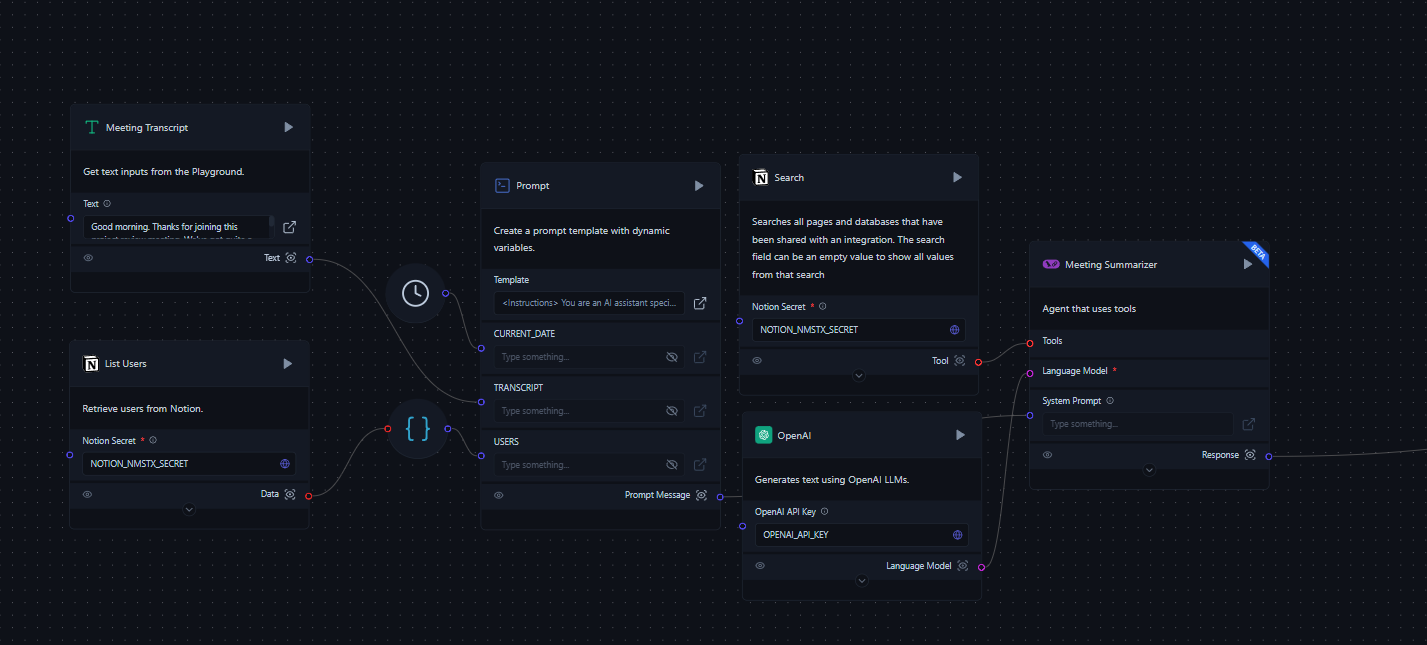
- 會議記錄(文字輸入):此Components允許使用者直接將會議記錄輸入到 Flow中。
- List Users(Notion Components):從 Notion 工作區擷取使用者清單。需要 Notion Secret(API 金鑰)。
- List Databases(Notion Components):搜尋並列出 Notion 工作區中的所有資料庫。需要以下輸入:
- Notion Secret(API 金鑰)
- Query(選用)
- Filter Type(預設:database)
- Sort Direction
- Prompt Template:此Components使用以下輸入建立動態提示範本:
- 會議記錄
- 使用者清單
- 資料庫清單
- 目前日期
- Meeting Summarizer(Tool Calling Agent):分析會議記錄並識別任務和行動項目。需要以下輸入:
- System Prompt(來自 Prompt Template Components)
- Language Model(OpenAI)
- Tools:
- Notion Search
- List Database Properties:擷取指定 Notion 資料庫的屬性。需要 Database ID 和 Notion Secret(API 金鑰)作為輸入。
- Create Page:在 Notion 資料庫中建立新頁面。需要 Database ID、Properties(JSON)和 Notion Secret(API 金鑰)作為輸入。
- Update Page Property:更新現有 Notion 頁面的屬性。需要 Page ID、Notion Secret(API 金鑰)和要更新的屬性作為輸入。
- Add Content to Page:將 markdown 文字轉換為 Notion 區塊並附加到指定的 Notion 頁面。需要 Page/Block ID、Notion Secret(API 金鑰)和 Markdown 文字作為輸入。
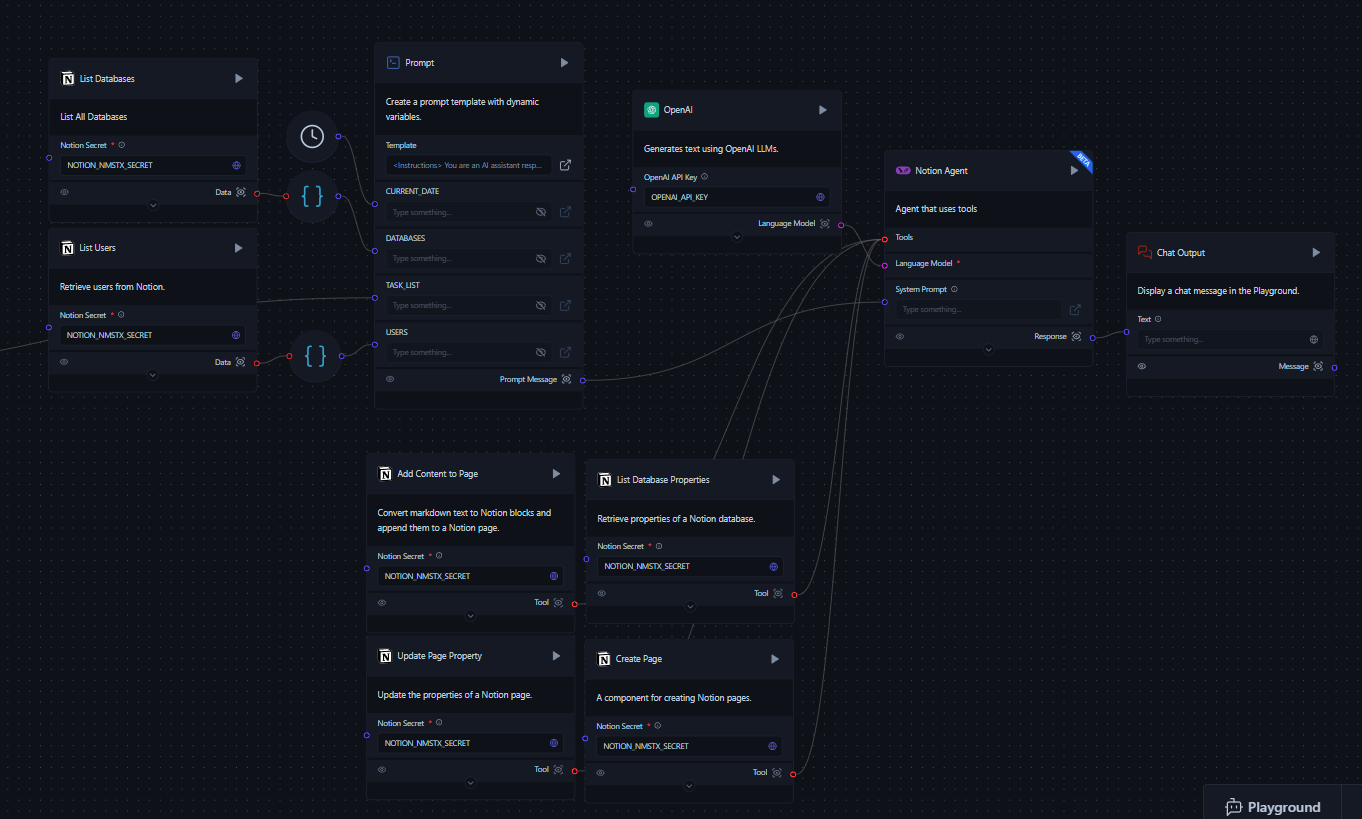
- Notion Agent(Tool Calling Agent):根據會議摘要在 Notion 中執行動作。需要以下輸入:
- System Prompt(來自第二個 Prompt Template Components)
- Language Model(OpenAI)
- Tools:
- List Database Properties:擷取指定 Notion 資料庫的屬性。需要 Database ID 和 Notion Secret(API 金鑰)作為輸入。
- Create Page:在 Notion 資料庫中建立新頁面。需要 Database ID、Properties(JSON)和 Notion Secret(API 金鑰)作為輸入。
- Update Page Property:更新現有 Notion 頁面的屬性。需要 Page ID、Notion Secret(API 金鑰)和要更新的屬性作為輸入。
- Add Content to Page:將 markdown 文字轉換為 Notion 區塊並附加到指定的 Notion 頁面。需要 Page/Block ID、Notion Secret(API 金鑰)和 Markdown 文字作為輸入。
- Chat Output:在 Playground 中顯示 Notion Agent 的最終輸出。
Flow過程
- 使用者輸入會議記錄。
- Flow擷取 Notion 使用者和資料庫的清單。
- 使用記錄、使用者和資料庫清單以及目前日期產生提示。
- Meeting Summarizer 分析記錄並識別任務和行動項目。
- Notion Agent 使用會議摘要來:
- 為新任務建立新頁面
- 為現有任務更新現有頁面
- 使用會議筆記將內容新增到頁面
- Chat Output 顯示在 Notion 中採取的動作摘要。
執行 Notion 會議筆記 Flow
-
手動建立 Flow或匯入預建 Flow JSON 檔案:
- 建議:下載會議 agent Flow JSON,然後將 Flow匯入 到 AgentBuilder。
- 建立空白 Flow,然後將先前描述的Components新增到您的 Flow中,並按照 Flow圖連接它們。
-
在各自的Components中輸入 Notion 和 OpenAI API 金鑰。
-
將您的會議記錄貼上到 Meeting Transcript Components中。
為了獲得最佳結果,請使用詳細的會議記錄。輸出的品質取決於提供的輸入的完整性。
-
透過點擊 Chat Output Components上的 Run component 或開啟 Playground 來執行 Flow。
-
檢閱總結您在 Notion 工作區中採取的動作的輸出。
-
選用:可以自訂 Flow以滿足您團隊的特定需求。 透過以下方式自訂此 Flow:
- 調整系統提示以變更 agent 的行為或上下文。
- 根據您的特定需求新增或移除 Notion 工具。
- 修改 OpenAI 模型參數(例如,temperature)以調整 agent 的回應風格。
Notion 對話 agent
Notion 對話 agent 是一個 AI 驅動的助理,可以透過自然語言對話與您的 Notion 工作區互動。此 Flow執行 Notion 相關任務,如建立頁面、搜尋資訊和管理內容,所有這些都透過聊天介面進行。
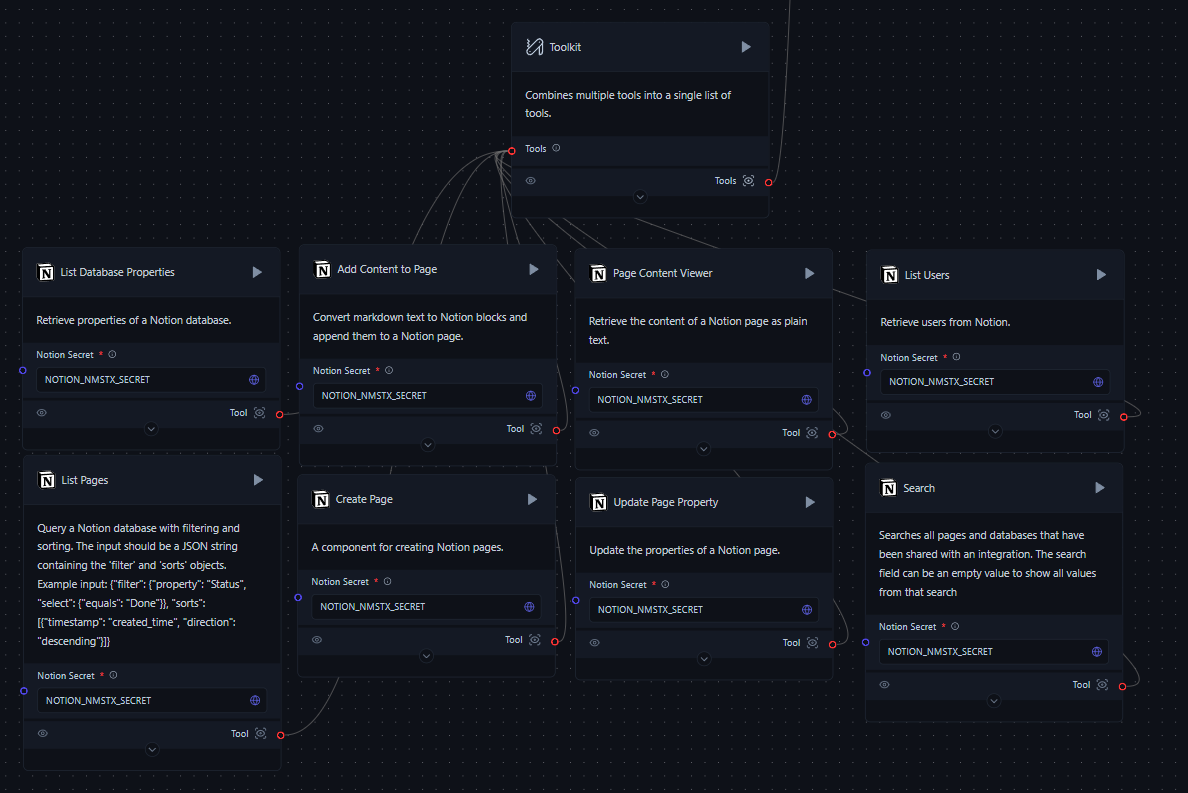
要建置此 Flow,您需要以下項目:
- Notion 應用程式
- Notion 帳戶和 API 金鑰
- OpenAI API 金鑰
- 建議:下載對話 agent Flow JSON,然後將 Flow匯入 到 AgentBuilder。
此 Flow中使用的Components
- Chat Input:接受使用者查詢和命令
- Chat Output:顯示 agent 的回應
- Language Model:使用 OpenAI 模型處理使用者輸入並產生回應
- Tool Calling Agent:根據使用者輸入協調各種 Notion 工具的使用
- Toolkit:將多個 Notion 特定工具組合成單一工具包
- Notion Tools:用於與 Notion 互動的各種Components,包括:
- List Users
- List Database Properties
- List Pages
- Page Content Viewer
- Create Page
- Update Page Property
- Add Content to Page
- Search
- Message History:儲存對話歷史
- Prompt Template:為 agent 提供系統指示和上下文
- Current Date:提供目前日期和時間作為上下文
執行對話 Notion agent
-
開啟 AgentBuilder 並建立新 Flow。
-
將上述Components新增到您的 Flow畫布,或下載對話 agent Flow(下載連結)並將 JSON 檔案匯入到 AgentBuilder。
-
按照 Flow圖連接Components。
-
在各自的Components中輸入 Notion 和 OpenAI API 金鑰。
-
要啟動 Flow,請點擊 AgentBuilder 中的「Play」按鈕。
-
在聊天介面中,輸入 Notion 相關的請求或問題。例如:
- "在我的任務資料庫中建立新頁面"
- "搜尋關於專案管理的頁面"
- "列出我 Notion 工作區中的所有使用者"
-
agent 將處理您的請求、使用適當的 Notion 工具,並提供回應。
-
繼續對話,根據需要詢問後續問題或給予新命令。
範例對話
_46User: List all the users in my Notion workspace._46_46Agent: Certainly! I'll use the Notion User List tool to retrieve that information for you. One moment please._46_46[Agent uses the Notion User List tool]_46_46Here's a list of users in your Notion workspace:_46_461. John Doe (john@example.com)_462. Jane Smith (jane@example.com)_463. Alex Johnson (alex@example.com)_46_46Is there anything specific you'd like to know about these users or any other Notion-related task I can help you with?_46_46User: Create a new page in my Projects database with the title "Website Redesign"._46_46Agent: Certainly! I'd be happy to create a new page in your Projects database with the title "Website Redesign". I'll use the Notion Page Creator tool to do this. First, let me check the properties of your Projects database to ensure we include all necessary information._46_46[Agent uses the Notion Database Properties tool]_46_46I've retrieved the properties for your Projects database. Now, I'll create the new page with the title "Website Redesign". One moment please._46_46[Agent uses the Notion Page Creator tool]_46_46Great news! I've successfully created a new page in your Projects database with the title "Website Redesign". Here are the details:_46_46- Title: Website Redesign_46- Page ID: [page_id_here]_46- URL: [page_url_here]_46_46Is there any additional information you'd like me to add to this new project page, such as a description, due date, or assigned team members?_46_46User: Yes, please add a description: "Redesign company website to improve user experience and modernize the look."_46_46Agent: Certainly! I'd be happy to add that description to the "Website Redesign" project page. I'll use the Add Content to Page tool to update the page with this information._46_46[Agent uses the Add Content to Page tool]_46_46I've successfully added the description to your "Website Redesign" project page. Here's a summary of what I've done:_46_461. Located the "Website Redesign" page using the page ID from our previous interaction._462. Added the following content to the page:_46_46Description: Redesign company website to improve user experience and modernize the look._46_46The description has been added as a new text block on the page. Is there anything else you'd like me to add or modify on this project page? -
選用:可以自訂 Flow以滿足您團隊的特定需求。 例如:
- 調整系統提示以變更 agent 的行為或上下文。
- 根據您的特定需求新增或移除 Notion 工具。
- 修改 OpenAI 模型參數(例如,temperature)以調整 agent 的回應風格。
疑難排解
如果您遇到問題:
- 確保所有 API 金鑰都正確設定並具有必要的權限。
- 檢查您的 Notion 整合是否具有存取相關頁面和資料庫的權限。
- 驗證 Flow中所有Components是否正確連接。
- 檢閱 AgentBuilder 日誌以尋找任何錯誤訊息。
如需更進階的使用和整合選項,請參閱 Notion API 文件 和 AgentBuilder 文件.
