Google components
Bundles 包含支援與 AgentBuilder 特定第三方整合的自訂Components。
此頁面描述 Google bundle 中可用的Components。
BigQuery
AgentBuilder 通過 Google bundle 中的 BigQuery Components與 Google BigQuery 整合,允許您執行 SQL 查詢並從您的 BigQuery 資料集中擷取資料。
在FLOW中使用 BigQuery Components
要在 Flow 中使用 BigQuery Components,您需要以下項目:
- 啟用 BigQuery API 的 Google Cloud 專案
- 具有 BigQuery Job User 角色的服務帳戶
- BigQuery 資料集和表格
- 運行的 AgentBuilder 伺服器
建立具有 BigQuery 存取權限的服務帳戶
- 選取並啟用您的 Google Cloud 專案。 如需詳細資訊,請參閱建立 Google Cloud 專案。
- 在您的 Google Cloud 專案中建立服務帳戶。 如需詳細資訊,請參閱建立服務帳戶。
- 將 BigQuery Job User 角色指派給您的新帳戶。 此角色允許 AgentBuilder 使用服務帳戶存取 BigQuery 資源。 您可能還需要允許存取您的 BigQuery 資料集。 如需詳細資訊,請參閱 BigQuery IAM 存取控制。
- 若要為服務帳戶產生新的 JSON 金鑰,請導航至您的服務帳戶。
- 按一下 Add Key,然後按一下 Create new key。
- 在 Key type 下,選取 JSON,然後按一下 Create。 JSON 私密金鑰檔案會下載到您的機器。 現在您有了服務帳戶和 JSON 私密金鑰,您需要在 AgentBuilder BigQuery Components中設定憑證。
在 AgentBuilder Components中設定憑證
設定服務帳戶並建立憑證 JSON 檔案後,請按照以下步驟驗證 AgentBuilder 應用程式。
- 在 AgentBuilder 中建立新 Flow。
- 在 Bundles 中,找到 Google BigQuery Components,然後將其新增到您的FLOW中。
- 在 BigQuery Components的 Upload Service Account JSON 欄位中,按一下 Select file。
- 在 My Files 窗格中,選取 Click or drag files here。 您的檔案瀏覽器會開啟。
- 在您的檔案瀏覽器中,選取服務帳戶 JSON 檔案,然後按一下 Open。
- 在 My Files 窗格中,選取您的服務帳戶 JSON 檔案,然後按一下 Select files。
- 在 My Files 窗格中,選取您的服務帳戶 JSON 檔案,然後按一下 Select files。 BigQuery Components現在可以使用您的服務帳戶 JSON 檔案查詢您的資料集和表格。
查詢 BigQuery 資料集
設定Components憑證後,查詢您的 BigQuery 資料集和表格以確認連線。
-
將 Chat Input 和 Chat Output Components連接到 BigQuery Components。
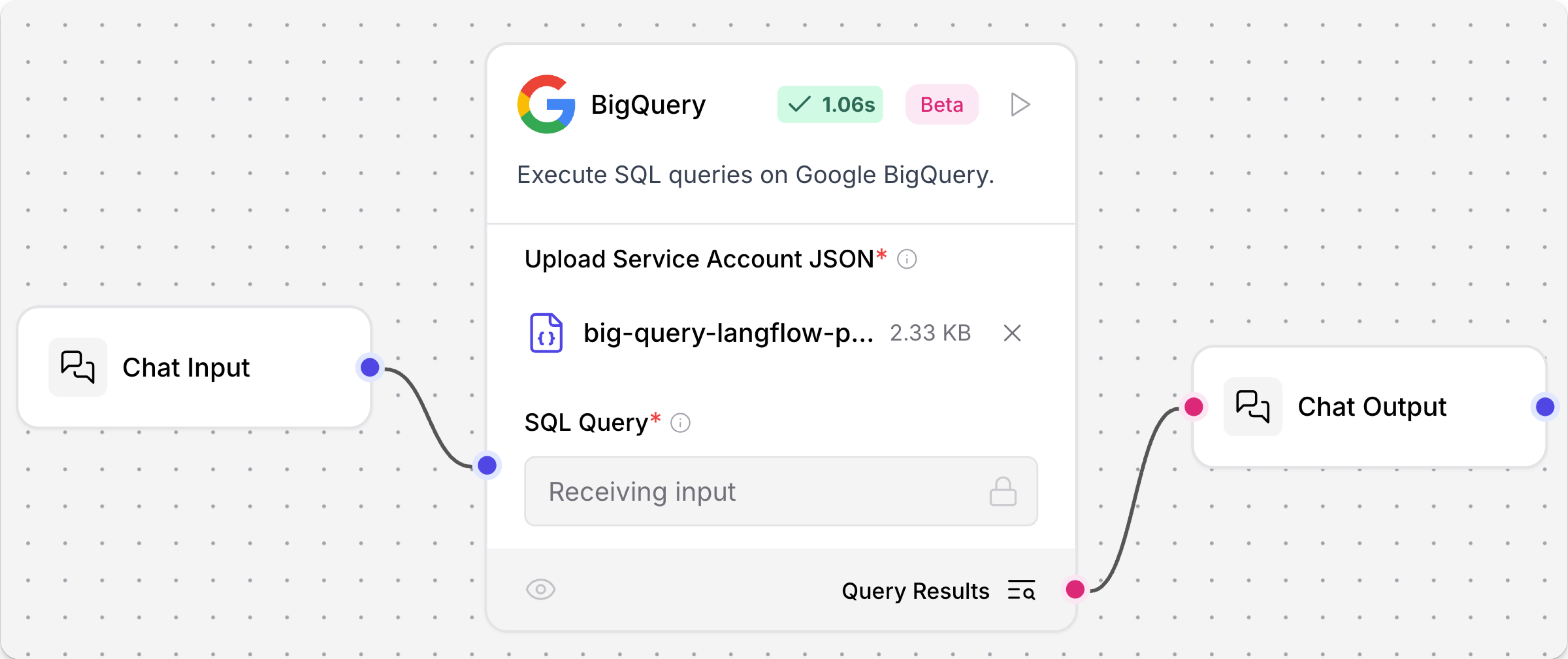
-
開啟 Playground,然後提交有效的 SQL 查詢。
此範例查詢儲存在名為
the_oscar_award的 BigQuery 資料集中的奧斯卡獲獎者表格:_10SELECT film, category, year_film_10FROM `big-query-langflow-project.the_oscar_award.oscar_winners`_10WHERE winner = TRUE_10LIMIT 10結果
_11film category year_film_11The Last Command ACTOR 1927_117th Heaven ACTRESS 1927_11The Dove; ART DIRECTION 1927_11Sunrise CINEMATOGRAPHY 1927_11Sunrise CINEMATOGRAPHY 1927_11Two Arabian Knights DIRECTING (Comedy Picture) 1927_117th Heaven DIRECTING (Dramatic Picture) 1927_11Wings ENGINEERING EFFECTS 1927_11Wings OUTSTANDING PICTURE 1927_11Sunrise UNIQUE AND ARTISTIC PICTURE 1927成功的聊天確認Components可以存取 BigQuery 表格。
Google Generative AI
此Components使用 Google Generative AI 模型 生成文字。
Google Generative AI 參數
| Name | Type | Description |
|---|---|---|
| Google API Key | SecretString | 輸入參數。用於 Google Generative AI 的 Google API 金鑰。 |
| Model | String | 輸入參數。要使用的模型名稱,例如 "gemini-pro"。 |
| Max Output Tokens | Integer | 輸入參數。要生成的最大權杖數。 |
| Temperature | Float | 輸入參數。以此溫度執行推論。 |
| Top K | Integer | 輸入參數。考慮最可能權杖的集合中的前 K 個。 |
| Top P | Float | 輸入參數。取樣時要考慮的權杖的最大累積機率。 |
| N | Integer | 輸入參數。為每個提示生成聊天完成的數量。 |
| model | LanguageModel | 輸出參數。使用指定參數設定的 ChatGoogleGenerativeAI 實例。 |
Google Generative AI Embeddings
Google Generative AI Embeddings Components使用來自 langchain-google-genai 套件的 GoogleGenerativeAIEmbeddings 類別連接到 Google 的生成式 AI 嵌入服務。
有關在FLOW中使用嵌入模型Components的詳細資訊,請參閱嵌入模型Components。
Google Generative AI Embeddings 參數
| Name | Display Name | Info |
|---|---|---|
| api_key | API Key | 輸入參數。存取 Google 生成式 AI 服務的秘密 API 金鑰。必要。 |
| model_name | Model Name | 輸入參數。要使用的嵌入模型名稱。預設值:"models/text-embedding-004"。 |
| embeddings | Embeddings | 輸出參數。建置的 GoogleGenerativeAIEmbeddings 物件。 |
Google Search API
此Components允許您呼叫 Google Search API。
Google Search API 參數
| Name | Type | Description |
|---|---|---|
| google_api_key | SecretString | 輸入參數。用於驗證的 Google API 金鑰。 |
| google_cse_id | SecretString | 輸入參數。Google 自訂搜尋引擎 ID。 |
| input_value | String | 輸入參數。搜尋查詢輸入。 |
| k | Integer | 輸入參數。要返回的搜尋結果數量。 |
| results | List[Data] | 輸出參數。搜尋結果列表。 |
| tool | Tool | 輸出參數。用於 LangChain 的 Google Search 工具。 |
其他 Google Search Components
AgentBuilder 包含多個支援 Google Search 的Components,例如以下:
- Apify Actors Components
- SearchApi Components
- Serper Google Search API Components
- News Search Components
- Web Search Components
Google Vertex AI
有關 Vertex AI Components的資訊,請參閱 Vertex AI bundle。
舊版 Google Components
舊版Components不再受支援,並且可能在未來版本中被移除。 您可以繼續在現有 Flow 中使用它們,但建議您盡快將它們替換為受支援的Components。 建議的替換方案包含在 Flow 中Components上的 Legacy 橫幅中。 它們也會在發行說明和 AgentBuilder 文件中盡可能提供。
如果您不確定如何替換舊版Components,請按提供者、服務或Components名稱 Search Components。 Components可能已被棄用,取而代之的是完全新的Components、類似的Components,或同一類別中同一Components的較新版本。
如果沒有明顯的替換方案,請考慮另一個Components是否可以適應您的使用案例。 例如,許多 Core components 提供通用功能,可以支援多個提供者和使用案例,例如 API Request Components。
如果這些選項都不可行,您可以使用舊版Components的程式碼建立自己的自訂Components,或在 GitHub 上開始討論 關於舊版Components。
為了阻止在新 Flow 中使用舊版Components,這些Components預設為隱藏。 在視覺編輯器中,您可以點擊 Component settings 來切換 Legacy 篩選器。
以下 Google Components處於舊版狀態:
Google OAuth Token
Google OAuth Token Components在 AgentBuilder 1.4.0 中已棄用。
若要將您的 Flow 連接到 Google OAuth 服務,請使用 Composio Components。
Gmail Loader
此Components使用服務帳戶 JSON 憑證和標籤 ID 篩選器從 Gmail 載入電子郵件。
作為替代方案,您可以使用 Composio Components 將您的 Flow 連接到 Google 服務。
Google Drive Loader
此Components使用服務帳戶 JSON 憑證和文件 ID 篩選器從 Google Drive 載入文件。
雖然沒有直接替代品,但請考慮使用 API Request Components 呼叫 Google Drive API。
Google Drive Search
此Components使用服務帳戶 JSON 憑證和各種查詢字串和篩選器搜尋 Google Drive。
雖然沒有直接替代品,但請考慮使用 API Request Components 呼叫 Google Drive API。
