Ollama
Bundles 包含支援特定第三方整合的自訂Components,與 AgentBuilder 搭配使用。
此頁面描述 Ollama bundle 中可用的Components。
如需有關 Ollama Components所使用 Ollama 功能和功能的詳細資訊,請參閱 Ollama 文件。
Ollama 文字生成
此Components使用 Ollama 的語言模型 生成文字。
要在 Flow 中使用 Ollama Components,請將 AgentBuilder 連接到本地執行的 Ollama 伺服器並選取模型:
-
將 Ollama Components新增到您的FLOW中。
-
在 Base URL 欄位中,輸入本地執行的 Ollama 伺服器地址。
此值設定為 Ollama 中的
OLLAMA_HOST環境變數。 預設基礎 URL 是http://127.0.0.1:11434。 -
建立連線後,在 Model Name 欄位中選取模型,例如
llama3.2:latest。要重新整理伺服器的模型列表,請點擊 Refresh。
-
選用:要配置其他參數,例如溫度或最大權杖,請點擊Components標頭選單中的 Controls。
-
根據您想要使用模型的方式,將 Ollama Components連接到 Flow 中的其他Components。
語言模型Components可以輸出 Model Response (
Message) 或 Language Model (LanguageModel)。當您想要將 Ollama 模型用作另一個 LLM 驅動Components的 LLM 時,請使用 Language Model 輸出,例如 Agent 或 Smart Function Components。如需詳細資訊,請參閱語言模型Components。在以下範例中,FLOW使用
LanguageModel輸出將 Ollama 模型用作 Agent Components的 LLM。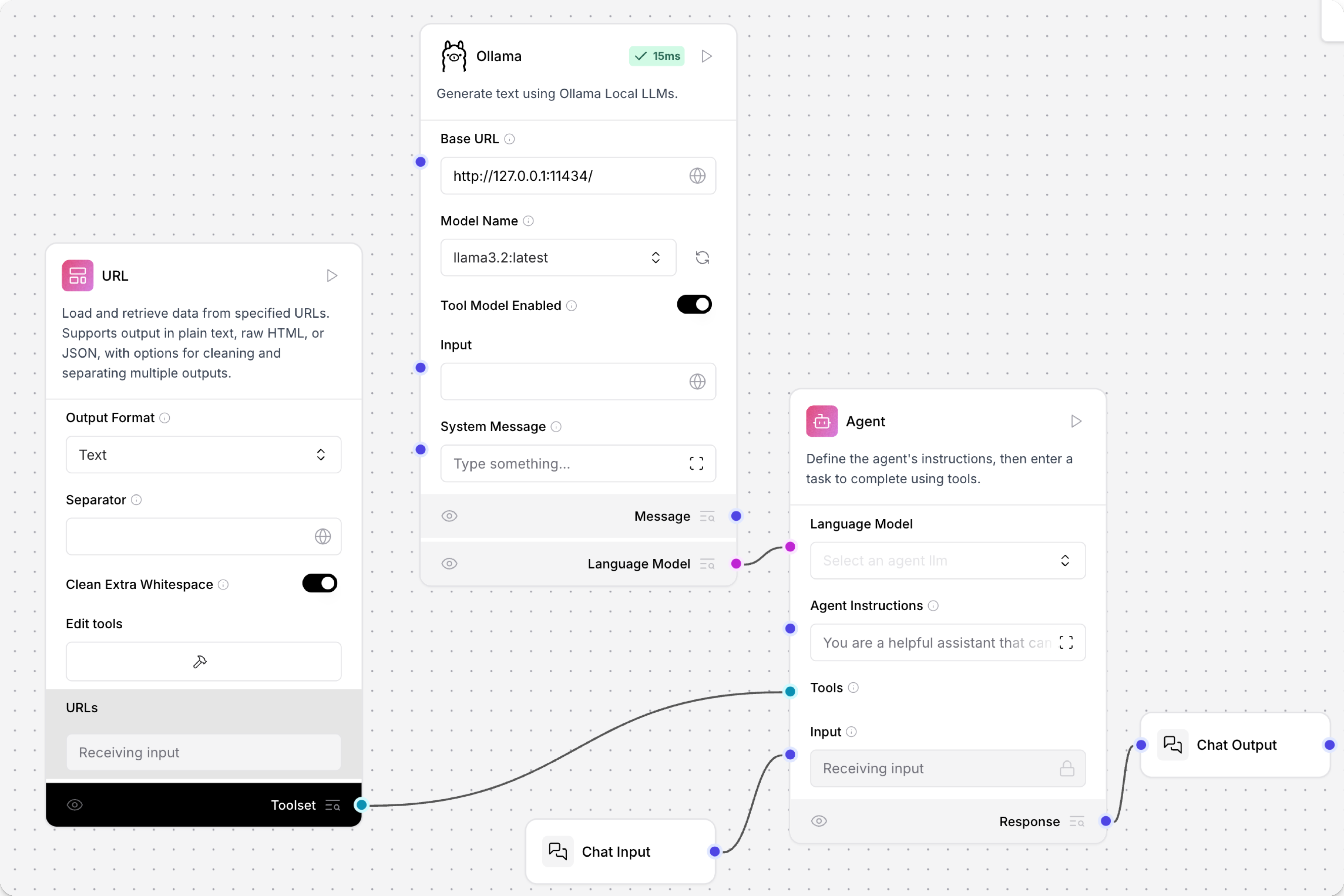
Ollama Embeddings
Ollama Embeddings Components使用 Ollama 嵌入模型 生成嵌入。
要在 Flow 中使用此Components,請將 AgentBuilder 連接到本地執行的 Ollama 伺服器並選取嵌入模型:
-
將 Ollama Embeddings Components新增到您的FLOW中。
-
在 Ollama Base URL 欄位中,輸入本地執行的 Ollama 伺服器地址。
此值設定為 Ollama 中的
OLLAMA_HOST環境變數。 預設基礎 URL 是http://127.0.0.1:11434。 -
建立連線後,在 Ollama Model 欄位中選取模型,例如
all-minilm:latest。要重新整理伺服器的模型列表,請點擊 Refresh。
-
選用:要配置其他參數,例如溫度或最大權杖,請點擊Components標頭選單中的 Controls。 可用參數取決於選取的模型。
-
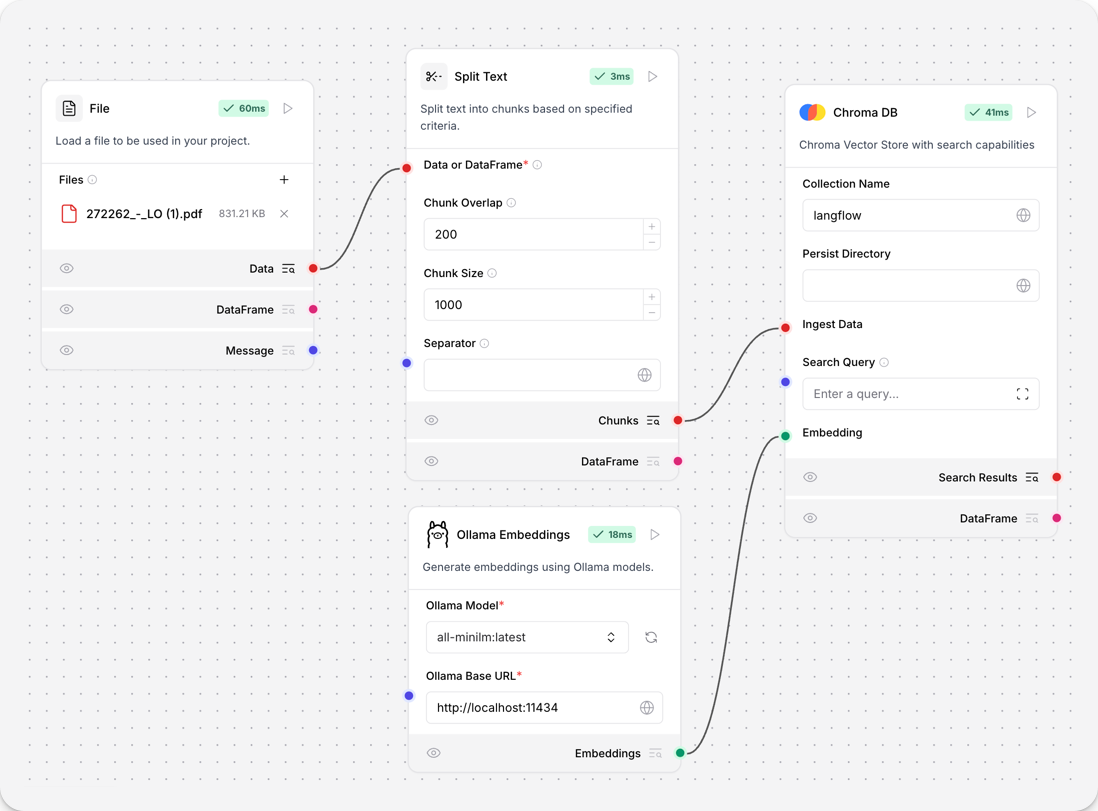
將 Ollama Embeddings Components連接到 Flow 中的其他Components。 如需在 Flow 中使用嵌入模型Components的詳細資訊,請參閱嵌入模型Components。
此範例將 Ollama Embeddings Components連接到從 PDF 文件提取的文字區塊生成嵌入,然後將嵌入和區塊儲存在 Chroma DB 向量儲存中。