Chroma
Bundles 包含支援特定第三方整合的自訂Components,與 AgentBuilder 搭配使用。
此頁面描述 Chroma bundle 中可用的Components。
Chroma DB
您可以使用 Chroma DB Components使用 Chroma 向量儲存實例來讀取和寫入 Chroma 資料庫。
支援遠端或記憶體中的實例,有或沒有持久性。
關於向量儲存實例
Because AgentBuilder is based on LangChain, vector store components use an instance of LangChain vector store to drive the underlying read and write functions. These instances are provider-specific and configured according to the component's parameters, such as the connection string, index name, and schema.
In component code, this is often instantiated as vector_store, but some vector store components use a different name, such as the provider name.
Some LangChain classes don't expose all possible options as component parameters. Depending on the provider, these options might use default values or allow modification through environment variables, if they are supported in AgentBuilder. For information about specific options, see the LangChain API reference and vector store provider's documentation.
寫入時,Components可以在指定位置建立新的資料庫或集合。
臨時(非持久性)本地 Chroma 向量儲存對於測試不需要保留資料庫的向量搜尋 Flow很有幫助。
如果您使用向量儲存Components查詢您的向量資料庫,它會產生搜尋結果,您可以將其作為 Data 物件清單或表格 DataFrame 傳遞給FLOW中的下游Components。
如果支援兩種類型,您可以在視覺編輯器中向量儲存Components的輸出連接埠附近設定格式。
在 Flow中使用 Chroma DB Components
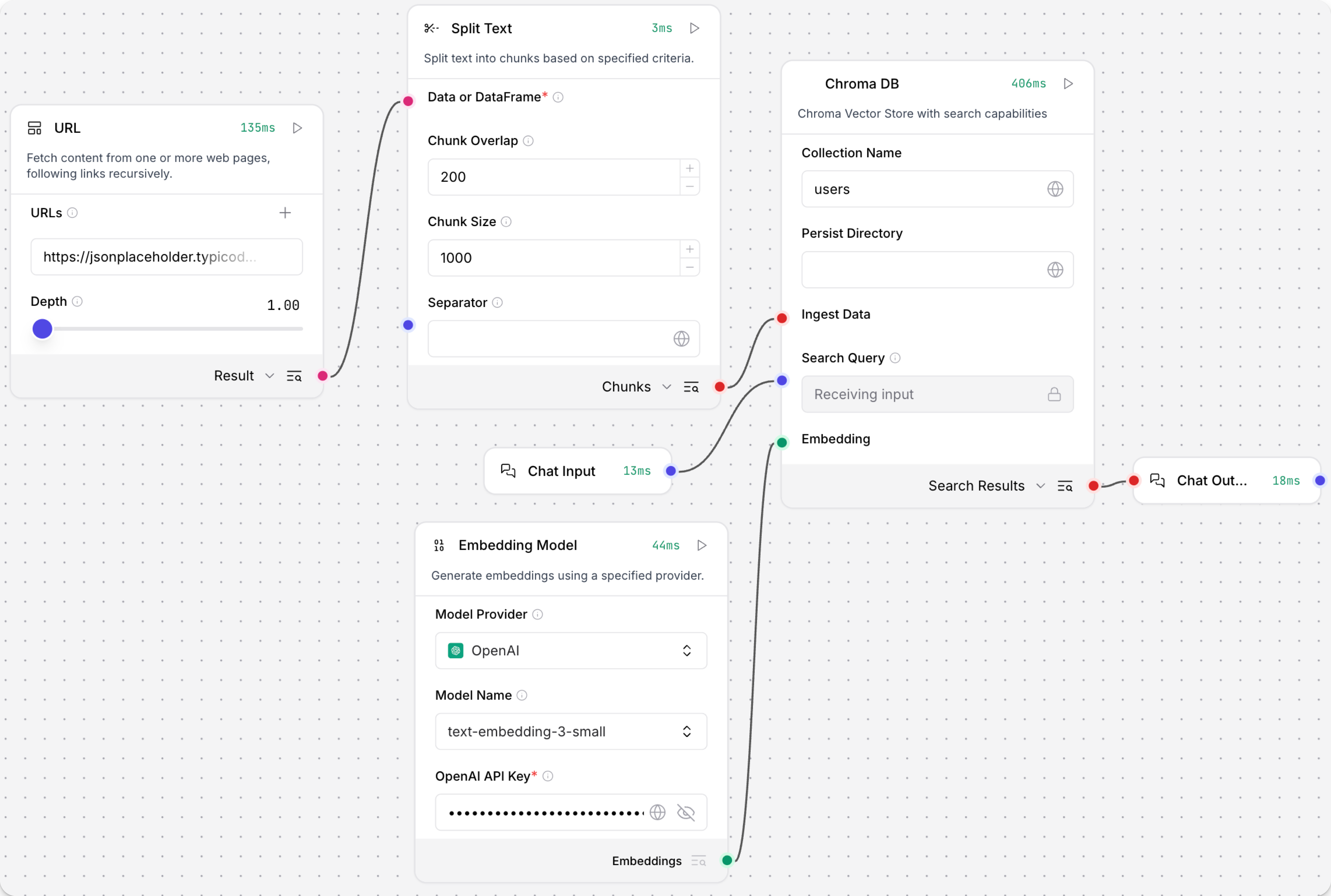
以下範例FLOW使用一個 Chroma DB Components進行讀取和寫入:
-
寫入時,它將來自 URL Components 的
Data分割成區塊,使用附加的 Embedding Model Components計算嵌入,然後將區塊和嵌入載入到 Chroma 向量儲存中。 要觸發寫入,請在 Chroma DB Components上點擊 Run component。 -
讀取時,它使用聊天輸入對向量儲存執行相似性搜尋,然後將搜尋結果列印到聊天中。 要觸發讀取,請開啟 Playground 並輸入聊天訊息。
執行 Flow一次後,您可以在每個Components上點擊 Inspect Output 以了解資料在從Components傳遞到Components時如何轉換。
Chroma DB 參數
您可以檢查向量儲存Components的參數,以了解它接受的輸入、支援的功能以及如何配置它。
某些參數在視覺編輯器中預設為隱藏。 您可以透過 Components的標頭選單 中的 Controls 修改所有參數。
某些參數是條件性的,只有在您設定其他參數或為其他參數選取特定選項後才可用。 條件參數在您設定所需的依賴項之前,可能不會在 Controls 窗格中顯示。
如需接受值和功能的資訊,請參閱提供者的文件或檢查Components程式碼。
| Name | Type | Description |
|---|---|---|
Collection Name (collection_name) | String | 輸入參數。您的 Chroma 向量儲存集合的名稱。預設值:langflow。 |
Persist Directory (persist_directory) | String | 輸入參數。要持久化 Chroma 資料庫,請輸入儲存 chroma.sqlite3 檔案的目錄相對或絕對路徑。留空表示臨時資料庫。讀取或寫入現有持久性資料庫時,請指定持久性目錄的路徑。 |
Ingest Data (ingest_data) | Data or DataFrame | 輸入參數。包含要寫入向量儲存的記錄的 Data 或 DataFrame 輸入。僅與寫入相關。 |
Search Query (search_query) | String | 輸入參數。用於向量搜尋的查詢。僅與讀取相關。 |
Cache Vector Store (cache_vector_store) | Boolean | 輸入參數。如果為 true,Components會在記憶體中快取向量儲存以加快讀取速度。預設值:啟用 (true)。 |
Embedding (embedding) | Embeddings | 輸入參數。用於向量儲存的嵌入函數。預設情況下,Chroma DB 使用其內建嵌入模型,或者您可以附加 Embedding Model Components來使用不同的提供者或模型。 |
CORS Allow Origins (chroma_server_cors_allow_origins) | String | 輸入參數。Chroma 伺服器的允許 CORS 來源。 |
Chroma Server Host (chroma_server_host) | String | 輸入參數。Chroma 伺服器的主機。 |
Chroma Server HTTP Port (chroma_server_http_port) | Integer | 輸入參數。Chroma 伺服器的 HTTP 連接埠。 |
Chroma Server gRPC Port (chroma_server_grpc_port) | Integer | 輸入參數。Chroma 伺服器的 gRPC 連接埠。 |
Chroma Server SSL Enabled (chroma_server_ssl_enabled) | Boolean | 輸入參數。為 Chroma 伺服器啟用 SSL。 |
Allow Duplicates (allow_duplicates) | Boolean | 輸入參數。如果為 true(預設值),寫入不會檢查集合中的現有重複項,允許您儲存相同內容的多個副本。如果為 false,寫入不會新增與集合中已存在的文件匹配的文件。如果為 false,它可以透過搜尋整個集合或僅搜尋 limit 中指定的記錄數量來嚴格執行重複資料刪除。僅與寫入相關。 |
Search Type (search_type) | String | 輸入參數。要執行的搜尋類型,Similarity 或 MMR。僅與讀取相關。 |
Number of Results (number_of_results) | Integer | 輸入參數。要返回的搜尋結果數量。預設值:10。僅與讀取相關。 |
Limit (limit) | Integer | 輸入參數。當 Allow Duplicates 為 false 時,限制要比較的記錄數量。這可以幫助改善寫入大型集合的效能,但可能會導致一些重複記錄。僅與寫入相關。 |
